a plain-English guide
Why isn’t my favicon showing in Google?
Your little site icon shows in the browser tab, but Google still shows a grey globe. Here is what Google actually checks today, how long it takes, and the exact steps for Squarespace, Wix, WordPress and Shopify.
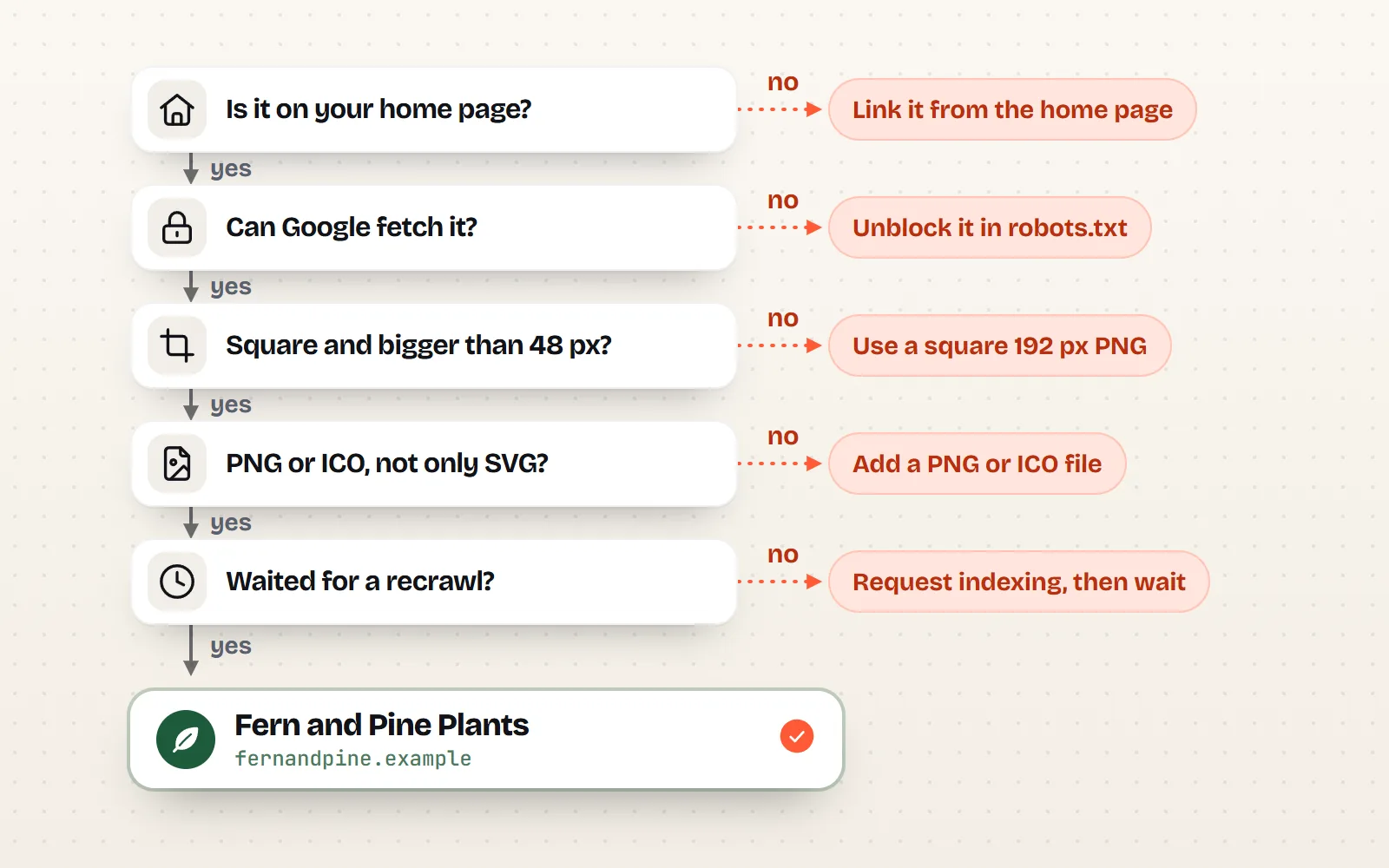
- Google reads the favicon from your home page only, one per hostname. A favicon set on other pages, or only in the browser, does not count.
- It must be crawlable, square and a supported format: at least 8 x 8 px (Google recommends larger than 48 x 48), in ICO, PNG, GIF, JPEG, BMP, PPM or TIFF. SVG is not on Google’s list.
- The “multiple of 48 px” rule is gone from Google’s guidelines, though Squarespace and Wix help pages still quote it. A 96 or 192 px square satisfies both.
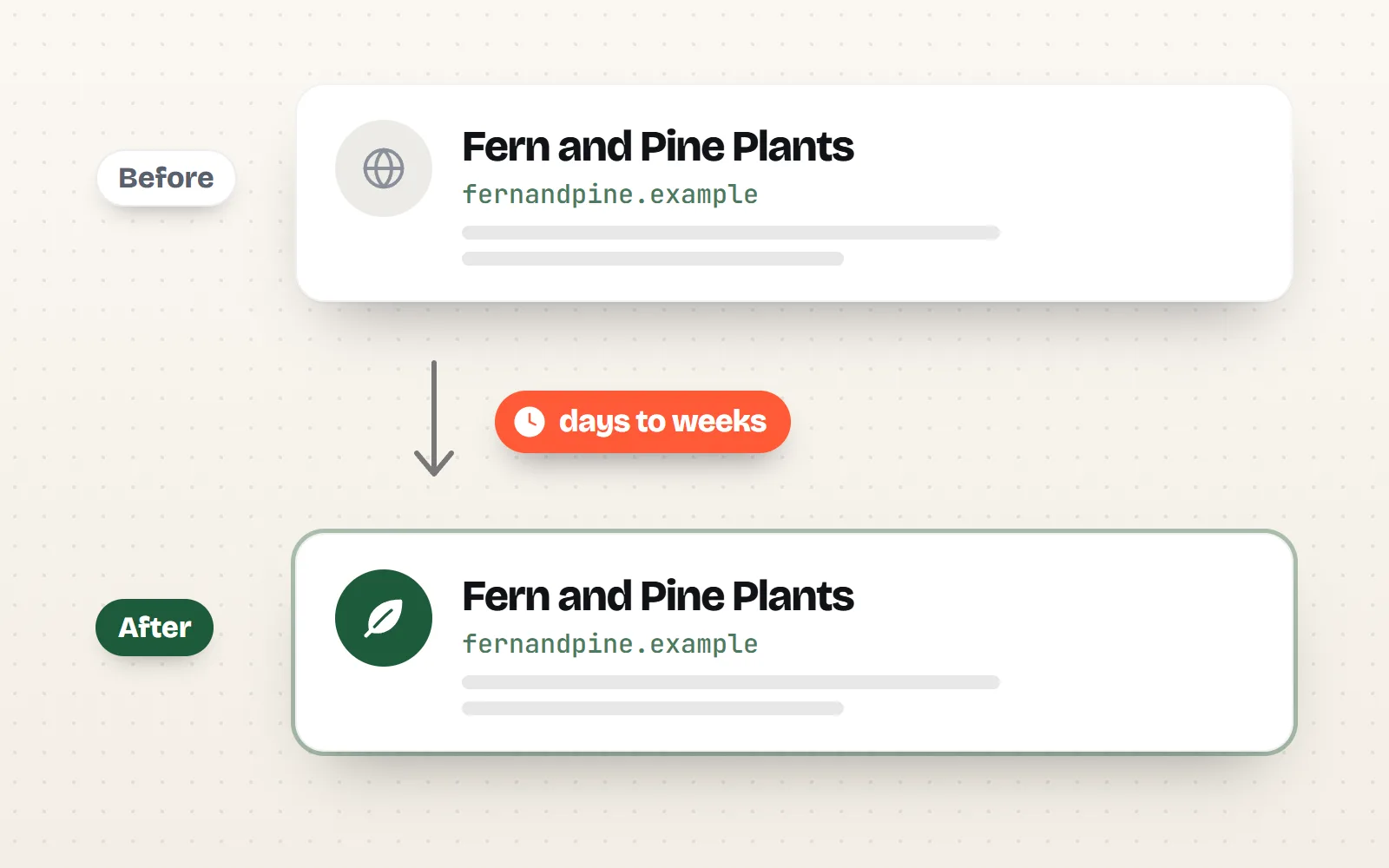
- Updates take days to weeks. Request indexing of your home page in Search Console to speed it up. Google says a favicon is never guaranteed.
- No code needed: download a PNG or a full favicon pack from any with icons page, then upload it in your site builder’s settings.
On this page 8 sections
Your favicon usually does not show in Google for one of five reasons: it is not linked from your home page, Google is blocked from fetching it, it is not square, it is in a format Google does not use (such as SVG), or Google simply has not recrawled your site yet, which can take days to weeks. Fix the first four, then ask Google to recrawl your home page in Search Console.
This guide walks through what Google checks today, how to make a favicon in a few minutes with no code, and the exact settings in Squarespace, Wix, WordPress and Shopify. If you build sites by hand and want every file and tag explained, our sister post Which favicon files do I need in 2026? covers the technical side.
Why does my favicon show in the browser tab but not in Google?
Because they are two different readers. Your browser looks at the page you are on, uses whatever icon it links to (SVG included), and keeps it in a cache for a long time. That is why you often see your new favicon in the tab straight away.
Google is pickier. It reads the icon linked from your home page only, fetches the file with a crawler called Googlebot-Image, checks the rules below, and only updates when it next crawls you. Google shows one favicon per site, where a site means a hostname: shop.example.com can have its own, but example.com/shop cannot.
What does Google need before it shows a favicon?
| Google’s rule | What it means for you | Common mistake |
|---|---|---|
| Linked from the home page | Your homepage’s code has an icon tag pointing to the file | Favicon added only to some pages, or a plugin overriding it |
| Crawlable | Googlebot can open the home page; Googlebot-Image can open the icon file | robots.txt or a security setting blocks the image folder |
| Square, at least 8 x 8 px | Same width and height; larger than 48 x 48 px recommended | A wide logo squashed into a rectangle |
| Supported format | ICO, PNG, GIF, JPEG, BMP, PPM or TIFF | Only an SVG favicon |
| Stable URL | The file address does not keep changing | A new file name on every redesign |
| Represents your brand | A logo mark or a clear symbol | Anything Google deems inappropriate gets a default icon |
How long does Google take to show a new favicon?
Google says crawling can take anywhere from several days to several weeks. You can nudge it:
- 1Open Google Search Console
Add and verify your site if you have not already. It is free.
- 2Inspect your home page
Paste your home page address into the URL Inspection box at the top.
- 3Press Request indexing
This asks Google to recrawl the page, which is where it finds your favicon.
- 4Wait, and do not keep changing it
Each new file name restarts the clock. Pick your final icon, then leave it alone.
Wix and Shopify also suggest resubmitting your sitemap in Search Console. It does no harm, but the home page is the page that matters for the favicon.
How do I make a favicon without code?
You need one clear symbol that still reads at 16 px. Simple, filled shapes work best, which is why Solid style icons make good favicons. On any icon page on with icons:
- 1
- 2Set your colours
Pick your brand colour for the icon. In Download > Options, set Background to a solid colour so it shows on light and dark tabs alike.
- 3Download the right file
For a site builder: PNG at the size it asks for (see below). For a hand-built site: the Favicon pack, under Websites & apps. For just a favicon.ico: ICO.
The Favicon pack is a ZIP with favicon.ico (16, 32 and 48 px inside), favicon.svg, a 180 x 180 apple-touch-icon.png on a solid background, 192 and 512 px PNGs for Android, a maskable icon, a site.webmanifest and a README with the tags to paste. The ICO download on its own holds 16, 32, 48, 64 and 256 px. Google can use the ICO and the Apple touch icon, so the pack covers search results even though Google ignores the SVG.
Browse more bold, simple shapes in the app icons collection. Our post on app icons vs interface icons explains why a favicon needs a simpler shape than the icons inside your site.
How do I change my favicon on Squarespace, Wix, WordPress and Shopify?
| Platform | Where | Upload this | Notes |
|---|---|---|---|
| Squarespace | Settings > Website > Favicon | PNG, 192 x 192 px | 100 to 300 px recommended, max 100 KB, no ICO |
| Wix | Dashboard > Settings > Website settings > Favicon | PNG, 192 x 192 px | Needs a Premium plan, a connected domain and a published site |
| WordPress | Settings > General > Site Icon | PNG, 512 x 512 px | At least 512 px; WordPress makes the smaller sizes |
| Shopify | Online Store > Edit theme > Theme settings > Logo or Favicon | PNG, 192 x 192 px or larger | Basic plan or higher; themes output a 32 px icon |
Squarespace
Open the Favicon panel (Settings > Website > Favicon), drag in your image and press Save. Squarespace recommends a PNG between 100 x 100 and 300 x 300 px, up to 100 KB, and does not take ICO files. You can add a separate dark mode version once the main one is set. A 192 px PNG fits Squarespace’s range and Google’s advice. If your browser still shows the old icon, Squarespace notes browsers cache favicons stubbornly: try a private window.
Wix
In your site’s dashboard go to Settings > Website settings and, under Favicon, click Upload Image. Wix needs a Premium plan, a connected domain and a published site first. Wix accepts ICO, PNG, JPG and SVG, but its search-results article asks for JPG or PNG, so use a PNG. Wix still asks for a multiple of 48 px, which a 192 px PNG satisfies. Our Wix and Squarespace guide covers adding icons to pages too.
WordPress
Since WordPress 6.5 the Site Icon lives in Settings > General: click Choose a Site Icon, upload a square PNG of at least 512 x 512 px, crop if asked, and save. Classic themes also have it in Appearance > Customize > Site Identity; block themes in the Site Editor. WordPress then creates the smaller sizes and the tags for you, so do not paste extra favicon code from a plugin or a tutorial on top: two sets of tags is a common cause of confusion. See our WordPress guide for icons inside your posts.
Shopify
From your Shopify admin go to Online Store, click Edit theme, click the gear for Theme settings, then Logo or Favicon (it depends on your theme). Under Favicon image, select or upload your file, click Done, then Save. You need the Basic plan or higher. Shopify’s help says 16 or 32 px is ideal, and its own themes Dawn and Horizon output the favicon at 32 x 32 px. That passes Google’s 8 px minimum, so it can show, but it is below the size Google recommends. Upload a crisp square of 192 px or more anyway, so Shopify has a sharp image to shrink.
My favicon is set up right and still missing. What else can I check?
- robots.txt and security tools. If your robots.txt blocks the folder the icon lives in, or a firewall blocks Google’s crawlers, Google cannot fetch it. Ask your host or developer if you are not sure.
- www versus no www. Google treats each hostname as its own site. Make sure the version that appears in Google redirects to, or has, the same home page with the icon.
- Duplicate tags. A theme setting plus pasted code plus a plugin can leave three different favicons. Keep one source.
- A changing file address. Some tools add a new file name on every save. Google wants a stable URL.
- A wide logo. A non-square image is not eligible. Use a square mark instead of your full wordmark.
If you can edit your site’s head, this is all Google needs to see on the home page (the favicon pack’s README lists the full set):
<link rel="icon" href="/favicon.ico" sizes="32x32">
<link rel="apple-touch-icon" href="/apple-touch-icon.png">Use one square PNG or ICO, larger than 48 px, linked from your home page, at an address that never changes. Then request indexing once and wait.
Upload only an SVG, rename the file every week, or stack plugin, theme and pasted favicon code on the same site.
The short answer
Google shows your favicon when your home page links to a square PNG or ICO larger than 48 px that its crawlers can fetch, at a stable address, and after it has recrawled your home page. Set it once in your site builder, request indexing in Search Console, and give it a few days to a few weeks. Need the icon itself? Pick one of 1000 free icons and download a PNG or the full favicon pack. For every file and size explained, read our favicon files guide, and for icon sizes in general, the icon sizes guide.
Frequently asked questions
Why does my favicon show in the browser tab but not in Google?
Browsers and Google read favicons differently. A browser uses whatever icon the current page links to, including SVG, and caches it. Google only reads the icon linked from your home page, fetches it with Googlebot-Image, and only shows supported formats such as PNG and ICO. Then it waits until its next crawl.
How long does it take for a new favicon to show in Google?
Google says crawling can take from several days to several weeks. You can speed it up by inspecting your home page in Google Search Console and pressing Request indexing. After that it is a matter of waiting.
Does my favicon have to be a multiple of 48 px?
Not any more. Google’s current guidelines say the favicon must be square and at least 8 x 8 px, and recommend larger than 48 x 48 px. Some site builders still quote the old multiple-of-48 rule, so a 96 x 96 or 192 x 192 px PNG keeps everyone happy.
Can I use an SVG favicon for Google?
Use SVG for browser tabs if you like, but give Google a PNG or ICO as well. Google’s list of supported favicon formats is BMP, GIF, ICO, PNG, JPEG, PPM and TIFF, and SVG is not on it.
Why does Google show a different icon or a globe for my site?
A globe means Google has no usable favicon for that hostname yet: the icon is missing from the home page, blocked from crawling, the wrong shape or format, or not crawled yet. Google can also replace an icon it considers inappropriate with a default one.
How do I make a favicon without design software?
Open any icon on withicons.com, pick a style and colour, then download a PNG at the size your site builder asks for, or the Favicon pack, which has favicon.ico, a 180 px Apple touch icon, Android icons and the tags to paste. It is free and MIT licensed.
Sources and notes
- Google Search Central: Define a favicon to show in search results (checked November 2026)
- Squarespace Help: Add a favicon or browser icon (checked November 2026)
- Wix Help: Wix Editor, changing your favicon (checked November 2026)
- Wix Help: Adding a favicon image to your site’s pages in search results
- WordPress.org Documentation: Creating a favicon (Site Icon, WordPress 6.5+)
- WordPress.com Support: Site icons
- Shopify Help Center: Adding a favicon (checked November 2026)
- Shopify Dawn theme, layout/theme.liquid (favicon link at 32 x 32)
Facts about other icon sets were checked against their official sites in November 2026. Libraries change, so check the links above for the latest numbers.