icons in code, the 2026 answer
Favicon sizes in 2026: the files you actually need
Old favicon guides ask for a dozen PNGs and a Windows tile file. Today five small files and four tags cover every browser, iPhones, Android and Google Search. Here is the short list, the exact code, and what changed.
- Five files cover almost every site in 2026:
favicon.ico(32 px),favicon.svg, a 180 x 180apple-touch-icon.png, and 192 and 512 px PNGs listed in a web manifest. - Add one more, a separate maskable 512 px PNG, if people install your site as an app on Android. Do not mark one icon
"any maskable": web.dev advises against it. - Safari reads SVG favicons now (since Safari 26.0, September 2025), so the old “Safari ignores SVG” advice is out of date. But Safari still ignores a dark-mode rule inside the SVG.
- Keep
favicon.ico: Google Search does not list SVG among its favicon formats, and many tools still ask for/favicon.icoby name. - Skip the rest: Windows tile files,
browserconfig.xml, and long lists of 57, 72, 114 and 152 px Apple icons are no longer needed.
On this page 12 sections
In 2026 most websites need just five favicon files: a 32 px favicon.ico, a favicon.svg, a 180 x 180 px apple-touch-icon.png, and 192 and 512 px PNGs listed in a web manifest. Add a sixth, a separate maskable icon, if people install your site as an app on Android. Four short tags in your page’s <head> tie them together, and that covers every current browser, iPhones, Android and Google Search.
A favicon is the tiny picture in a browser tab, a bookmark or a search result. Old guides ask for fifteen or twenty files, written for browsers that no longer exist. Below: the short list, the exact code, what changed, and how to get the whole set from any with icons icon page. We checked every fact with WebKit, web.dev, MDN, Google and Apple in November 2026.
Which favicon files do I need in 2026?
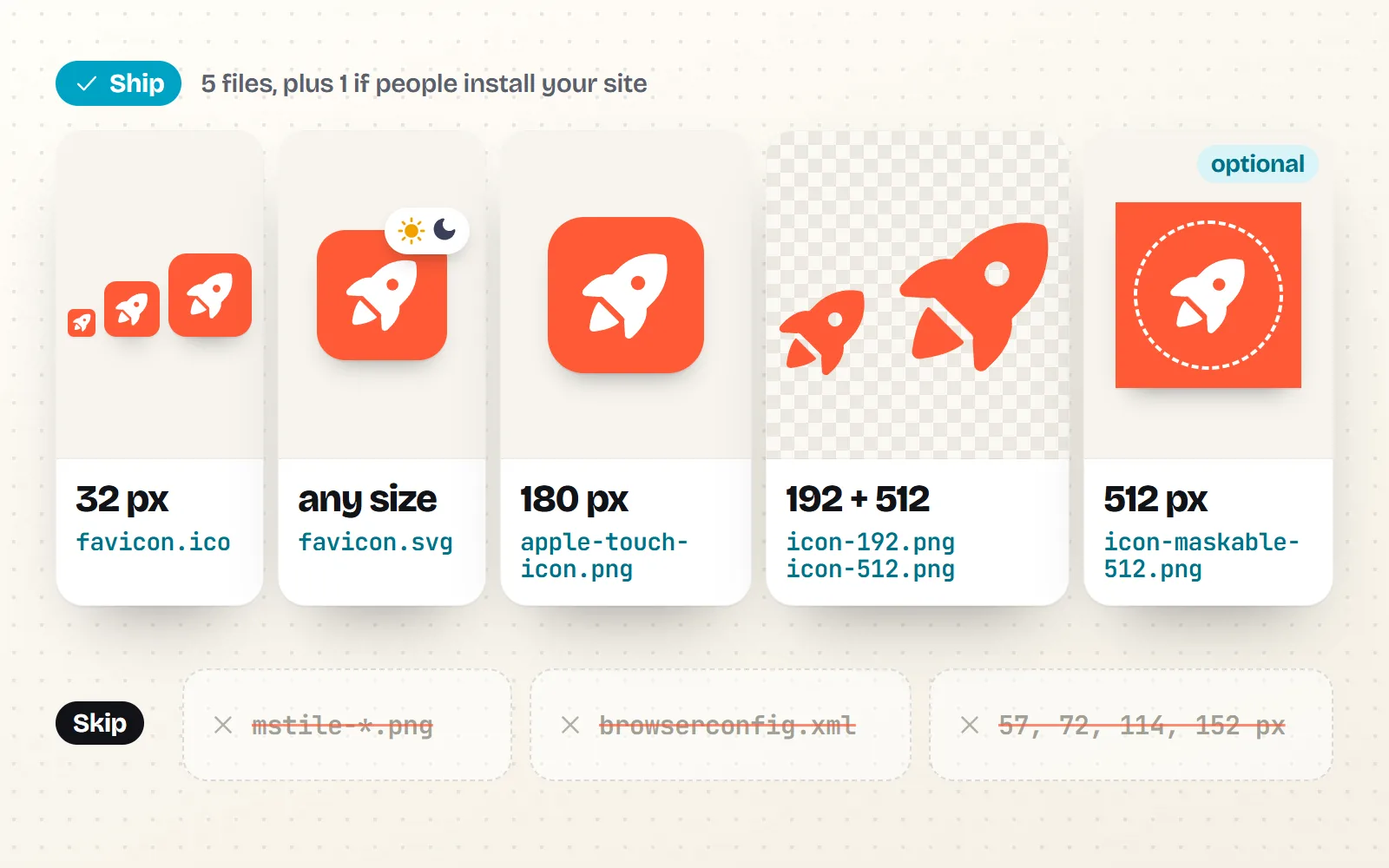
Here is the whole set. The first four are what almost every site should ship; the maskable one is for sites people install as apps.
| File | Size | Who uses it | Need it? |
|---|---|---|---|
favicon.ico | 32 x 32 px (can also hold 16 and 48) | Older browsers, tools and crawlers that ask for /favicon.ico by name, Google Search | Yes |
favicon.svg | Any (it is a vector) | Chrome, Edge, Firefox and Safari 26+ tabs and bookmarks, sharp at every size | Yes |
apple-touch-icon.png | 180 x 180 px, solid background | iPhone and iPad “Add to Home Screen”, and some other apps that show site icons | Yes |
icon-192.png + icon-512.png | 192 and 512 px | Android home screens and installed web apps (listed in the manifest) | Yes, with a manifest |
icon-maskable-512.png | 512 px, solid background, padded | Android adaptive icons (circles, squircles) | If people install it |
mstile-*.png, browserconfig.xml | Many | Pinned tiles in Internet Explorer and the old Edge | No |
| 57, 72, 76, 114, 120, 152 px Apple icons | Many | iPhones and iPads from the early 2010s | No |
What are the exact favicon link tags?
Put the files at the root of your site and paste these lines into the <head> of every page. The browser picks the best match for each place it shows an icon.
<link rel="icon" href="/favicon.ico" sizes="32x32">
<link rel="icon" href="/favicon.svg" type="image/svg+xml">
<link rel="apple-touch-icon" href="/apple-touch-icon.png">
<link rel="manifest" href="/site.webmanifest">
The type="image/svg+xml" part matters: browsers that do not understand SVG skip that line and fall back to the ICO. Can I use also notes that Chrome and Firefox need your server to send SVG files with that same type, which most hosts do already. If you use Next.js, you can skip writing the tags by hand: drop favicon.ico, icon.svg and apple-icon.png into the app/ folder and Next.js adds the matching tags for you, according to its docs.
Do I still need favicon.ico?
Yes. It is the oldest favicon format, and plenty of software still asks for /favicon.ico at the root of your site without reading your tags at all: feed readers, chat apps that build link previews, older browsers, some crawlers.
Google Search is the big one. Its favicon guide (updated 27 October 2026) lists BMP, GIF, ICO, PNG, JPEG, PPM and TIFF as supported formats. SVG is not on that list, so an SVG-only site gives Google nothing it says it supports. Google also asks for a square icon of at least 8 x 8 px, recommends larger than 48 x 48 px, and shows only one favicon per hostname. If your icon still does not show up in results, our post on why a favicon is not showing in Google walks through the fixes.
Does Safari support SVG favicons now?
Yes. WebKit’s Safari 26.0 release notes (15 September 2025) say Safari “now supports the SVG file format for icons” everywhere icons appear, favicons included. Can I use lists SVG favicons in Chrome since version 80 and Firefox since version 41, so every major browser reads them in 2026.
So answers from 2024 and early 2025 that say “Safari ignores SVG favicons” are out of date.
How do I make a favicon that changes in dark mode?
An SVG file can carry its own little style sheet, so it can change colour when the browser is in dark mode. That keeps a dark logo from vanishing on a dark tab bar. Here is the idea, with one shape for clarity:
<svg xmlns="http://www.w3.org/2000/svg" viewBox="0 0 24 24">
  <style>
    path { fill: #1d2433; }
    @media (prefers-color-scheme: dark) {
      path { fill: #ffffff; }
    }
  </style>
  <path d="M12 2 4 7v10l8 5 8-5V7z"/>
</svg>
Chrome and Firefox switch the colour. Safari does not: WebKit bug 309949, filed in March 2026, confirms Safari 26 ignores media queries inside SVG favicons, and a July 2026 comment adds that other WebKit browsers on Linux behave the same. The bug was still open when we checked in November 2026.
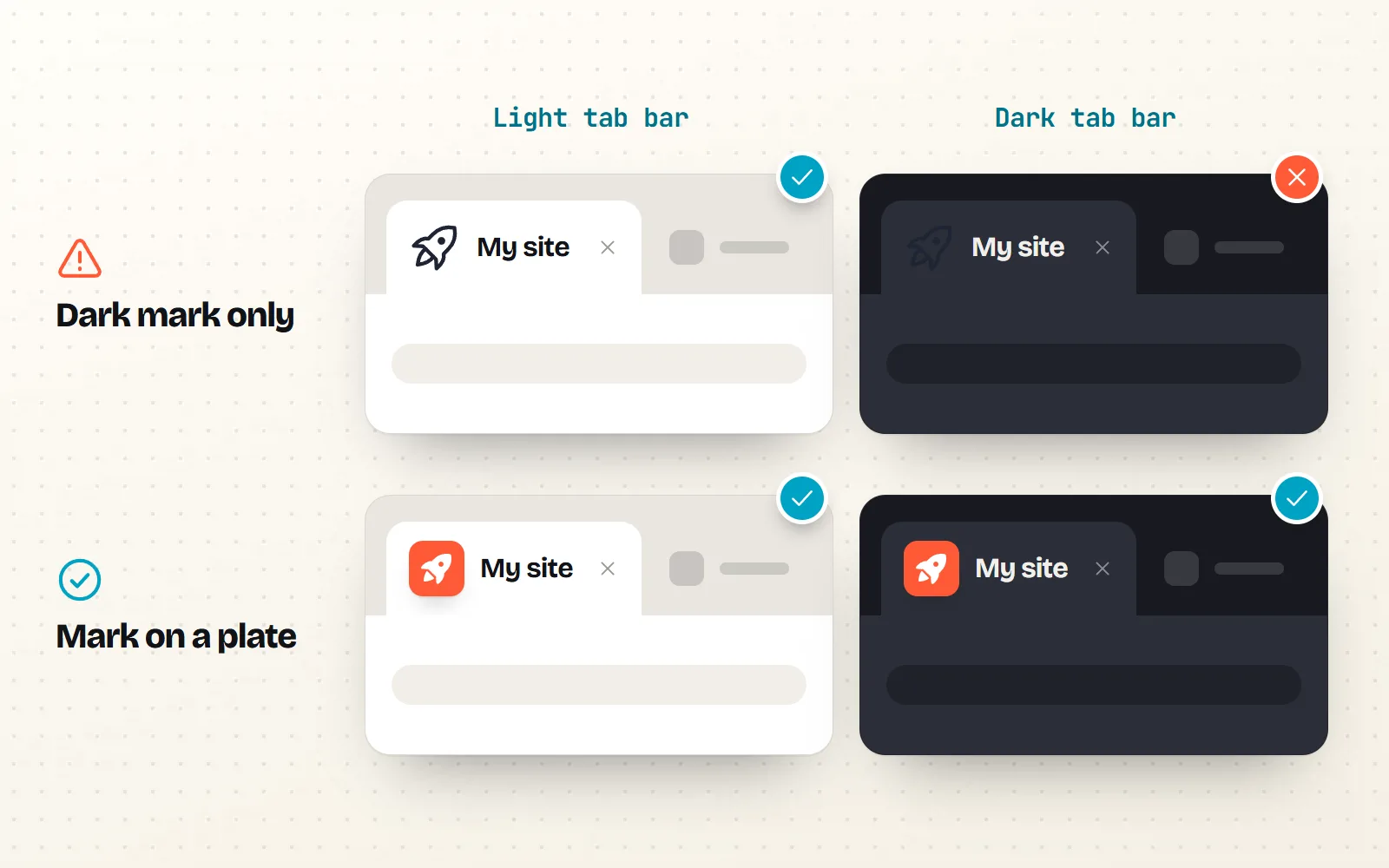
So the honest advice is: design a favicon that reads on both light and dark tabs, and treat the dark-mode switch as a bonus. A solid shape on its own coloured square (a “plate”), or a mid-tone colour with good contrast on both, works everywhere. Our dark mode icons guide explains the contrast side.
What size should the apple-touch-icon be?
Make it 180 x 180 px, as a PNG, with a solid background. Apple’s web app docs show 180 x 180 for current iPhones and explain that when no exact size matches, iOS uses the next larger icon. So one 180 px file covers iPhone and iPad, and the old lists of 57, 72, 114 and 152 px files are no longer needed.
Give it a solid background and a little breathing room around the icon. iOS rounds the corners itself, and developers widely report that see-through areas show up black on the home screen. Name it apple-touch-icon.png and put it at the root: Apple’s docs say Safari looks there by that name even without a tag.
Which icons go in the web manifest, and what is a maskable icon?
A web manifest is a small text file that tells phones and computers how to install your site like an app: its name, colours and icons. web.dev says Chromium browsers need at least a 192 x 192 px and a 512 x 512 px icon. Those two are your normal icons: transparent background, no extra padding, like your favicon.
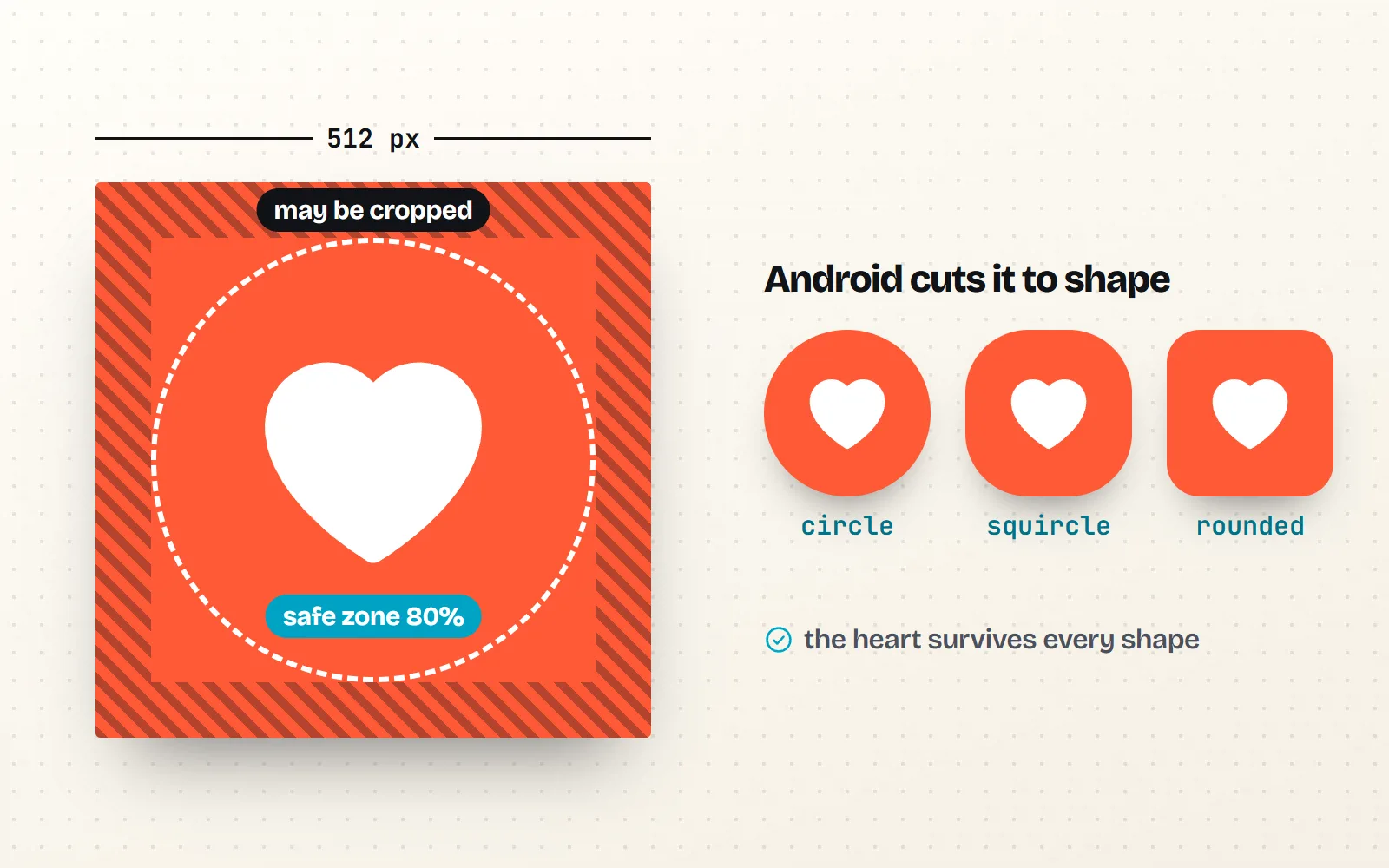
A maskable icon is a second version made for Android’s shaped icons. The phone crops it into a circle, a squircle or a rounded square, so it needs a solid background that fills the whole square and the important part kept inside the middle. web.dev defines that safe zone as a circle with a radius of 40% of the icon’s width (MDN puts it as a circle 80% across), and warns that the outer 10% may be cut off.
{
  "name": "My site",
  "icons": [
    { "src": "/icon-192.png", "sizes": "192x192", "type": "image/png" },
    { "src": "/icon-512.png", "sizes": "512x512", "type": "image/png" },
    { "src": "/icon-maskable-512.png", "sizes": "512x512", "type": "image/png", "purpose": "maskable" }
  ],
  "theme_color": "#ffffff",
  "background_color": "#ffffff",
  "display": "standalone"
}
Which favicon files can I skip?
Ship the ICO, the SVG, one 180 px Apple touch icon, the 192 and 512 px manifest icons and, for installable sites, one separate maskable icon. Test the SVG at 16 px before you ship it.
Generate mstile images and browserconfig.xml, a dozen Apple sizes, extra manifest sizes like 144 px “just in case”, or a single "any maskable" icon.
Also check how your icon looks tiny. At 16 px, fine lines and small gaps blur together, which is why filled icons usually make better favicons than outlines. Compare these Solid style icons with their Line style versions at real tab sizes.
How do I get a favicon pack from a free icon?
Every one of our 1000 icons can become a full favicon set in one download, in any of its 34 styles. You pick the look, the file is built in your browser, and nothing needs signing up.
- 1Pick an icon and a style
Search the icon library (for example rocket or leaf) and open its page. Choose a style: Solid style is the safest at 16 px; bolder creative styles like Sticker style or Pixel style can work too.
- 2Set colour and background
Choose your colour, and a background colour if you want a plate. The Apple touch icon and the maskable icon always get a solid background (white unless you pick one).
- 3Download the Favicon pack
Open Download, then Websites & apps, and choose Favicon pack. You get one ZIP file.
- 4Upload and paste
Put the files at the root of your site and paste the four tags from the README into your
<head>.
Here is exactly what the ZIP contains, straight from our export code:
favicon.icowith 16, 32 and 48 px images inside.favicon.svg, the icon as a vector with its colours locked in. It has no dark-mode rule; add one yourself, as shown above, if you want it.apple-touch-icon.png, 180 x 180 px on a solid background with at least 10% padding.icon-192.pngandicon-512.pngfor Android and installed web apps.icon-maskable-512.pngon a solid background with at least 20% padding, so the icon stays inside the safe circle.site.webmanifestlisting the two normal icons and the maskable one as a separate entry, plus name, theme and background colours.README.txtwith the<link>tags and atheme-colormeta tag to paste.
Need only one piece? The same Websites & apps group has a standalone ICO (16 to 256 px inside) and SVG downloads. Our free app icons page and the app icon vs UI icon post explain how a favicon differs from the icons inside your interface.
How do I check my favicon works?
- Open
yoursite.com/favicon.icoandyoursite.com/favicon.svgdirectly. Both should show the icon, not an error page. - In Chrome, open DevTools, then Application, then Manifest. It lists your icons and warns if one is missing, and its Icons section can show the maskable safe zone.
- For Google Search, be patient. Google’s guide says a new favicon can take from several days to several weeks to appear.
Browsers cache favicons hard: if you still see the old one, try a private window first. For icon sizes inside your interface, see our icon sizes guide; for file types elsewhere, SVG vs PNG icons.
The bottom line
Favicons got simpler. Ship favicon.ico, favicon.svg, a 180 px Apple touch icon and two manifest PNGs, add a separate maskable icon if your site installs as an app, and paste four tags. Safari now reads the SVG, Google still wants a bitmap, and dark-mode SVG favicons work in Chrome and Firefox but not yet in Safari. Any of our 34,000 SVGs can be your starting point.
Frequently asked questions
What size should a favicon be?
Make the ICO file 32 x 32 px (it can also hold 16 and 48 px). Add an SVG, which has no fixed size and stays sharp everywhere. For phones, add a 180 x 180 px Apple touch icon, and for installed web apps, 192 x 192 and 512 x 512 px PNGs in a web manifest.
Do I still need favicon.ico in 2026?
Yes, keep it. Browsers and many tools still ask for /favicon.ico at the root of your site, and Google Search lists ICO, PNG and other bitmap formats as supported but not SVG. One small ICO file is cheap insurance.
Does Safari support SVG favicons?
Yes, since Safari 26.0 (released 15 September 2025). WebKit announced SVG support everywhere Safari shows icons, favicons included. Safari does not yet apply a prefers-color-scheme rule inside an SVG favicon, so a dark-mode version will not switch there (WebKit bug 309949, still open when we checked in November 2026).
What size is the apple-touch-icon?
180 x 180 px, as a PNG with a solid background. Apple’s own example lists 180 x 180 for current iPhones, and its docs say that when no exact size matches, the next larger icon is used, so one 180 px file covers iPhone and iPad.
Should I use "any maskable" in my web manifest?
No. web.dev’s guide to maskable icons says it does not recommend combining purposes, because a maskable icon used as a normal icon carries extra padding and looks small. List your normal 192 and 512 px icons, then add a separate icon with "purpose": "maskable".
Can I make a favicon from a free icon?
Yes. Every icon page on with icons has a Favicon pack download (under Websites & apps) with the ICO, SVG, Apple touch icon, 192, 512 and maskable PNGs, a site.webmanifest and the tags to paste. All 1000 icons are MIT licensed, so you can use them on any site without credit.
Sources and notes
- WebKit: WebKit Features in Safari 26.0 (SVG icons and favicons, 15 September 2025), checked November 2026
- WebKit bug 309949: SVG favicons don’t respect media query overrides (dark mode), checked November 2026
- Can I use: SVG favicons, checked November 2026
- web.dev: Adaptive icon support in PWAs with maskable icons, checked November 2026
- web.dev: Add a web app manifest (192 and 512 px icons for Chromium), checked November 2026
- MDN: Define your app icons (safe zone, SVG and PNG icons), checked November 2026
- Google Search Central: Define a favicon to show in search results (updated 27 October 2026), checked November 2026
- Apple: Configuring Web Applications (apple-touch-icon sizes), checked November 2026
- Next.js docs: favicon, icon and apple-icon file conventions, checked November 2026
- Microsoft Learn: Internet Explorer 11 lifecycle (desktop app support ended 15 June 2022)
Facts about other icon sets were checked against their official sites in November 2026. Libraries change, so check the links above for the latest numbers.