a plain-English guide
Can I sell stickers, shirts or printables made with free icons?
Yes with some licences, no with others, and never by reselling the icon files themselves. Here is which free icon licences allow merch, print-on-demand and printables in 2026, plus why line icons cut wrong on a Cricut.
- Open licences say yes. MIT, ISC, Apache 2.0 and CC0 icons can go on stickers, shirts, mugs and printables you sell, with no credit and no extra fee.
- Marketplaces usually say pay. Flaticon’s and Freepik’s (now Magnific’s) free licences exclude products for resale where the icon is the main element. Flaticon sells a per-icon Merchandising Licence (up to 100,000 copies). Icons8 asks commercial printers to contact it.
- Canva says “make it original”. Its content can go on print-on-demand products only as part of your own design, never printed as-is or sold as clipart.
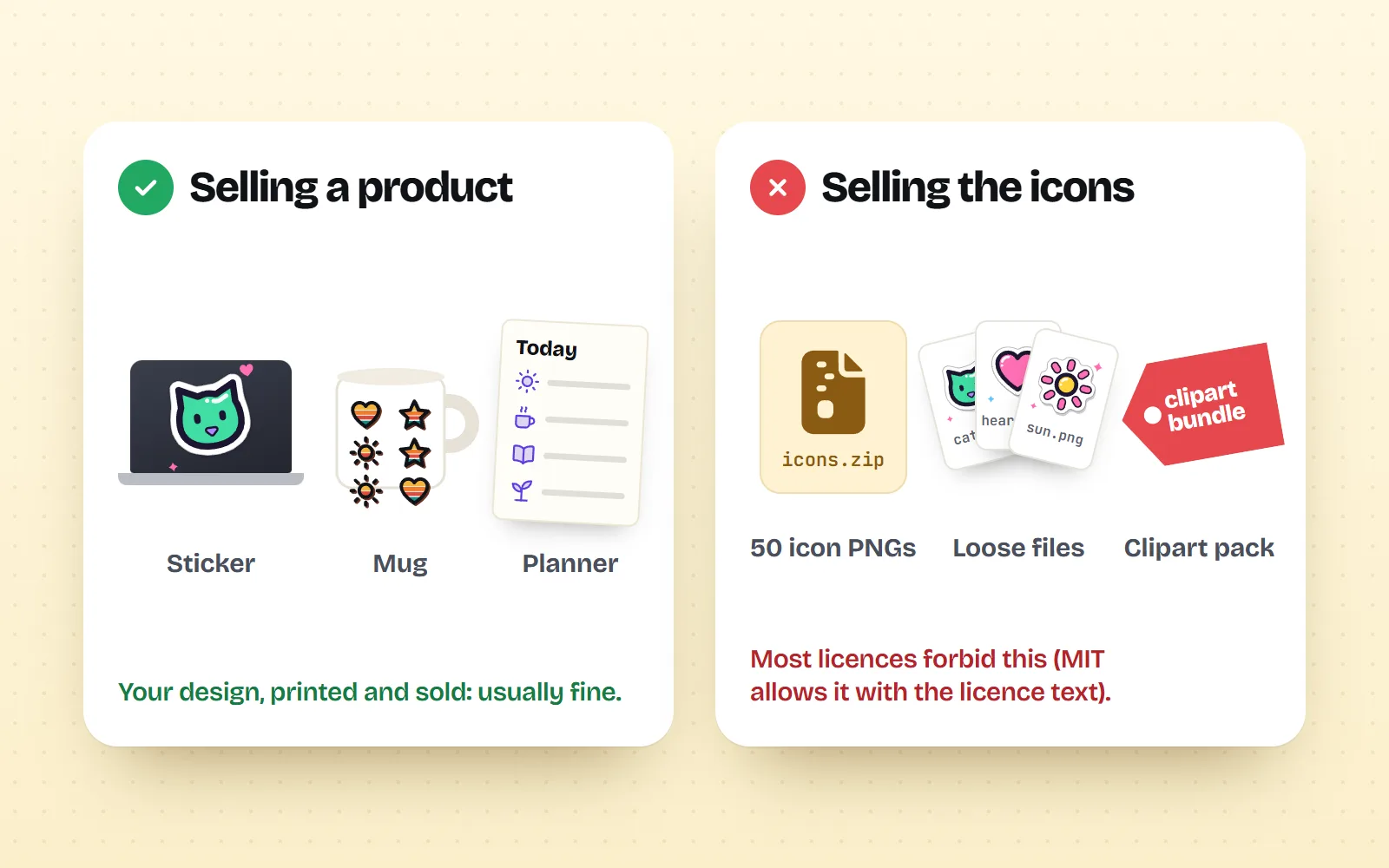
- Sell products, not the icon files. Sticker packs, clipart bundles and planner sticker PNGs are the icons themselves, which most licences forbid. MIT allows it with the licence text, but it is rarely worth it.
- Cutting machines cut paths, not line widths. For a Cricut, use a filled style such as Solid, or convert strokes to shapes first (Inkscape: Path, Stroke to Path).
On this page 8 sections
Yes, you can sell stickers, T-shirts, mugs, planners and printables made with free icons, as long as the icon’s licence allows products for resale. Open licences such as MIT, ISC, Apache 2.0 and CC0 do, with no fee and no credit. Marketplace free plans (Flaticon, Freepik, Icons8) usually do not when the icon is the main element, and want a paid or merchandising licence. Canva allows it only as part of your own original design. And almost no licence lets you resell the icon files themselves.
Older answers say “email us” or “buy a commercial licence for everything”. Both are out of date. Below is what each source actually says in November 2026, where the “don’t resell the icons” line sits, and a section for anyone with a Cricut or another cutting machine, because line icons and blades do not get along. We make with icons (MIT), so we will flag where another source is the better choice.
Which free icon licences let you sell products?
| Source | Products for sale? | The conditions |
|---|---|---|
| MIT, ISC, Apache 2.0, CC0 (with icons, Lucide, Heroicons, Tabler, Material Symbols…) | Yes | No credit on the product. Keep the licence text only if you pass the icon files on. |
| CC BY 4.0 (for example Font Awesome Free icons) | Yes, with a credit | Credit the creator and licence, usually in the listing description. |
| Remix Icon (licence v1.0, January 2026) | Yes, as part of a product | Icons may be decorative or functional elements, but not the main value. No standalone icon packs, no logos. |
| Canva free and Pro content | Yes, in an original design | Fine on print-on-demand items as part of your own design. Not printed as-is, not sold as clipart. |
| Flaticon free or Premium | Not as the main element | Resale items where the icon is the main element need the per-icon Merchandising Licence (up to 100,000 copies). |
| Freepik / Magnific free | Not as the main element | Same main-element rule, unless your subscription terms say otherwise. Free use also needs a credit. |
| Icons8 free | Ask first | Free use needs a legible link. Its help centre says commercial printing projects should contact Icons8. |
| Creative Market | Yes, by licence tier | Personal: not for products for sale. Commercial: up to 5,000 end products. Extended Commercial: up to 250,000. |
If you only remember one thing: open-source licences treat merch like any other use, and marketplaces treat it as a separate, paid right. Our guide to free icons and commercial use explains each licence type in more depth.
What does “main element” mean on Flaticon and Freepik?
Both use the same idea. Their free licences exclude printed or digital items made for resale (they list T-shirts, cups, postcards, greeting cards, invitations, calendars and more) in which their content is the main element “because of size, relevance or any other cause”. The key phrase is the last one: in case of doubt, it is deemed the main element.
- A single icon on a sticker, a mug or a shirt: main element. Needs a merchandising licence.
- A small icon beside your own illustration or lettering: possibly not, but the doubt rule works against you.
- Icons as tiny bullets inside a printable planner you designed: closer to decoration, but read the terms for your exact case.
Flaticon’s Merchandising Licence is bought per icon and is one-time and non-refundable. It removes the credit and allows the icon as the main element, but it caps copies at 100,000, still forbids logos, and forbids putting the icon inside print-on-demand design tools where your customers build their own products.
Can I sell the icons themselves, as sticker packs or clipart?
This is the line almost every licence draws. Selling a product (a printed sticker, a finished planner, a shirt) is one thing. Selling the icon files so that buyers can reuse them is redistribution, and most sources forbid it:
- Canva gives the example of a sticker sheet of 20 library elements sold as individual PNG files: not allowed, because it is standalone use and “similar to selling clipart files”.
- Flaticon and Magnific forbid reselling or sublicensing their content and including it in any collection for resale.
- Remix Icon forbids standalone icon packs and competing icon sets, even with small changes such as colour or stroke width.
- MIT (with icons) allows it if the licence text goes with the files. Our licence page is honest about it: anyone can get them free here, so it is rarely worth it.
What about print-on-demand shops and Etsy?
Print-on-demand services print your design when someone orders it. The icon licence still decides what you may upload. Canva adds a useful warning: some services ask you to confirm that you own the copyright in what you upload. With licensed content you do not own the copyright, you hold a licence, so read each shop’s upload terms. If it only asks you to confirm you have the right to use the design, licensed content is fine within the licence.
Never put brand logos or characters on products, whatever the icon licence says. An icon licence covers the drawing, never someone else’s trademark. with icons contains no brand logos for exactly this reason. If your product is a logo for your own shop, read can I use a free icon in my logo first.
Why do line icons cut wrong on a Cricut?
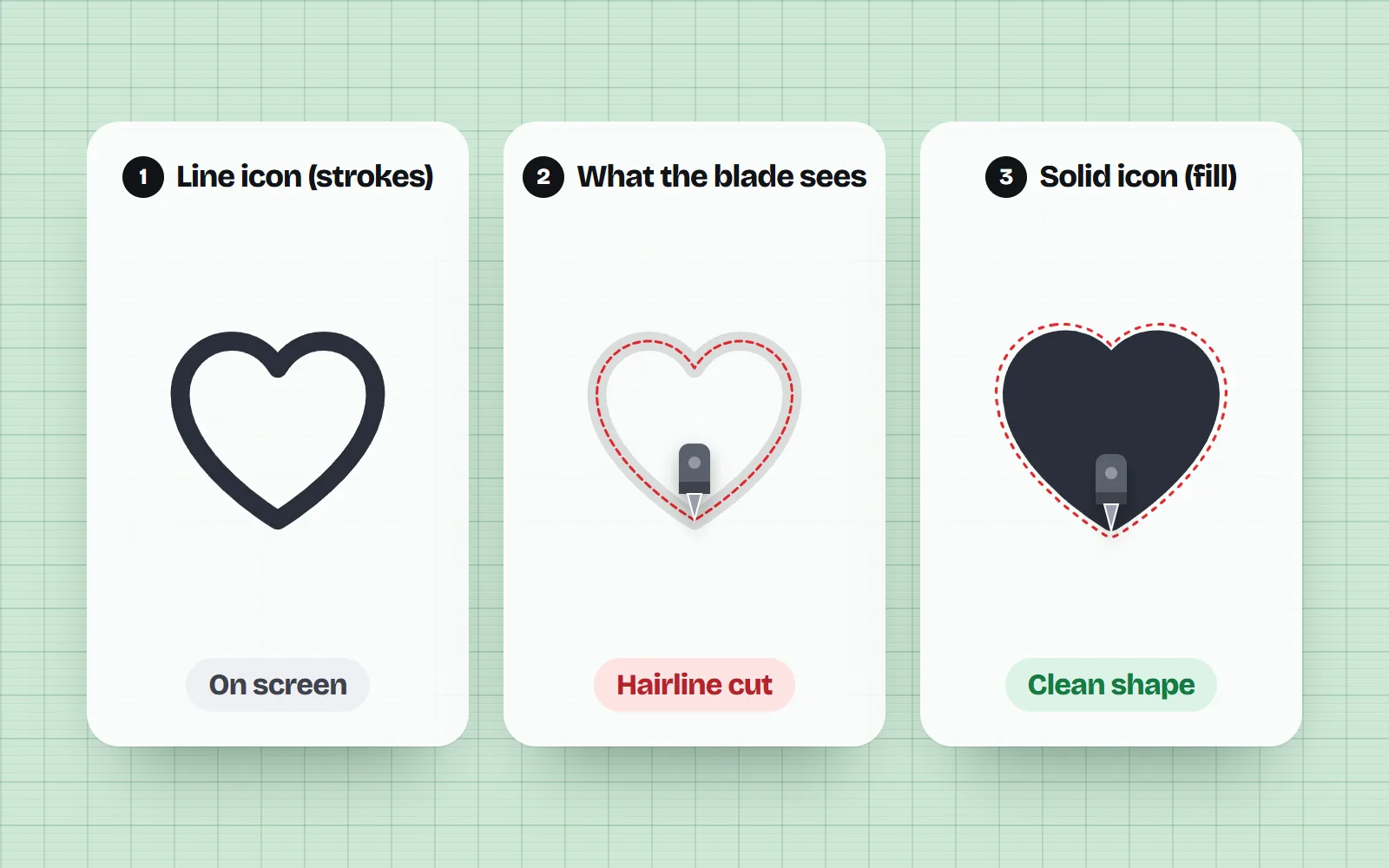
Cutting machines follow paths: the outline of each shape in the file. In an SVG (a picture made of shapes, so it stays sharp at any size), there are two ways to paint a shape: a fill, which colours its inside, and a stroke, which draws a line of a certain width along its path. On screen they look alike. To a blade they are very different.
Line icons, including our default Line style, are drawn with strokes. When Design Space reads them it builds cut lines from the paths, and the stroke width is not kept. So a bold 1.75 px line becomes either one hairline slit down the middle, or a closed outline that previews as a filled blob. Cricut’s own Illustrator guide gives the fix: shapes should be filled, and strokes should be turned into shapes with Outline Stroke before you save.
Two other things trip people up, both from Cricut’s help centre: SVG uploads are limited to 5,000 paths, and gradients, pattern fills, clipping paths and live text count as unsupported. Gradients cannot be split into cut layers, so Design Space suggests a PNG and Print Then Cut instead.
Which with icons styles cut cleanly?
We checked the files. Our Solid style is fill-only and single colour: only 3 of its 1000 icons contain a stroke (the slash in camera-off and zap-off, and the tail of black-cat). Retro and Bauhaus are flat colour fills with no gradients, so Design Space can separate them into one layer per colour for layered vinyl.
- Best for single-colour cuts: Solid style. Inner cutouts are part of the shape, so the blade cuts them too.
- Best for layered vinyl: Retro style and Bauhaus style, flat colours only.
- Convert first: Line, Duo, Sticker, Kawaii and the other outlined styles use strokes.
- Print Then Cut instead: the glossy and 3D styles (Glass, Clay, Chrome and friends) use gradients. Download a PNG for those; our sticker icons look great printed.
How to turn a line icon into a cut-ready shape
- 1Download the SVG
Open the icon page, pick the style and colour, and download SVG.
- 2Open it in Inkscape (free) or Illustrator
Select everything with Ctrl+A (Cmd+A on a Mac).
- 3Convert strokes to shapes
Inkscape: Path, Stroke to Path (Ctrl+Alt+C). Illustrator: Object, Path, Outline Stroke. The icon looks the same but is now filled outlines.
- 4Merge the pieces
Inkscape: Path, Union. Illustrator: Pathfinder, Unite. Overlapping lines become one clean shape.
- 5Save and upload
Save as plain SVG and upload it to Design Space. Check the preview: you should see solid shapes, not hairlines.
What size and resolution do printables need?
For anything printed, a vector file (SVG or PDF) stays sharp at any size. Our PDF download is a true vector file. If your tool wants a picture, our PNG download goes up to 4,096 pixels, which is about 13.6 inches (34.6 cm) wide at 300 pixels per inch. Our print resolution guide has a size chart for stickers, shirts and posters.
Check the licence before you design, keep a note of each source, use icons as parts of your own composition, pick filled styles for cutting, and test-cut one before a batch.
Print a marketplace icon on its own and sell it, sell icon files as a pack, put brand logos on merch, or upload a stroked line icon straight to a cutting machine.
Frequently asked questions
Can I use Flaticon icons on products I sell on Etsy?
Not as the main element under the free or Premium licence: Flaticon’s terms exclude items made for resale, such as T-shirts, mugs and cards, where the icon is the main element, and in doubt it counts as main. For those you need Flaticon’s per-icon Merchandising Licence, which allows up to 100,000 copies and still forbids logos and print-on-demand design tools.
Can I sell T-shirts made in Canva?
Yes, if the design is original. Canva’s help centre says you can sell T-shirts, mugs, stickers and posters, including through print-on-demand services, as long as you combine elements into your own design. Printing a single Canva graphic as-is, or with only a colour change or border, counts as standalone use and is not allowed.
Do I need to credit the icons on products I sell?
Not with MIT, ISC, Apache 2.0 or CC0 icons. CC BY icons need a credit, which sellers usually put in the listing description. Icons8’s free plan asks for a legible link on the product, its description or your website, and says commercial printing projects should contact it first.
Can I sell digital planner stickers made from free icons?
Be careful: planner stickers are usually sold as separate PNG files the buyer can reuse, which most licences treat as redistributing the icons. Canva and Flaticon forbid it and Remix Icon forbids standalone icon sales. MIT allows it if you include the licence text, but buyers can get the same icons free.
Why does my SVG cut as a solid blob or a thin line on my Cricut?
Design Space builds cut lines from the shapes in the file and does not keep stroke width. A line icon drawn with strokes becomes one hairline cut along the middle of each line, or fills in as a blob. Use a filled icon style, or convert strokes to paths before uploading (Inkscape: Path, Stroke to Path; Illustrator: Object, Path, Outline Stroke).
Is this legal advice?
No. It is a plain-English summary from an icon library, checked against each licence in November 2026. Licences change, so read the current terms of any source before a big print run, and ask a lawyer if a lot is at stake.
Sources and notes
- with icons licence (MIT), checked Nov 2026
- Flaticon terms of use, sections 8.1 to 8.3, checked Nov 2026
- Flaticon Merchandising License summary, checked Nov 2026
- Magnific (formerly Freepik) terms of use, June 2026, section 8.1, checked Nov 2026
- Icons8: How to use our graphics for free (physical goods), checked Nov 2026
- Icons8 Help: Can I use your icons for printing? (23 Jan 2024), checked Nov 2026
- Canva Help: Use Canva to design digital and physical products for sale, checked Nov 2026
- Canva Content License Agreement, checked Nov 2026
- Creative Market: License FAQ (Personal, Commercial, Extended Commercial), checked Nov 2026
- Remix Icon License v1.0 (January 2026), checked Nov 2026
- Cricut Help: How to upload images into Design Space (5,000-path limit), edited 30 Mar 2026
- Cricut Help: Image uploads, unsupported items, checked Nov 2026
- Cricut Design Space guide: Preparing artwork from Adobe Illustrator (Outline Stroke tip)
- Tavmjong Bah, Inkscape manual: Stroke to Path (Ctrl+Alt+C)
Facts about other icon sets were checked against their official sites in November 2026. Libraries change, so check the links above for the latest numbers.