icons in code, the 2026 answer
Can you use SVG icons in email?
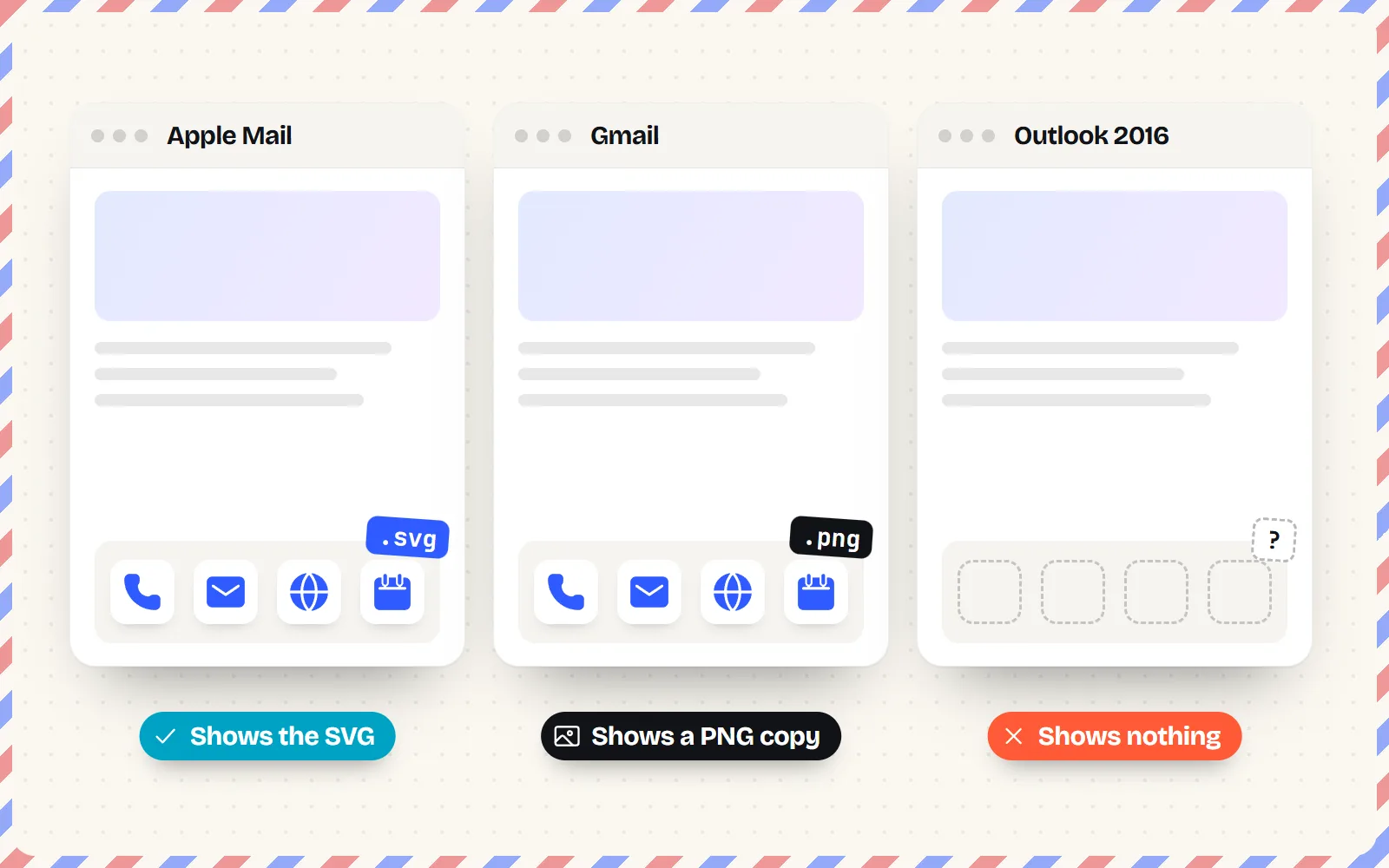
Gmail finally shows SVG images, so the old “never” answers are wrong. But it turns them into PNGs, and older Outlook still shows nothing. Here is what works in 2026, and why a 2x PNG is still the safe pick.
- Use PNG icons in email, at twice the size they show (a 20 px icon as a 40 px or larger PNG), with
widthandheightset in the HTML. - SVG files work in more places than they used to: caniemail’s September 2026 test shows Apple Mail, Yahoo and Outlook.com display them, and Gmail now shows them too, but converted to PNG.
- Classic Outlook for Windows 2007 to 2016 still shows no SVG at all, and SVG code pasted into the email (inline
<svg>) is stripped by Gmail, Outlook and Yahoo. - Email apps cannot recolour your icons, and dark mode varies by app. Pick a colour that reads on light and dark, or put the icon on a coloured circle.
- Give every icon
alttext: classic Outlook blocks pictures by default, and then readers see only the words.
On this page 8 sections
You can use SVG icons in some email apps in 2026, but you should not rely on them. caniemail’s September 2026 test shows Apple Mail, Yahoo and Outlook.com display SVG images, and Gmail now shows them too, converted to PNG. Classic Outlook for Windows 2007 to 2016 still shows nothing. For icons that must appear for everyone, use PNG files saved at twice their display size, with width and height set in the HTML.
That covers newsletters, receipts, signatures and any email with little phone, calendar or social icons. Below we show which apps render what, the exact sizes to export, how dark mode and blocked images change things, and how to get crisp PNGs from any with icons icon page. Writing a signature? Our email signature guide has the click-by-click steps for Gmail, Outlook and Apple Mail.
Which email clients show SVG images in 2026?
There are two ways to put an SVG in an email, and they behave very differently. A linked file is an ordinary <img src="icon.svg"> pointing at a file on a server. Inline SVG means pasting the SVG code itself into the email’s HTML. Here is what caniemail, the reference site email developers use, records for each.
| Email app | Linked .svg file | Inline <svg> code |
|---|---|---|
| Apple Mail (Mac, iPhone, iPad) | Yes (recent versions) | Yes on iPhone, partly on Mac (2020 test) |
| Gmail (web, iPhone, Android) | Shown, but turned into a PNG | No |
| Outlook for Windows 2007 to 2016 | No | No |
| Outlook 2019 for Windows | Yes | No |
| Outlook.com and Outlook phone apps | Yes | No |
| Outlook for Mac | Yes (recent versions) | No (latest tested) |
| Yahoo Mail and AOL | Yes | No |
| Samsung Email, Thunderbird | Yes | Yes |
The inline column has not been retested since 2020, so treat it as a strong hint rather than a fresh fact. Even so, no big webmail app showed inline SVG then, and nothing we found suggests that changed.
Why is PNG still the safe choice for email icons?
A PNG is an ordinary picture made of pixels. Every email app on the list above shows it. With SVG you gain very little and risk a lot:
- Older Outlook shows nothing. Outlook for Windows 2007 to 2016 has no SVG support, and plenty of offices still run it. A missing icon in a “Call us” button is a real cost.
- Gmail converts it anyway. Gmail now turns your SVG into a PNG before showing it, so the main reason to use SVG (sharp at every size) is gone in the biggest inbox.
- Emails get forwarded. A reply or a forward from one app to another can drop images the second app does not understand.
- You cannot recolour it there. The website tricks that make SVG icons follow the text colour do not work in email, so an SVG offers no colour advantage.
So the rule is simple: PNG for anything people must see, SVG only as a bonus where you control the audience (for example, an internal email to a team that all uses Apple Mail). Our SVG vs PNG guide explains the difference outside email.
What size should icon PNGs be for retina screens?
Most phones and many laptops have high-resolution screens that pack two or three real pixels into each pixel you design for. A 20 px PNG shown at 20 px looks soft there. The fix: save the image at least twice as big as it will appear, and tell the email how big to show it.
| Where the icon goes | Shown at | Save the PNG at |
|---|---|---|
| Next to text in a signature | 16 to 20 px | 40 to 64 px |
| Social icons in a footer | 24 to 32 px | 64 px |
| Feature icons in a newsletter | 40 to 48 px | 96 to 128 px |
| A big hero illustration | 96 px or more | 2x the display size (192 px and up) |
Set the display size with the width and height attributes on the image, not only with CSS. caniemail notes that Outlook for Windows does not support the CSS width property on images, so an icon sized only in CSS can show up at its full saved size there. Use pixel numbers, not percentages.
<a href="https://example.com/contact">
  <img src="https://example.com/email/phone-64.png"
       width="20" height="20" alt="Call us"
       style="display:block; border:0;">
</a>
Host the image on a public web address (your site, a CDN, or a shared file link). Two things that look tempting but fail: base64 data URIs (the image written as text inside the HTML), which caniemail shows Gmail does not display, and attaching the image, which some apps show as a paperclip attachment instead.
How do dark mode inboxes change my icons?
Dark mode is where email icons most often go wrong. Some apps let your email choose its own dark colours, some change the colours for you, and some do nothing. caniemail shows Apple Mail and Outlook.com honour a dark-mode style rule in the email (prefers-color-scheme), while Gmail and Outlook for Windows do not (last tested March 2023).
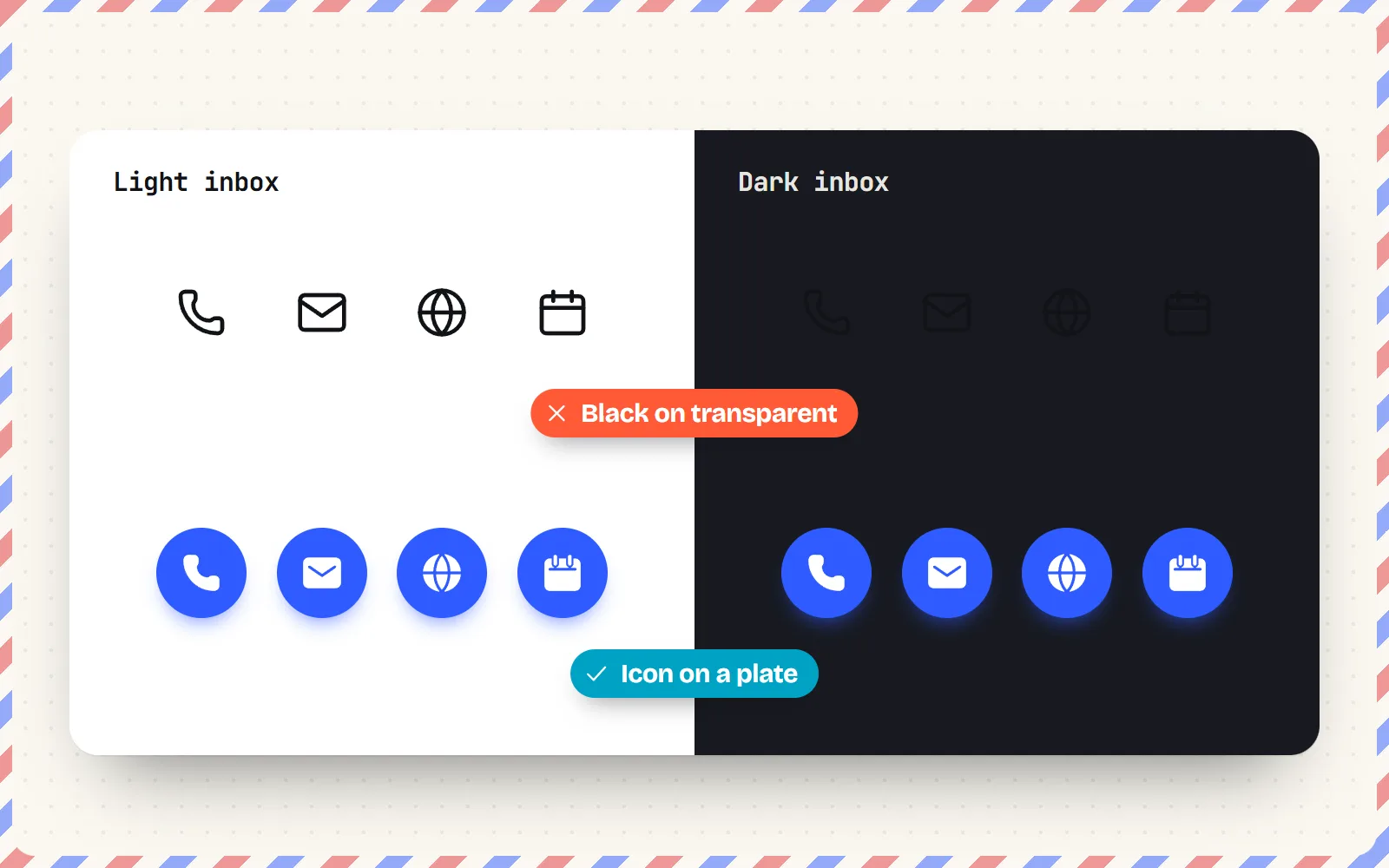
Because you cannot count on a swap, design icons that survive both backgrounds. A pure black icon on a see-through background disappears on a dark inbox; a pure white one disappears on a light inbox. Our dark mode icons guide covers the colour side in depth.
Use a mid-tone brand colour that reads on white and on near-black, or bake the icon onto a small coloured circle or rounded square so it carries its own background. Test the email in a dark inbox before sending.
Send black or very dark grey icons on a transparent background, or count on CSS to swap the icon colour in dark mode across every app.
What alt text should email icons have?
Alt text is the short description an app shows (or reads aloud) when the picture is not displayed. In email that happens a lot: Microsoft’s support pages say classic Outlook blocks automatic picture downloads by default, so many readers see your alt text before your icons.
- Icon next to words (a phone icon before “+1 555 0100”): the text already says it, so use an empty
alt=""and the reader skips the icon. - Icon-only link (a social icon, a “call” button): describe where it goes, for example
alt="Our page on Instagram"oralt="Call us". - Never leave alt out. Without it, some apps show the file name instead, and screen readers may read it out.
Our guide to accessible icons explains labels for icons in general.
How do I get email-ready PNG icons from with icons?
Every icon page has a PNG download where you pick the size and colour, so you get exactly the file an email needs. All 1000 icons in all 34 styles work this way, free and MIT licensed.
- 1Pick your icons
Search the icon library for what you need, for example phone, mail, globe and map-pin. Stick to one style for the whole set; Solid style reads best at 16 to 20 px.
- 2Choose the colour
Set the colour you want in the email. Email apps cannot recolour it later, so pick the final shade now (or a background colour for a plate).
- 3Download a PNG at the right size
Choose PNG and set the size to the size it will show at, then turn on “@2x for sharp screens” to double the pixels. Or type a size directly, for example 64 px. The PNG set download gives you 1x to 4x in one ZIP.
- 4Host and insert
Upload the PNGs somewhere public, insert them with width, height and alt text, and send yourself a test in Gmail, Outlook and a phone.
Want movement? Icons with motion also download as GIF, which plays in most email apps. caniemail notes that Outlook for Windows 2007 to 2016 does not play animated GIFs (it is widely reported to show the first frame), so make sure that frame works on its own. For the plain-HTML side of icons on websites (where SVG is the right answer), see our HTML guide and free PNG icons page.
The bottom line
SVG in email is no longer a flat “never”: Apple Mail, Yahoo and Outlook.com show it, and Gmail now shows a PNG copy of it. But older Outlook still shows nothing and inline SVG is stripped almost everywhere, so PNG remains the safe default. Save icons at twice their display size, set width and height in the HTML, choose colours that work in dark mode, and always add alt text. The email signature guide takes you through the rest.
Frequently asked questions
Does Gmail support SVG images in 2026?
Partly. caniemail’s test of 16 September 2026 shows Gmail on the web, iPhone and Android now displays SVG images linked from an <img> tag, but it rasterises them, turning each one into a PNG. Earlier tests (2020 to 2024) showed no support on Gmail’s web app. SVG code written straight into the email is still removed.
Does Outlook support SVG in email?
It depends on the version. caniemail lists no SVG support in Outlook for Windows 2007, 2010, 2013 and 2016, but support in Outlook 2019, Outlook.com, Outlook for Mac (recent versions) and the Outlook phone apps. Since many workplaces still run older desktop Outlook, PNG is the safer pick.
What size should icons be in an email?
Show them at about 16 to 24 px next to text, and 24 to 32 px for social icons. Save the PNG at two or three times that size (for example 48 or 64 px for a 20 px icon), then set width="20" height="20" on the <img> tag so it shows small but stays sharp on high-resolution screens.
Why are my email icons not showing?
The most common reasons: the reader’s app blocks images until they click “download pictures” (classic Outlook does this by default), the image is an SVG in a client that does not support it, the image is a base64 data URI (Gmail does not show those), or the file is not publicly hosted. Use hosted PNGs with alt text.
Can I change an icon’s colour with CSS in email?
No. Email apps treat icons as plain pictures, and the tricks websites use (currentColor, CSS masks, inline SVG) do not work across email clients. Download each icon in the exact colour you need. If you need two colours (light and dark), make two files.
Sources and notes
- caniemail: SVG image format (linked file), last tested 16 September 2026, checked November 2026
- caniemail: Embedded <svg> image (inline), last tested February 2020, checked November 2026
- caniemail: @media (prefers-color-scheme), last tested March 2023, checked November 2026
- caniemail: width property (CSS width on images in Outlook for Windows), checked November 2026
- caniemail: Base 64 image format, checked November 2026
- caniemail: GIF image format (animation in Outlook for Windows), checked November 2026
- Microsoft Support: Block or unblock automatic picture downloads in classic Outlook, checked November 2026
- Stack Overflow: SVG image not showing in HTML email (2011, the stale “no plans” answer)
Facts about other icon sets were checked against their official sites in November 2026. Libraries change, so check the links above for the latest numbers.