icons in code, the 2026 answer
Is SMIL deprecated? How to animate SVG icons today
Ten-year-old answers still say SMIL is dying. It is not. Here is what each way of animating an icon is good at in 2026: CSS, SMIL, the Web Animations API and Lottie, plus the one setting every animation must respect.
- No, SMIL is not deprecated. Chrome announced a plan to deprecate it in April 2015 and suspended that plan in August 2016.
<animate>and friends work in every major browser today. - For most icon motion, use CSS on inline SVG: transitions for hover and state, keyframes for loops,
transform-box: fill-boxto turn parts around their own centre,stroke-dashoffsetfor a line that draws itself. - Use SMIL or CSS inside the file when the animation must travel as one self-contained
.svgthat plays even in an<img>. Use the Web Animations API when JavaScript needs to start, pause, reverse or chain motion. - Lottie is worth it for rich, designer-made motion from After Effects. For a bell that rings or a heart that beats, it is a player library you do not need.
- Whatever you use, honour
prefers-reduced-motion, and give anything that loops longer than five seconds a way to pause (WCAG 2.2.2).
On this page 10 sections
No, SMIL is not deprecated. Chrome announced a plan to deprecate it in April 2015, then suspended that plan in August 2016, and SMIL animation works in every major browser today. For most icons, though, CSS is still the best tool: transitions for hover and state changes, keyframes for loops, and stroke-dashoffset for lines that draw themselves. Use SMIL for self-contained animated files, the Web Animations API when JavaScript needs control, and Lottie only for rich, designer-made motion.
Many top answers were written in 2015 and 2016, while the deprecation plan was live, and in 2023 someone asked on Meta Stack Overflow for them to carry a warning. Below is the 2026 picture, checked on MDN, caniuse and the Chromium and W3C lists in November 2026. For when animated icons help, rather than how to build them, read animated icons: when they help and when they hurt.
Is SMIL deprecated?
SMIL is the animation language built into SVG: elements like <animate>, <animateTransform>, <animateMotion> and <set> that you write inside the drawing itself. Here is what actually happened to it:
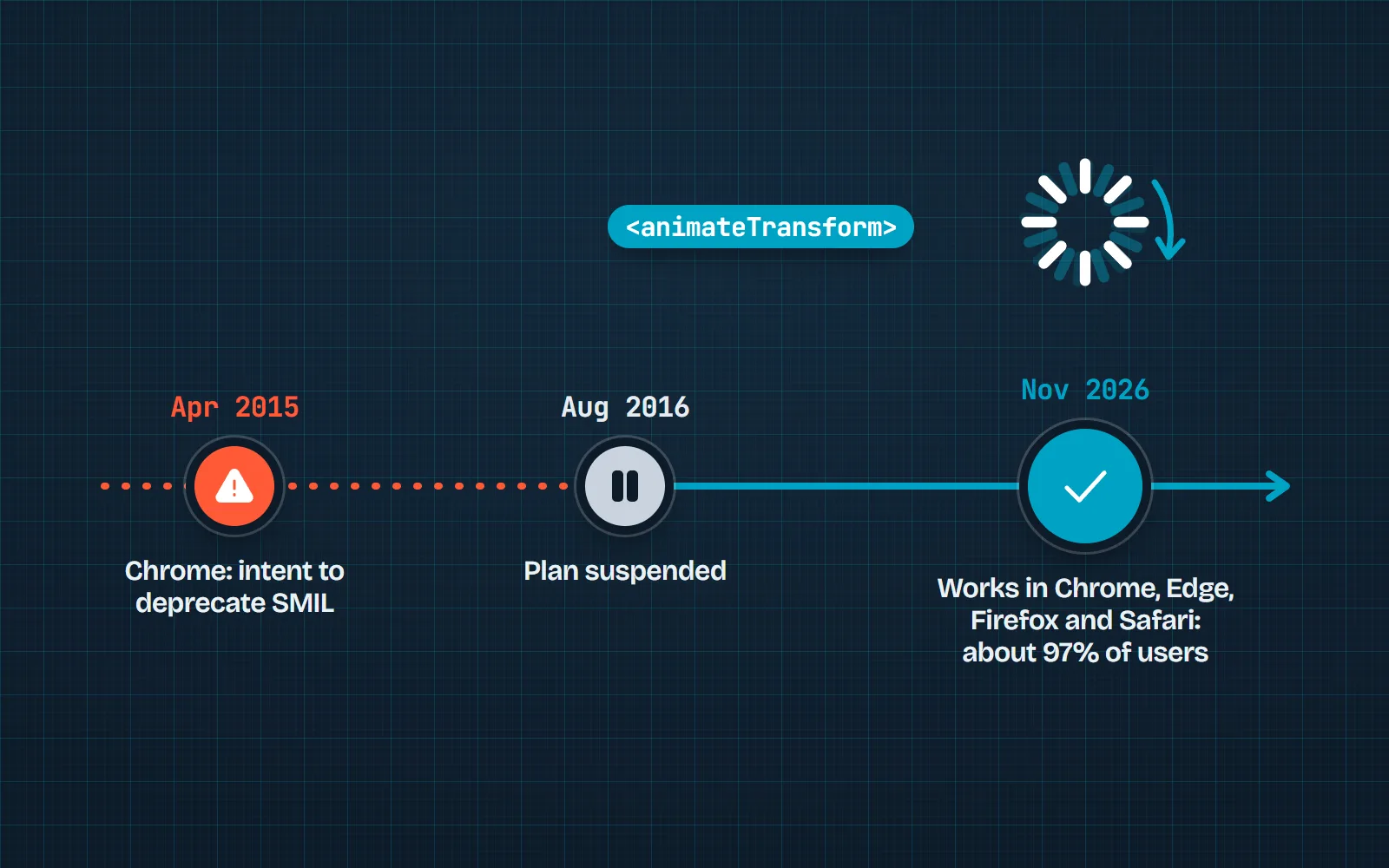
- April 2015: the Chrome team posted an “intent to deprecate” on the blink-dev list, saying SMIL added complexity and was rarely used, and that CSS and Web Animations should replace it.
- August 2016: after developers pointed out things SMIL could do that nothing else could yet, Chrome said it had decided to “suspend our intent to deprecate”.
- Today: SMIL plays in Chrome, Edge, Firefox and Safari. caniuse puts support at about 97% of users worldwide, and MDN documents it as a normal part of SVG.
So “SMIL is deprecated, convert to CSS” is out of date. SMIL is not the best choice for every icon, but it is not going away.
What is the best way to animate an SVG icon today?
| Method | Best for | Plays in an <img> | Needs JavaScript | Reduced motion |
|---|---|---|---|---|
| CSS transitions and keyframes | Hover, state changes and loops on icons in your page | if written in the file | one media query | |
SMIL (<animate>) | Self-contained animated files; animating SVG attributes | no simple off switch | ||
| Web Animations API | Motion that code starts, pauses, reverses or chains | check it in your code | ||
| Lottie / dotLottie | Rich motion designed in After Effects | needs a player | depends on the player | |
| GIF or MP4 | Slides, chat, email, video editors | GIF | always plays |
Most product teams land on CSS for interface icons and a GIF or video for slides and social posts. That is also how our own tools are built, which we come back to at the end. For a tour of ready-made animated sets, see the best animated icon libraries.
How do I animate an SVG icon with CSS?
Put the SVG in your page (pasted code, a component or a web component), then animate it like any other element. Two rules keep it smooth: animate only transform (move, turn, scale) and opacity (fade), and tell the browser where each part should pivot.
That second rule is the bit most tutorials miss. Inside an SVG, a shape turns around the corner of the whole drawing by default, not around its own middle, so a spinning gear wobbles across the icon. transform-box: fill-box makes transform-origin measure from the shape itself. It has worked in every major browser since January 2020.
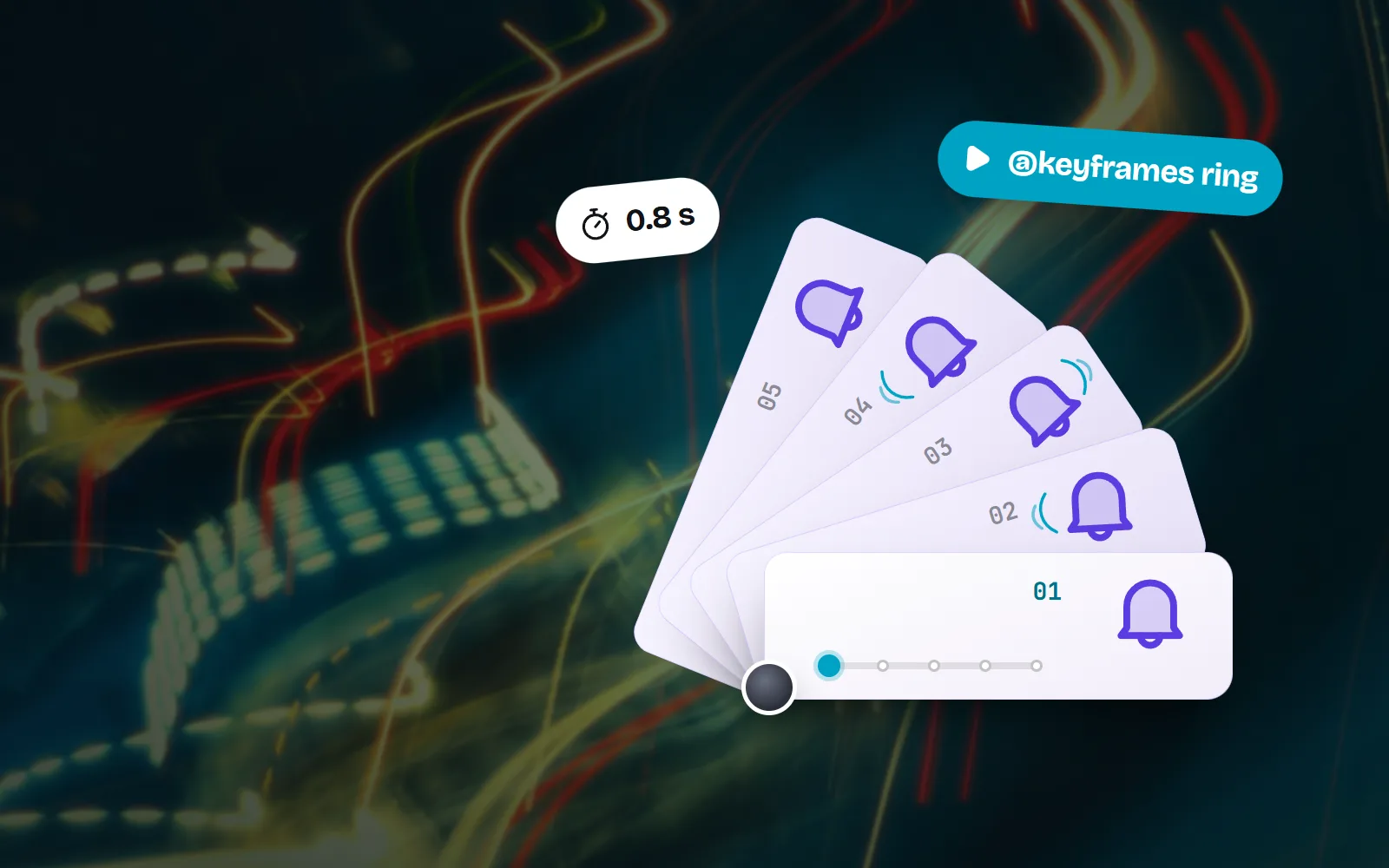
/* A bell that rings from its hook when its button is hovered or focused */
@keyframes ring {
  0%, 100% { transform: rotate(0); }
  20% { transform: rotate(14deg); }
  40% { transform: rotate(-10deg); }
  60% { transform: rotate(6deg); }
}
.bell-btn:is(:hover, :focus-visible) .bell {
  animation: ring 0.8s ease-in-out;
  transform-box: fill-box;
  transform-origin: 50% 0;   /* swing from the top, not the corner */
}
Trigger it from the button, not the icon, so it also plays for keyboard users, and keep hover motion short (well under a second). Hover over the tiles below: each style, from Line style to Clay style, plays the bell icon’s own hover motion.
How do I make a line icon draw itself?
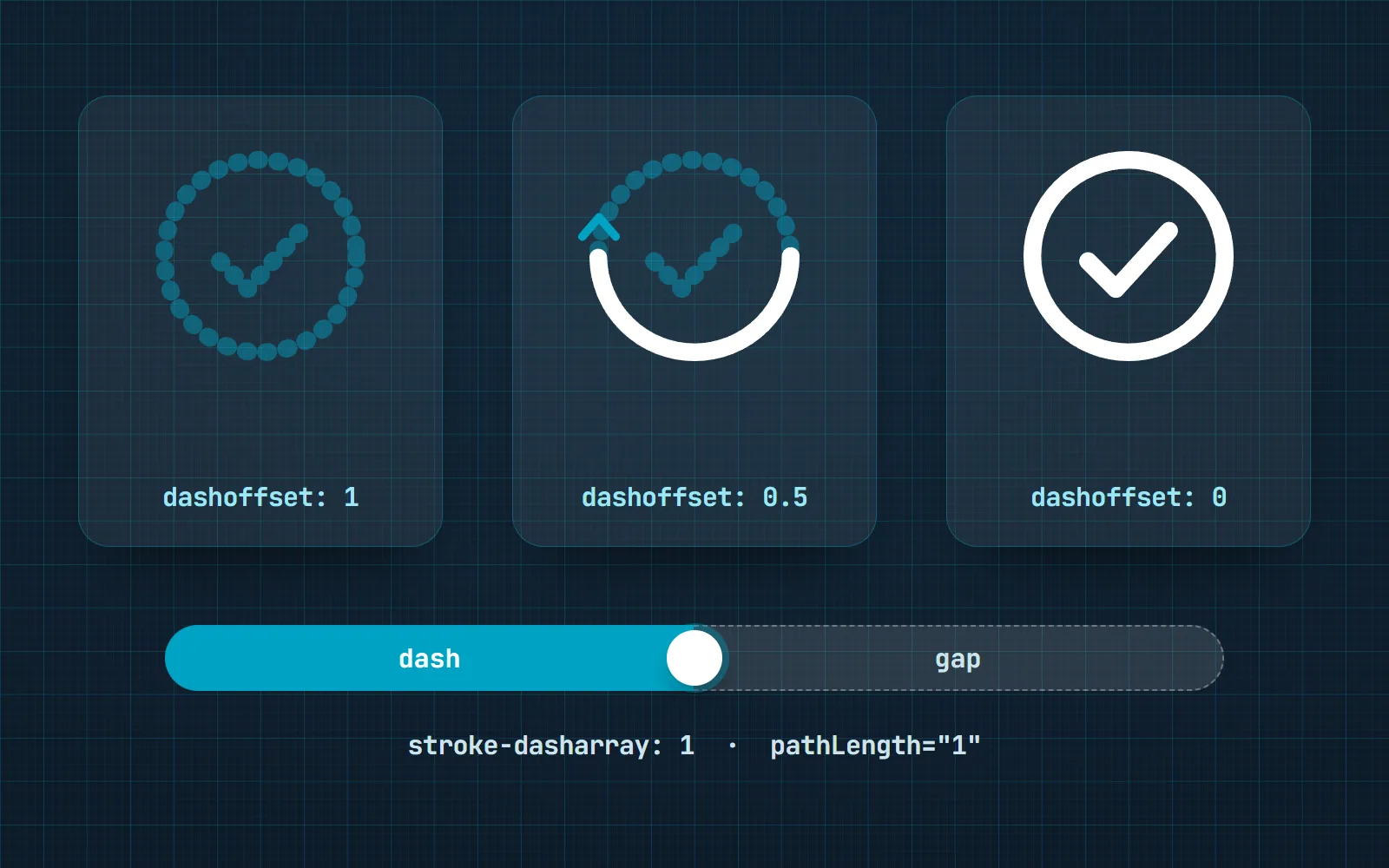
The “drawing” effect is a dashed line trick. Imagine the stroke is one very long dash with an equally long gap. Slide the dash out of view, then slide it back, and the line seems to draw itself from start to end. pathLength="1" tells the browser to treat the path as one unit long, so you never have to measure it.
<svg viewBox="0 0 24 24" fill="none" stroke="currentColor" class="draw">
  <path pathLength="1" d="…" />
</svg>
.draw path {
stroke-dasharray: 1;
stroke-dashoffset: 1;
animation: draw 0.6s ease-out forwards;
}
@keyframes draw { to { stroke-dashoffset: 0; } }It only works on strokes, so it suits outline styles like Line style and Sketch style. Filled icons need a different reveal, such as a fade or a scale. Our motion package has a draw preset that does exactly this on outline styles and falls back to a pop on filled ones.
When is SMIL the right choice?
SMIL earns its place when the animation has to live inside the file. An SVG used as an image (an <img> tag or a CSS background) runs no JavaScript, but animation written into the file still plays. That makes SMIL handy for an animated logo in a README, a loading spinner served as a plain file, or a CMS that only accepts images.
<svg viewBox="0 0 24 24" width="24" height="24" fill="none" stroke="#2f5bff" stroke-width="2"
     stroke-linecap="round" xmlns="http://www.w3.org/2000/svg">
  <circle cx="12" cy="12" r="9" stroke-opacity="0.25" />
  <path d="M12 3a9 9 0 0 1 9 9">
    <animateTransform attributeName="transform" type="rotate"
      from="0 12 12" to="360 12 12" dur="1s" repeatCount="indefinite" />
  </path>
</svg>
Two things to know. First, an SVG in an <img> cannot see your page’s CSS, so currentColor falls back to black: write the colour into the file, as above. Second, SMIL has no simple off switch for reduced motion, because your CSS media queries cannot pause it. CSS keyframes in a <style> element inside the file also play in an <img>, and they can carry a reduced-motion rule, which is why our own animated SVG export uses CSS rather than SMIL.
When should I use the Web Animations API?
The Web Animations API is the same engine as CSS animation, driven from JavaScript with element.animate(). It has been Baseline since March 2020. Reach for it when code needs to decide: play a “pop” when a like is saved, reverse it on undo, wait for it to finish before moving on.
const reduce = matchMedia('(prefers-reduced-motion: reduce)').matches

async function pop(icon) {
  if (reduce) return
  const anim = icon.animate(
    [{ transform: 'scale(1)' }, { transform: 'scale(1.25)' }, { transform: 'scale(1)' }],
    { duration: 300, easing: 'ease-out' }
  )
  await anim.finished   // then update the counter, close the menu, etc.
}
Turning one icon into another, like play into pause or a menu into a close button, is a common reason to add code. A swap needs state: which icon is showing now? Click the tiles to see three swaps, each with its own transition.
Is Lottie worth it for icons?
Lottie is a format for vector animation exported from tools like After Effects, played back by a small player library. dotLottie (.lottie) packages the same animation in a compressed file, which its makers say is far smaller than raw JSON. It is excellent at things that are painful to hand-code: many parts moving on their own curves, morphing shapes, character animation.
For interface icons it is usually more than you need: a player must load before anything moves, colours are baked in unless the player themes them, and a ringing bell is a few lines of CSS. Use Lottie when a motion designer hands you a rich animation, or a tool you use expects Lottie files.
How do I respect prefers-reduced-motion?
Some people get dizzy or distracted by movement, and they can ask their device for less of it: on Windows 11 under Accessibility, Visual effects, Animation effects; on iPhone under Accessibility, Motion; on a Mac in the Accessibility settings; on Android with Remove animations. Browsers pass that choice to your page as prefers-reduced-motion, which has worked everywhere since January 2020.
/* Motion only for people who have not asked for less */
@media (prefers-reduced-motion: no-preference) {
  .bell-btn:hover .bell { animation: ring 0.8s ease-in-out; }
}
“Reduce” does not have to mean “nothing”. A quick fade is usually fine; spins, bounces and big movements are what to drop. And separately from that setting, WCAG 2.2.2 (level A) says anything that moves on its own for more than five seconds alongside other content needs a way to pause, stop or hide it. A gentle loop on a loader is fine; a page of looping icons needs a pause button. Our accessible icons guide covers the rest.
Animate transform and opacity, trigger hover motion from the button, keep it under a second, and switch it off for reduced motion.
Loop every icon on the page, animate width or top, or ship a whole Lottie player for one spinning arrow.
How does with icons animate its icons?
Every one of our 1000 icons has its own hand-tuned motion: the bell rings from its hook, the heart beats, the loader steps round. It ships as @withicons/motion, which is plain CSS at its core: add a class and a data-wm name, and the icon moves. There are 32 presets plus 12 made for 3D styles, and 12 effects for turning one icon into another. The optional JavaScript helper (motion() and swap(), about 4 KB gzipped) adds hover that finishes, play on scroll and pausing loops that are off screen. When someone asks for reduced motion, everything stops.
<link rel="stylesheet" href="https://cdn.jsdelivr.net/npm/@withicons/motion@latest/dist/motion.css">
<link rel="stylesheet" href="https://cdn.jsdelivr.net/npm/@withicons/motion@latest/dist/icons/bell.css">

<button class="wm-trigger" aria-label="Notifications">
  <span class="wm wm-hover" data-wm="bell"><svg aria-hidden="true">…bell…</svg></span>
</button>Not writing code? Every icon page exports its motion as a GIF, animated PNG or WebP, WebM or MP4 video, animated SVG, PNG frames, Lottie, dotLottie or an animated PowerPoint slide. The animated SVG is self-contained, with a reduced-motion rule built in, and plays in an <img>; apps that show SVG as a still picture, like Figma or PowerPoint, see only the first frame, so use a GIF there. Start with our no-code guide to animating an icon, browse free animated icons, or try the 50 animated loaders in the Loader Studio.
Frequently asked questions
Is SMIL deprecated in Chrome?
No. In April 2015 the Chrome team posted an “intent to deprecate” SMIL on the blink-dev list. After pushback, it said in August 2016 that it had decided to “suspend our intent to deprecate”. SMIL still works in Chrome, Edge, Firefox and Safari; caniuse puts support at about 97% of users worldwide in November 2026.
Should I use SMIL or CSS to animate SVG?
CSS for icons inside your page: it is easy to trigger on hover or state, and you can switch it off for reduced motion with one media query. SMIL for a standalone animated SVG file, or when you need to animate an SVG attribute that CSS cannot reach in every browser.
Do SVG animations play inside an img tag?
Animations written inside the file, as SMIL or as CSS in a <style> element, play in an <img>. JavaScript does not run there, so the Web Animations API and Lottie players cannot drive an SVG used as an image.
How do I make an SVG line draw itself?
Add pathLength="1" to the path so its length counts as 1, set stroke-dasharray: 1 and stroke-dashoffset: 1, then animate the offset to 0. The dash slides along and the line appears from start to end. It only works on strokes, so it suits outline icons.
Is Lottie better than CSS for icons?
For simple icon motion, no: CSS is lighter, needs no script and recolours with your theme. Lottie shines when a motion designer has built something rich in After Effects (many parts, eased paths, character animation) that would be painful to rebuild by hand.
How do I stop icon animations for people who prefer reduced motion?
Wrap motion in @media (prefers-reduced-motion: no-preference), or turn it off inside @media (prefers-reduced-motion: reduce). In JavaScript, check matchMedia('(prefers-reduced-motion: reduce)').matches before starting. People set this in their system settings; it has worked in every major browser since January 2020.
Sources and notes
- Chromium blink-dev: Intent to deprecate: SMIL (Philip Rogers, 29 April 2015)
- W3C www-svg list: Chrome suspends its intent to deprecate SMIL (forwarded 17 August 2016)
- Meta Stack Overflow: SVG SMIL animations are back and well (2023)
- caniuse: SVG SMIL animation (about 97% global support), checked November 2026
- MDN: SVG animation with SMIL, checked November 2026
- MDN: transform-box (Baseline since January 2020), checked November 2026
- MDN: the pathLength attribute, checked November 2026
- MDN: Element.animate() (Baseline since March 2020), checked November 2026
- MDN: prefers-reduced-motion (Baseline since January 2020), checked November 2026
- MDN: SVG as an image (scripts disabled), checked November 2026
- W3C: Understanding WCAG 2.2 SC 2.2.2 Pause, Stop, Hide (Level A), checked November 2026
- dotLottie: the .lottie format, checked November 2026
- with icons: @withicons/motion README, checked November 2026
Facts about other icon sets were checked against their official sites in November 2026. Libraries change, so check the links above for the latest numbers.