a plain-English guide
How to change app icons on Android in 2026
Pixels now theme every icon, Samsung has Theme Park, and Nova changed owners twice. Here is the route that fits your phone, and how to get a crisp PNG for any icon you make yourself.
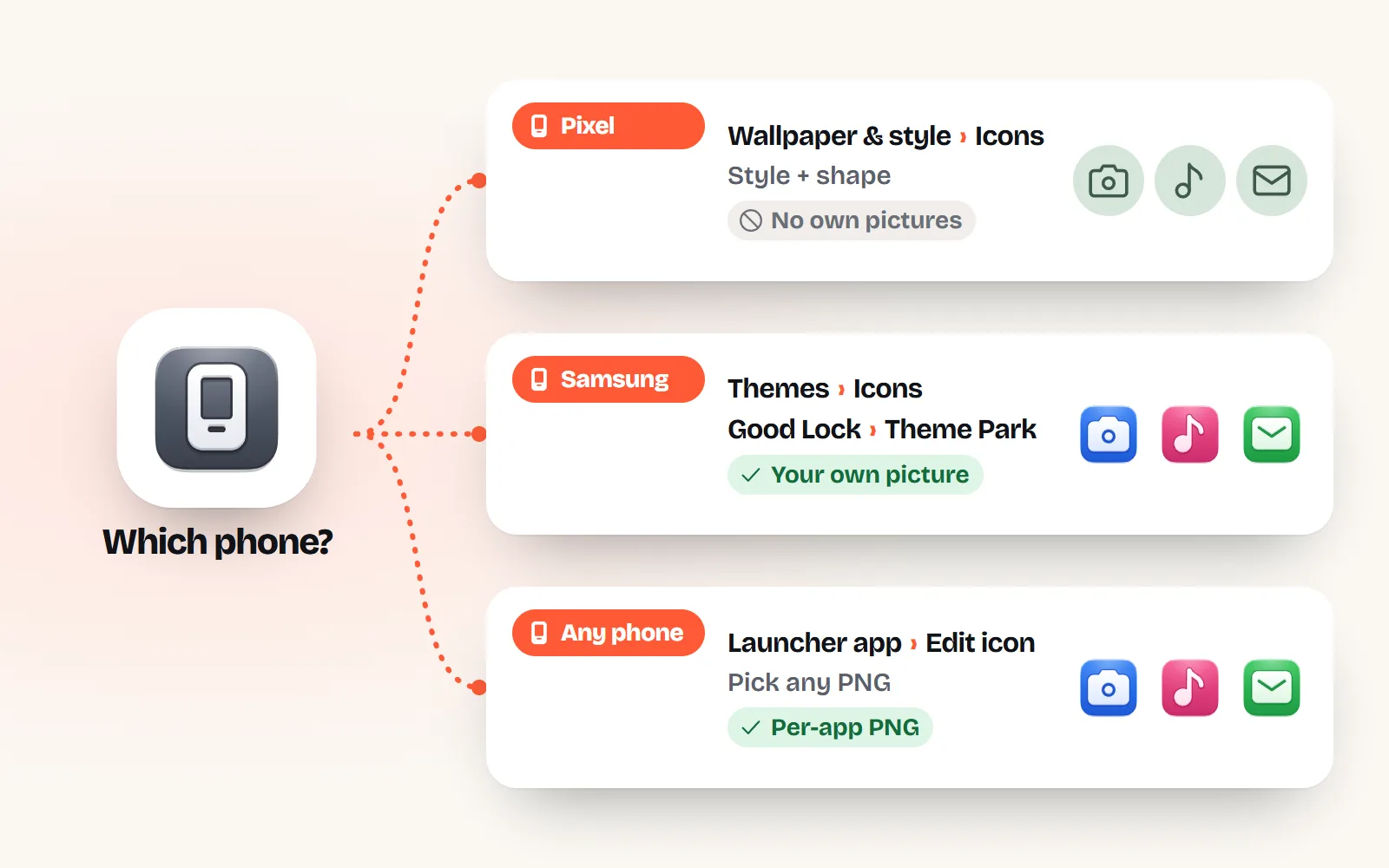
- Pixel: touch and hold the Home screen, then Wallpaper & style, Icons. Pick a Style (Default, Minimal or an AI-made custom set) and a Shape. Since Android 16 QPR2 the system themes apps that have no themed icon of their own. You cannot set your own picture for one app in the Pixel launcher.
- Samsung Galaxy: Themes, then Icons, for ready-made icon sets. For your own picture on one app, use Good Lock’s Theme Park module, which can take an image from your gallery.
- Any Android phone: a third-party launcher (Lawnchair, Smart Launcher, Nova and others) lets you swap single icons for your own PNG. Nova still exists: Instabridge bought it in January 2026, and the free version is moving to ads.
- Two meanings of “icon pack”: on Android it is an app full of replacement app icons that a launcher applies. In design it is a matching set of icons for slides, sites and documents.
- Size: a square PNG of 512 px is plenty (launchers draw icons at 48 dp, which is 192 px on the sharpest screens). Download one in any colour from a with icons page.
On this page 10 sections
To change app icons on Android in 2026, start with what your phone already has. On a Pixel, touch and hold the Home screen, tap Wallpaper & style, then Icons, and pick a style and a shape. On a Samsung Galaxy, use Themes for whole icon sets or Good Lock’s Theme Park to put your own picture on one app. On any phone, a launcher such as Lawnchair, Smart Launcher or Nova lets you swap a single icon for any PNG you like.
Most guides that rank for this question date from 2020 or 2021 and say “install Nova or Apex”. A lot has changed since: Pixels theme every icon, Pixels got AI icon styles in March 2026, and Nova has changed hands twice. This guide was checked against Google, Samsung and Android developer pages in November 2026. If you want icons of your own, every one of the 1000 icons on with icons comes in 34 styles, as a PNG at any size and colour.
What is the quickest way to change app icons on my Android phone?
It depends on who made your phone. Android lets phone makers ship their own home screen app (the “launcher”: the app that shows your icons and wallpaper), so the menus differ.
| Your phone | Restyle all icons | Your own picture on one app | Where to start |
|---|---|---|---|
| Google Pixel | Style, shape, themed colours | Not in the Pixel launcher | Wallpaper & style, then Icons |
| Samsung Galaxy | Galaxy Themes icon sets | Good Lock, Theme Park | Themes, then Icons; Good Lock from the Galaxy Store |
| Other phones (Motorola, OnePlus, Xiaomi and more) | Varies by maker | Usually via a launcher | Settings, then Home screen or Themes |
| Any phone with a launcher app | Icon packs | Per-app edit | Install a launcher, set it as the default Home app |
How do I change icons on a Google Pixel?
Pixel Phone Help describes two controls, both under the same menu:
- 1Open the menu
On your Home screen, touch and hold an empty space, then tap Wallpaper & style.
- 2Choose a style
Tap Icons, then Style. Google lists Default, Minimal and Create your own. Create your own builds a full set from styles Google offers (AI-generated, added in the March 2026 Pixel Drop), downloads it in the background and notifies you when it is ready.
- 3Choose a shape
Tap Icons, then Shape, pick the shape you want and tap Apply. Google notes it also changes folders, but icons in the all-apps list are not restyled.
What changed: themed icons used to work only for apps that shipped a monochrome version, so a themed home screen always had a few stubborn full-colour icons. Android’s developer docs now say that starting with Android 16 QPR2 (the December 2025 update on Pixels), Android automatically themes app icons for apps that do not provide their own. If your icons suddenly all turned one colour, that is why. Pick the Default style to get the original colours back.
How do I change app icons on a Samsung Galaxy?
Whole icon sets: Galaxy Themes
Samsung’s support page gives the route: touch and hold an empty area of the Home screen, tap Themes, open the menu, then My stuff and the Icons tab, pick an icon set and tap Apply. New sets download from the same Themes screen (some free, some paid), and you need a Samsung account. To go back, choose Default on the Icons tab.
Your own picture on one app: Theme Park
Good Lock is Samsung’s own customisation app, from the Galaxy Store, and Theme Park is the module of it that customises app icons. Samsung community guides describe the steps: in Theme Park you create or edit an icon theme, choose a single app and replace its icon with an image from your gallery. Menu names have moved around between One UI versions, and Good Lock is not offered on every model or in every country, so expect the exact labels to differ a little.
Theme Park is the best route on a Galaxy, because the real app keeps its badges and long-press menu. It is a much better answer than the old “install Nova” advice.
Which launcher should I use now that Nova changed hands?
A launcher is an app that replaces your home screen. Once you set it as your default Home app in Settings, you can usually touch and hold any app, choose edit, tap the icon and pick a PNG from your phone. Here is the Nova story, because many answers still get it wrong:
- September 2025: Nova’s developer said he had been asked to stop working on it and had left Branch, its owner since 2022. Headlines said Nova was shutting down.
- January 2026: Instabridge, a Swedish company, bought Nova and said “Nova is here to stay”. It said it was evaluating ads for the free version and that Nova Prime would stay ad-free. 9to5Google reported that ad and tracking code from Google and Facebook had already been added.
- Today: Nova still works and still edits icons. It is simply no longer the automatic recommendation.
Alternatives people use today include Lawnchair (free and open source, close to the Pixel look, with options to tweak icons) and Smart Launcher. Check the current Play Store listing and its data safety section before you install any launcher, because a launcher sees every app you open.
Try one launcher, set three or four icons, and live with it for a day before you redo your whole home screen.
Install three launchers at once, or grant one permissions it does not explain. A home screen app runs all the time.
Can I change one app’s icon without a new launcher?
Yes, with a shortcut. A shortcut-maker app from Google Play creates a home-screen shortcut that opens an app, with any picture you choose as its icon. You then move the real app off the home screen (it stays in the app drawer). It works on most phones, Pixels included, with two catches: it is a shortcut, not the app, so the notification badge and long-press menu may not appear, and some launchers add a tiny badge to shortcut icons.
This is the same trade-off iPhone users make with the Shortcuts app; the iPhone version of this guide covers it in detail.
What is an icon pack, and is it the same as an icon set?
The words mean two different things, depending on who says them:
| Android icon pack | Design icon pack (icon set) | |
|---|---|---|
| What it is | An app of replacement icons for popular apps | A matching collection of icons on one grid, one stroke and one style |
| Where it comes from | Google Play or the Galaxy Store | Icon libraries such as with icons |
| How you use it | Apply it in a launcher or theme tool; icons swap automatically | Copy or download icons into slides, sites, docs and apps |
| Brand logos | Usually yes (redrawn app logos) | Often no; with icons draws none |
| Works on a Pixel | Not in the Pixel launcher | As PNGs via a shortcut or launcher |
So with icons is an icon set, not an installable Android icon pack. That makes it right for themed shortcuts and a calm, matching home screen built from everyday objects (a camera, a note, a map pin), and wrong if you want the redrawn logo of every app. More words like this in our icon glossary, and what makes a set a set in what is an icon library.
What size should a custom Android app icon be?
Android draws launcher icons at 48 dp (a density-independent unit), which is 192 x 192 pixels on the sharpest screens. Google Play asks for 512 x 512 pixels for store icons. So a square 512 px PNG is the safe choice: big enough for any phone, small enough to keep the file light.
Launchers cut icons into a shape (a circle, a squircle, a rounded square), so leave a little room around the drawing, or the edges get clipped. A solid background colour also helps your icon read as a tile, rather than floating over the wallpaper.
How do I get a PNG icon at the right size?
- 1Find your icon
Search the icon library with an everyday word (“music”, “mail”, “bin” all work), or start from the free app icons page, which has ready tiles at 256, 512 or 1024 px.
- 2
- 3Download the PNG
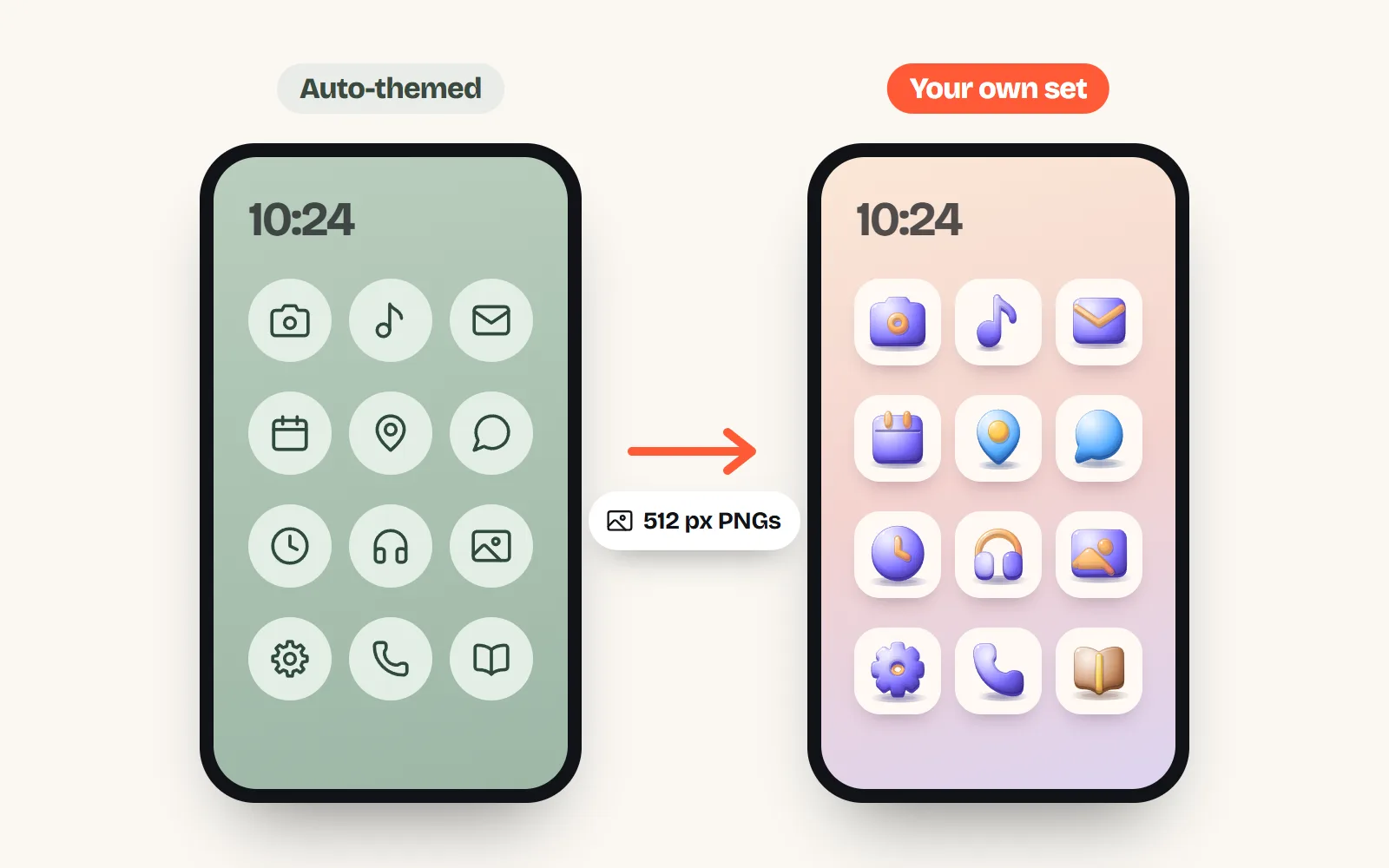
Open More formats, choose PNG, pick 512 px (or type your own size), and choose a background: see-through, white or a custom colour. Add Small or Medium padding so the launcher’s mask does not clip it.
- 4Put it on your phone
Save it to your phone’s Downloads or Photos, then pick it in your launcher, Theme Park or shortcut maker.
What changed since the old answers?
- Nova is no longer the default answer: its developer left in September 2025 and Instabridge bought it in January 2026, with ads coming to the free version.
- Pixels theme every icon since Android 16 QPR2 (December 2025), offer icon shapes, and since March 2026 make AI icon styles. They still accept no third-party icon packs or per-app pictures.
- Samsung moved the per-app route into Good Lock’s Theme Park, so a Galaxy no longer needs a third-party launcher for custom icons.
Frequently asked questions
Can I change app icons on Android without a launcher?
Partly. Pixels let you restyle every icon at once (style, shape, themed colours) but not set your own picture per app. Samsung phones can do per-app pictures with Good Lock’s Theme Park module. On other phones, a shortcut-maker app can put a home-screen shortcut with your image that opens the app, though it is a shortcut, not the app itself, so badges may not show.
Is Nova Launcher shut down?
No. Its original developer left in September 2025 and development paused, which led to “shut down” headlines. In January 2026 Instabridge bought Nova and said it would keep it going, with ads being considered for the free version and Nova Prime staying ad-free. Reports at the time found ad and tracking code in the update.
What is an icon pack on Android?
An app from Google Play or the Galaxy Store that contains replacement icons for popular apps. You install it, then apply it from a launcher or a theme tool, and matching icons replace the originals. It does nothing on its own, and the Pixel launcher does not support third-party icon packs.
Why do my Pixel icons all look the same colour?
That is themed icons. Since the Android 16 QPR2 update (December 2025 on Pixels), Android automatically themes app icons for apps that do not provide their own monochrome version. Choose the Default style in Wallpaper & style, Icons, to get the full-colour icons back.
What size should a custom Android app icon be?
Launchers draw app icons at 48 dp, which is 192 x 192 pixels on the sharpest (xxxhdpi) screens, and Google Play uses 512 x 512 for store icons. A square 512 px PNG covers every phone. Leave a little padding so the launcher’s mask does not clip the edges.
Are with icons an Android icon pack?
No. with icons is a design library: you download single PNGs or SVGs and set them yourself through a launcher, Theme Park or a shortcut. It is not an installable icon pack that swaps every app at once, and it has no brand logos, so it suits making your own themed shortcuts rather than replacing the Instagram icon.
Sources and notes
- Pixel Phone Help: Change wallpaper on your Pixel phone (Home screen styles, custom icons, icon shape; checked November 2026)
- Android Developers: Adaptive icons (“Starting with Android 16 QPR 2, Android automatically themes app icons”; checked November 2026)
- Android Developers: Support different pixel densities (48 dp = 192 px at xxxhdpi)
- Android Developers: Google Play icon design specifications (512 x 512 PNG)
- 9to5Google: Pixel home screens are getting custom icons, but Google’s keeping them locked to AI (3 March 2026)
- Samsung Support: Change the theme and icons on your Galaxy phone (checked November 2026)
- Samsung Newsroom: Customizing your Galaxy smartphone with the Good Lock app (Theme Park)
- 9to5Google: Nova Launcher’s developer leaves, project shutting down (8 September 2025)
- Nova Launcher: Nova is here to stay (Instabridge acquisition, 20 January 2026)
- 9to5Google: Nova Launcher has new owners, and ads may be coming (20 January 2026)
- Lawnchair on GitHub (free, open-source home app)
Facts about other icon sets were checked against their official sites in November 2026. Libraries change, so check the links above for the latest numbers.