icons in code, the 2026 answer
How to change an SVG icon’s colour with CSS
The top answers online still reach for Modernizr, jQuery and filter hacks. Here is what works today: currentColor for inline SVG, a CSS mask for image files, and CSS variables for icons with more than one colour.
- Put the SVG in the page and paint it with
currentColor. Then CSScolorsets the icon’s colour, and hover, focus and dark mode just work. - An SVG in
<img>orbackground-imagecannot be recoloured by your page’s CSS. It is a separate document, sofillnever reaches inside. - For an SVG file you can only point to, use a CSS mask:
mask-image: url(icon.svg)plusbackground-color: currentColor. It has been Baseline (works in every major browser) since December 2023. - Skip the old tricks:
<object>tags, jQuery that swaps images for inline code, andfilter: invert() sepia() hue-rotate()chains that only get close to a colour. - For icons with several colours, use CSS variables inside the SVG. with icons works this way:
--with-duoor--with-clay-c1recolours one part, and in most stylescolorstill sets the outline.
On this page 10 sections
To change an SVG icon’s colour with CSS, put the SVG in your page (pasted in, as a component, or through a sprite) with fill or stroke set to currentColor, then set the CSS color property. If the SVG is a file you can only point to, in an <img> tag or a CSS background, you cannot recolour it directly: show it through a CSS mask with background-color: currentColor instead. Masks have worked in every major browser since December 2023.
Below: why fill sometimes refuses to work, the mask method, multi-colour icons, and a table of every method. Not a developer? Our everyday guide to changing icon colours covers slides, documents and design tools without any code.
Why can’t I change the colour of an SVG in an img tag?
When you write <img src="icon.svg"> or background-image: url(icon.svg), the browser treats the SVG as a picture, much like a PNG. It opens the file as its own little document, draws it and shows the result. MDN’s guide to SVG as an image lists the limits: scripts are switched off and external files cannot load. Your page’s stylesheet does not reach inside either, so a rule like img path { fill: red } has nothing to match.
So the real question is whether the SVG’s shapes can live in your page. If yes, CSS can colour them. If no, you colour the space the image fills instead, with a mask.
How do I change an inline SVG’s colour with CSS?
Paint the icon with currentColor. That keyword means “whatever the CSS color is here”, the same colour as the text around it. Set it once on the SVG, and the icon follows its parent: link colour, button colour, hover colour, dark mode colour.
<!-- the icon paints its outline with currentColor -->
<a class="nav-link" href="/">
  <svg viewBox="0 0 24 24" width="24" height="24" fill="none"
       stroke="currentColor" stroke-width="1.75" aria-hidden="true">
    <path d="M2.5 11 L12 3.5 L21.5 11"/>
    <path d="M5 9.5 V19 A2 2 0 0 0 7 21 H17 A2 2 0 0 0 19 19 V9.5"/>
  </svg>
  Home
</a>

<style>
  .nav-link { color: #475569; }
  .nav-link:hover { color: #e11d48; }   /* the icon turns red too */
</style>
That snippet is the real home icon from with icons, trimmed a little. Every one of our 1000 icons ships this way: the ink is currentColor, so you never write a colour into the SVG at all. The icons below are drawn the same way, and they take this page’s text colour.
Components work the same way. @withicons/react, the Vue, Svelte, Angular and Solid packages and the <with-icon> web component all default to currentColor, and a color prop is only a shortcut for setting it. SVG sprites with <use href="#home"> also inherit color, which our post on how SVG sprites work covers in detail.
Why is my fill or stroke not changing?
If you pasted an SVG into the page and color or fill still does nothing, one of these traps is almost always the cause:
1. The paths have their own colour
Many exported SVGs carry fill="#000" on every <path>. A colour you set on the outer <svg> is only inherited, and a colour written on the path itself wins over an inherited one. Fix it at the source: replace those values with currentColor (or delete them so the path inherits). As a quick patch, a CSS rule that targets the paths also works, because MDN notes that when the attribute and the CSS property are both set, “the CSS property takes priority”.
2. It is an outline icon, and you set fill
Outline icons are drawn with stroke (the line) and fill="none". Setting fill: red turns their insides into red blobs, and the outline stays black. Use stroke for line icons, fill for solid ones, or simply use currentColor in the file and change color, which covers both.
3. An inline style or a more specific rule beats yours
A style="fill:#333" inside the SVG outranks your stylesheet, and so does a more specific library selector. Your browser’s developer tools show which rule wins.
4. You are trying to reach inside a <use> copy
An icon drawn with <use> is a copy in a hidden “shadow tree”, so selectors like .icon path cannot reach it. Inherited values still flow in, though: color, fill and CSS variables set on the <svg> or <use> all reach the copy.
Write currentColor into the SVG once, then change color in CSS for every state: default, hover, active, disabled, dark mode.
Hard-code fill="#000" in the file and then fight it with !important rules, or set fill on an outline icon and wonder why it turns into a blob.
How do I change the colour of an SVG used as an img or background-image?
Use the SVG as a mask: a stencil. The element gets a background colour, and the mask cuts that colour into the icon’s shape. Because the background is currentColor, the icon follows your text colour just like inline SVG does.
.icon {
  display: inline-block;
  width: 1em;
  height: 1em;
  background-color: currentColor;   /* the colour you see */
  mask: url("/icons/home.svg") center / contain no-repeat;   /* the shape */
}
.button:hover .icon { color: #e11d48; }   /* or change color on the icon itself */
The file’s own colours do not matter here. For an image mask, the browser only reads how opaque each pixel is (MDN’s mask-mode page explains that image masks use alpha by default), so a black icon, a red icon and a grey icon all produce the same stencil. The colour comes entirely from background-color.
Support is no longer a worry. MDN lists mask-image as Baseline Widely available since December 2023, the month Chrome 120 removed the need for the -webkit- prefix. If you must support browsers older than that, add the same value as -webkit-mask above the unprefixed line.
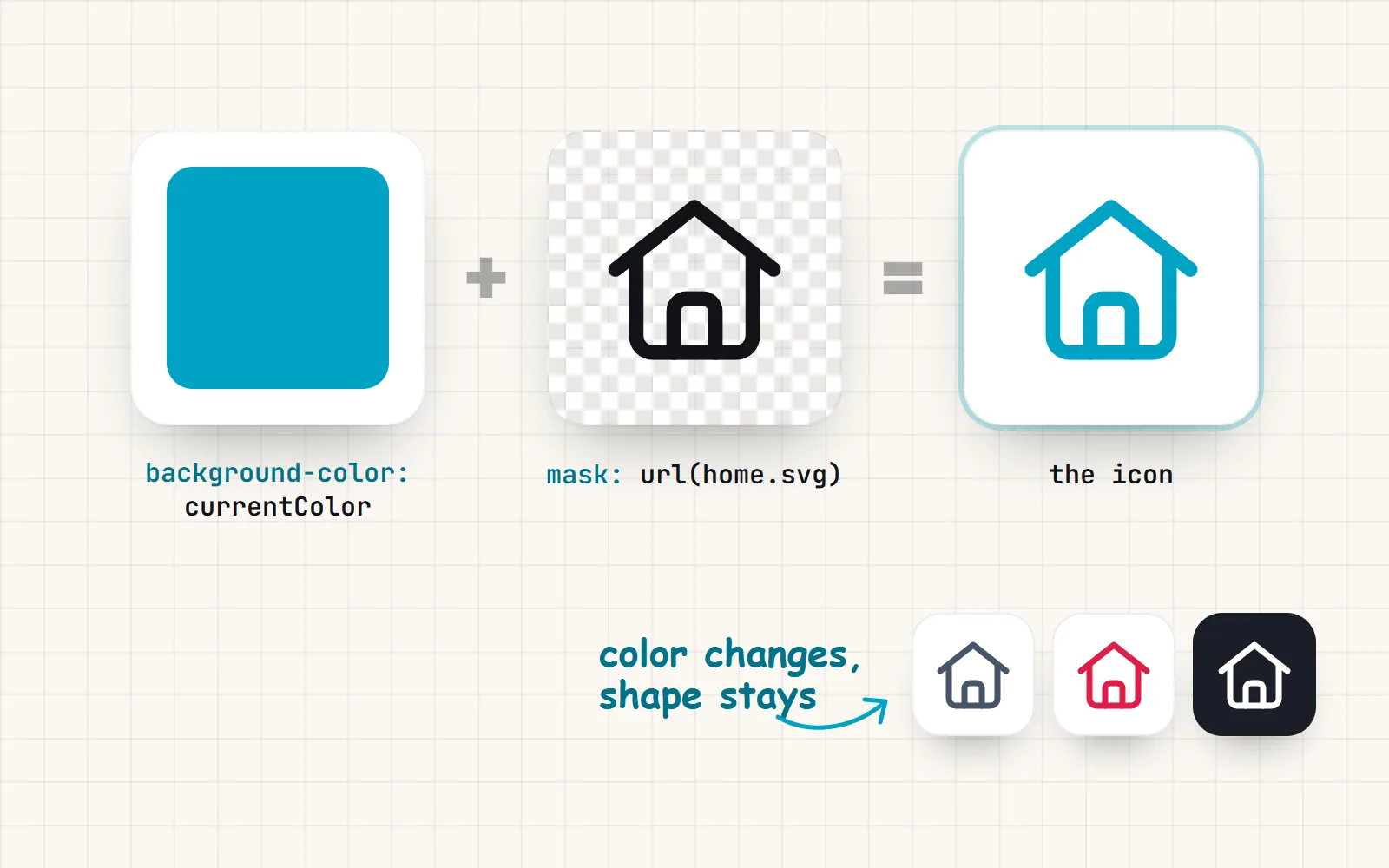
The mask method has one limit: it gives you a single colour, because the stencil only knows “icon” or “not icon”. That suits line and solid icons perfectly. For more about icons in pseudo-elements and data URIs, read our post on SVG icons in CSS.
What about CSS filter to recolour an SVG?
You will still see answers like filter: invert(27%) sepia(51%) saturate(2878%) hue-rotate(346deg). Filters work on the finished picture, so they can push a black icon toward a target colour. They are a hack for icons, though. You need a generator to work out each new colour, the result is only close to the colour you asked for, hover needs a second chain, and the filter shifts every colour in the image, not just the one you wanted.
A filter is fine when you cannot touch the markup at all, or for a general effect such as greying out a disabled picture. For a brand colour on an icon, use currentColor or a mask.
How do I change the colours of a multi-colour SVG icon?
A mask only gives one colour, and currentColor is only one value. For icons with two or more colours, put a CSS variable (a custom property) on each extra colour inside the SVG, with a default after the comma:
<svg viewBox="0 0 24 24" class="badge-icon">
  <path fill="var(--icon-fill, #fde68a)" d="..."/>   <!-- the soft body -->
  <path stroke="currentColor" fill="none" d="..."/>  <!-- the outline -->
</svg>

<style>
  .badge-icon { color: #1e293b; --icon-fill: #bfdbfe; }
</style>
Variables pass through inheritance, so this works for inline SVG, components and sprites drawn with <use>. It does not work for <img> files or data URIs, which cannot see your CSS. That is why with icons ships two kinds of SVG download on every icon page: a plain SVG with the colours written in, and a themable SVG that keeps currentColor and the variables for developers.
Our multi-colour styles are built exactly like this. In Duo style the soft tint is --with-duo and the accent detail is --with-duo-accent. Palette styles such as Clay style, Kawaii style or Sticker style give every colour its own variable, for example --with-clay-c1 for the main body of a clay icon (each style’s full list is in the @withicons/core README). In styles whose outline is currentColor, such as kawaii, color still sets the outline. Each icon also comes with 20 to 30 hand-picked palettes that set the right variables for you, in every style at once.
/* recolour the body of every clay icon in this section, no SVG edits */
.promo { --with-clay-c1: #a78bfa; }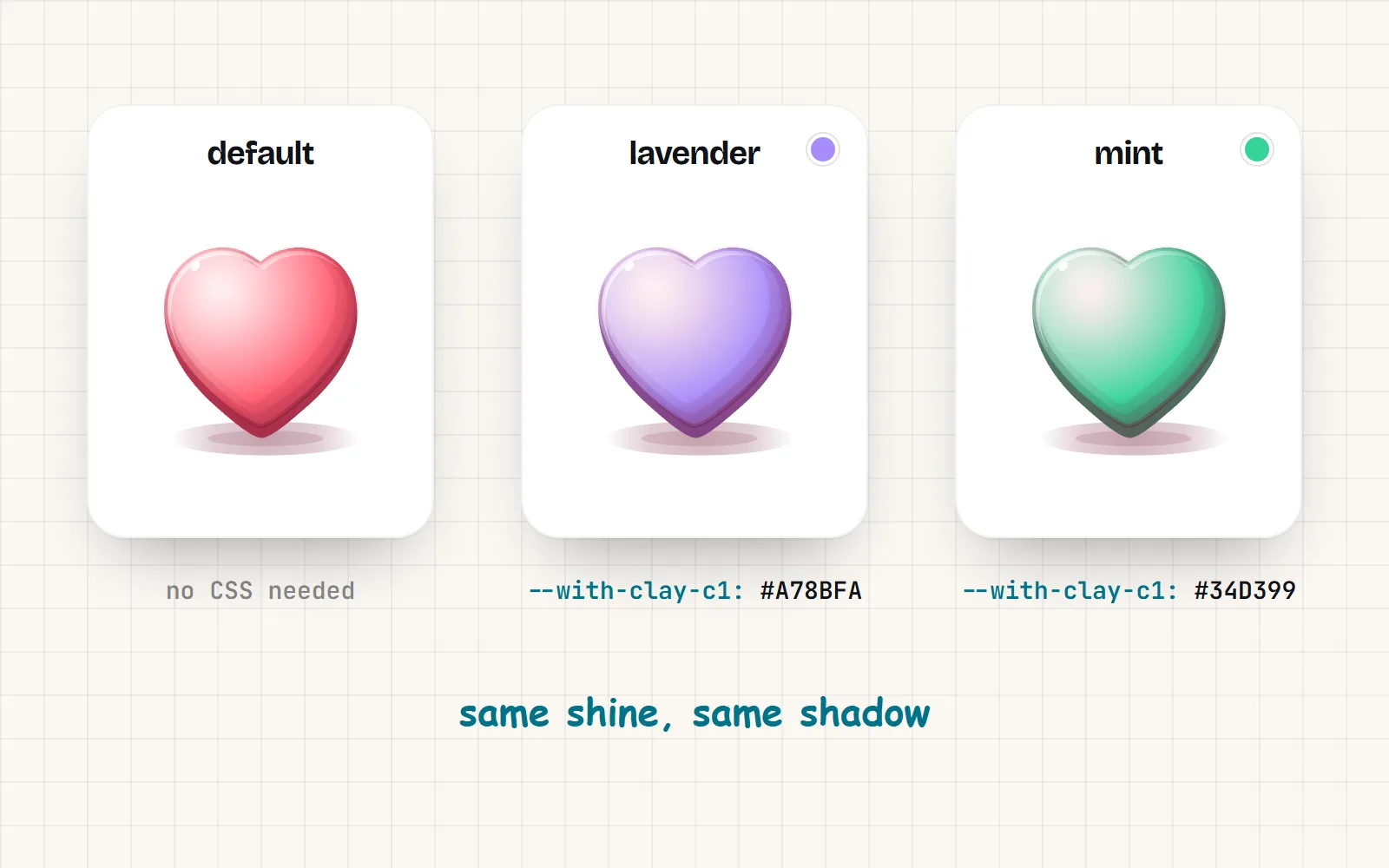
Which method should I use? Every option side by side
| Method | Recolour with CSS | Hover and dark mode | Several colours | Best for |
|---|---|---|---|---|
Inline SVG or a component, painted with currentColor | Follows color | With CSS variables | Interface icons in apps and sites | |
Sprite with <use href> | Follows color | Variables pass in | Many icons, one cached file | |
CSS mask + background-color: currentColor | One colour | CSS-only icons, pseudo-elements, files you cannot inline | ||
<img src="icon.svg"> | Only the colours in the file | Logos and illustrations that never change colour | ||
CSS background-image | Only the colours in the file | Decoration in fixed colours | ||
CSS filter chain | Close, not exact | A second chain per state | Last resort when you cannot change the markup | |
<object> or jQuery swaps (2012-2014 answers) | With scripts | Nothing new: use inline SVG instead |
- Building an app or site with a framework? Use an icon component. It is inline SVG with
currentColoralready done. - Plain HTML, and you want the icon to follow the text? Paste inline SVG, or use a sprite if the same icons repeat.
- Only CSS, or icons in
::before? Use the mask method. with icons’<i class="with with-home">classes do exactly this for you, see Font Awesome-style icon classes. - A logo or illustration whose colours are fixed? A plain
<img>is perfect. Not everything needs to be recolourable.
How do I change an SVG icon’s colour on hover or in dark mode?
Once the icon uses currentColor (inline or masked), you never style the icon itself. You style the text colour of whatever holds it:
button { color: #334155; }
button:hover, button:focus-visible { color: #2563eb; }

@media (prefers-color-scheme: dark) {
  button { color: #e2e8f0; }   /* every icon inside follows */
}
One rule covers the label and the icon together, so they never drift apart. Our guide to icons in dark mode goes further, including multi-colour styles on dark backgrounds.
The short version
Inline the SVG and paint it with currentColor; use a CSS mask when the SVG has to stay a file; use CSS variables when an icon has more than one colour. Leave filters for photos and <object> tags for the history books. Every icon in the with icons library is ready for all three: copy the SVG code, download the themable SVG, or grab the CSS class from the icon page. For a no-build setup, start with the HTML guide or the free SVG icons page.
Frequently asked questions
Why does fill not change my SVG’s colour?
Usually for one of three reasons. The SVG is in an <img> tag or a CSS background, where page CSS cannot reach. Or the paths inside have their own fill="#000", which beats a colour you set on the outer <svg>. Or it is an outline icon, which is drawn with stroke, not fill. Replace the hard-coded colours with currentColor and set color instead.
Can I change the colour of an SVG in an img tag?
Not directly. An SVG loaded through <img src> is drawn as a separate image, so your page’s CSS cannot style its insides. Either paste the SVG into the page (or use an icon component), or keep the file and show it through a CSS mask with background-color: currentColor.
How do I change an SVG background-image colour?
Use the same file as a mask instead of a background: mask: url(icon.svg) center / contain no-repeat; background-color: currentColor;. The mask cuts the shape out, and the background colour fills it, so you can change it on hover or in dark mode.
Is CSS mask-image supported in all browsers now?
Yes. MDN lists mask-image as Baseline Widely available, working across browsers since December 2023, when Chrome 120 dropped the need for the -webkit- prefix. Keep a -webkit-mask line only if you support older browsers.
Should I use CSS filter to recolour an SVG?
Only as a last resort. A chain like invert() sepia() saturate() hue-rotate() approximates a colour, needs a calculator for each new colour, and changes everything in the image. For icons, currentColor or a mask gives you the exact colour with one line.
How do I change the colours of a multi-colour SVG icon?
Give each colour in the SVG a CSS variable with a fallback, such as fill="var(--icon-accent, #f59e0b)", and set the variable in your CSS. It works for inline SVG, components and sprites. It does not work for <img> files, which cannot see your CSS.
Sources and notes
- MDN: mask-image (Baseline Widely available since December 2023), checked November 2026
- web.dev: New to the web platform in November 2023 (Chrome 120 unprefixes mask properties)
- MDN: mask-mode (image masks use alpha by default), checked November 2026
- MDN: the SVG fill attribute (“the CSS property takes priority”), checked November 2026
- MDN: the currentColor keyword, checked November 2026
- MDN: SVG as an image (restrictions in img and background-image), checked November 2026
- Stack Overflow: How can I change the color of an SVG element? (question 22252472)
- with icons: @withicons/core README (palette variables), checked November 2026
Facts about other icon sets were checked against their official sites in November 2026. Libraries change, so check the links above for the latest numbers.