icons in code, the 2026 answer
How do SVG sprites work in 2026?
One file, many icons, each shown with a single line. Here is how symbol and use work today, how to colour sprite icons (even with several colours), and why a sprite on a CDN still will not load.
- An SVG sprite is one file holding many icons, each a
<symbol>with an id. You show one with<svg><use href="sprite.svg#home"/></svg>. - Use plain
href.xlink:hrefis deprecated since SVG 2, and plainhrefworks in every current browser (Safari since 12.1, in 2019). No polyfill needed. - A sprite file must come from your own site. Browsers refuse a
<use>that points to another domain, and CORS headers do not change that.data:URLs were removed too (Chrome 120, Firefox 122). - Colour it with
currentColorand CSS variables. Selectors cannot reach the copied shapes, but inherited values can, sofill="var(--accent, #f59e0b)"gives a sprite icon a second or third colour. - For a few icons, components or single files are simpler. Sprites pay off when one page shows many icons of the same style.

On this page 9 sections
An SVG sprite is one SVG file that holds many icons, each inside a <symbol> with its own id. You show an icon with <svg><use href="sprite.svg#home"/></svg>. In 2026 three rules cover almost every problem: use plain href (not xlink:href), serve the sprite from your own site because browsers block <use> across domains, and colour icons with currentColor and CSS variables, which do pass into the copied shapes.
Below we explain what a sprite is in plain words, how to build and use one, how to give sprite icons one or several colours, what to do when the sprite lives on a CDN, and when a sprite is the wrong tool. Not writing code? You can skip all of this and copy icons straight from the icon library.
What is an SVG sprite?
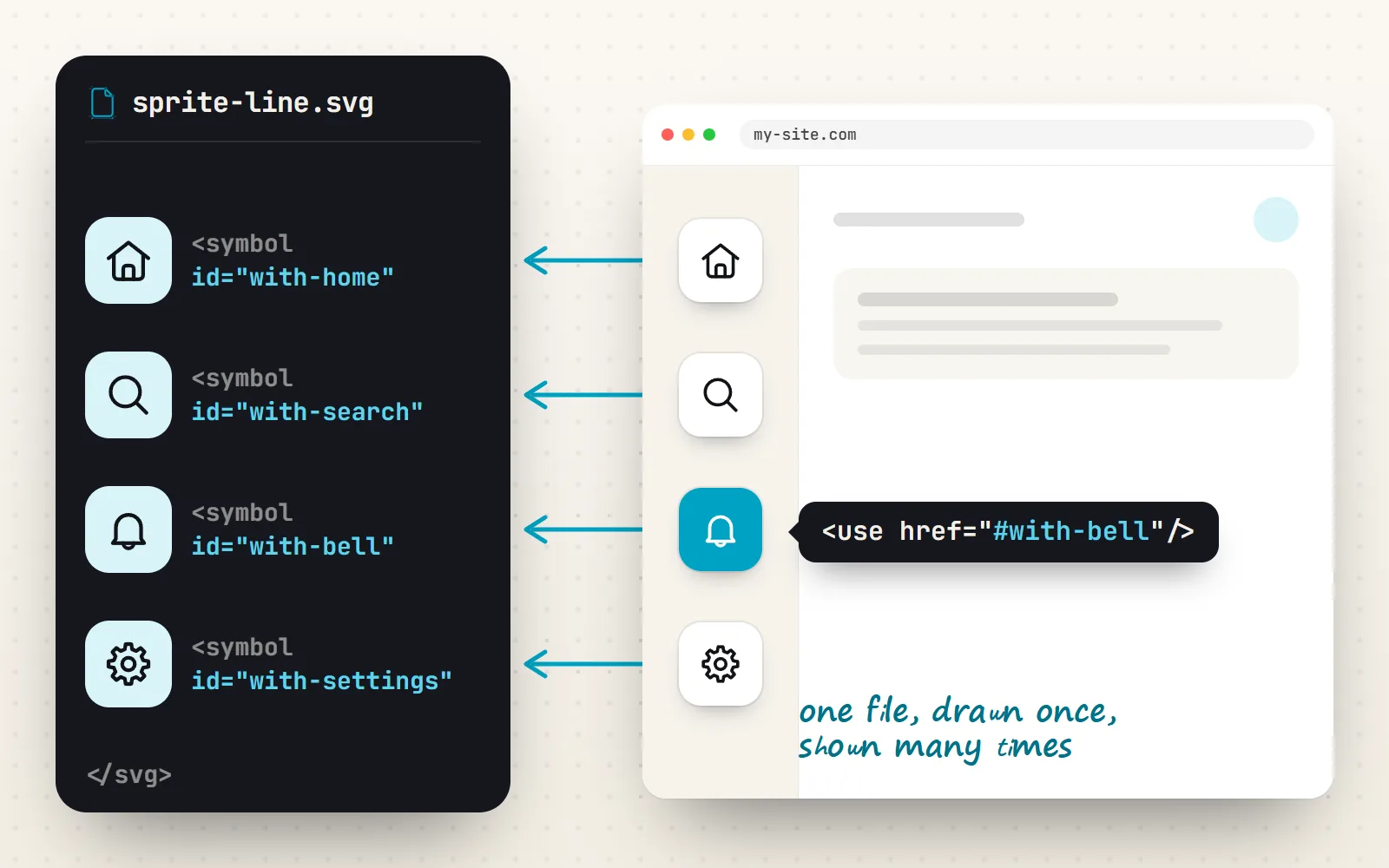
Think of a sheet of stamps. The sheet is one file. Each stamp has a name. When you need a picture, you say “stamp the home one here” instead of drawing it again. An SVG sprite works the same way: the file holds every icon once, and each place on the page that shows an icon just points to it.
The name comes from old CSS image sprites, where many small PNGs were packed into one big image and shown through a window. SVG sprites are better behaved: each icon keeps its own shapes and viewBox, stays sharp at any size and can take the text colour.
How do I make and use an SVG sprite?
A sprite is an <svg> with one <symbol> per icon. The viewBox goes on each symbol, because the icons may not all share one. Here are two real symbols from the with icons line sprite, shortened to two icons:
<!-- sprite-line.svg -->
<svg xmlns="http://www.w3.org/2000/svg">
  <symbol id="with-home" viewBox="0 0 24 24" fill="none" stroke="currentColor"
          stroke-width="1.75" stroke-linecap="round" stroke-linejoin="round">
    <path d="M2.5 11 L12 3.5 L21.5 11"/>
    <path d="M5 9.5 V19 A2 2 0 0 0 7 21 H17 A2 2 0 0 0 19 19 V9.5"/>
  </symbol>
  <symbol id="with-bell" viewBox="0 0 24 24">…</symbol>
</svg>
Then, anywhere on a page served from the same site:
<svg width="24" height="24" aria-hidden="true"><use href="/sprite-line.svg#with-home"/></svg>

<!-- an icon that carries meaning gets a name -->
<svg width="24" height="24" role="img" aria-label="Notifications">
  <use href="/sprite-line.svg#with-bell"/>
</svg>- 1One symbol per icon
Give each a unique id and its own viewBox. Put shared attributes like
strokeon the symbol so the copies inherit them. - 2Size the outer svg
Set
widthandheight(or CSS) on the<svg>that holds the<use>. The symbol’s viewBox scales the drawing to fit. - 3Point at it with href
Use
href="file.svg#id"for a separate file, orhref="#id"when the sprite is inlined in the page. - 4Label or hide
Decorative icons get
aria-hidden="true"; meaningful ones getrole="img"and anaria-label. More in our accessible icons guide.
Should I use href or xlink:href?
Use href. SVG 2 replaced xlink:href with plain href, and MDN now marks the old one as deprecated. If an element has both, browsers use href. The old “Safari needs xlink” advice was true until Safari 12.1 in 2019.
| What you write | Chrome | Firefox | Safari | Use it? |
|---|---|---|---|---|
<use href="#id"> | Since 50 | Yes | Since 12.1 | Yes |
<use xlink:href="#id"> | Yes | Yes | Yes | Deprecated, only for old files |
<use href="data:…"> | Removed in 120 | Removed in 122 | Never | No |
<use href="file.svg"> (no #id) | Since 137 | No | No | Not yet portable |
How do I change the colour of an icon from a sprite?
Draw the symbol with currentColor, then set the CSS color on the outer <svg> or any parent. The icon follows your text colour, hover colour and dark mode, exactly as an inline icon would. Our guide to changing SVG colour with CSS covers this method in depth.
<svg width="24" height="24" style="color:#e11d48"><use href="/sprite-solid.svg#with-heart"/></svg>Why can’t CSS reach the paths inside use?
When the browser draws a <use>, it makes a private copy of the symbol in a hidden, read-only tree (the SVG 2 spec calls it a shadow tree). A selector written from the outside, like .nav svg path, cannot match those copied paths, because they are not really children of your markup. That is why fill on a path selector seems to do nothing.
What does get through is inheritance. The spec says elements in the copy inherit styles from their <use>. So color, fill and stroke set on the outer SVG flow in, as long as the symbol does not hard-code its own colours. And CSS custom properties (variables like --accent) are inherited too, which is the key to more than one colour.
How do I make a multi-colour sprite icon?
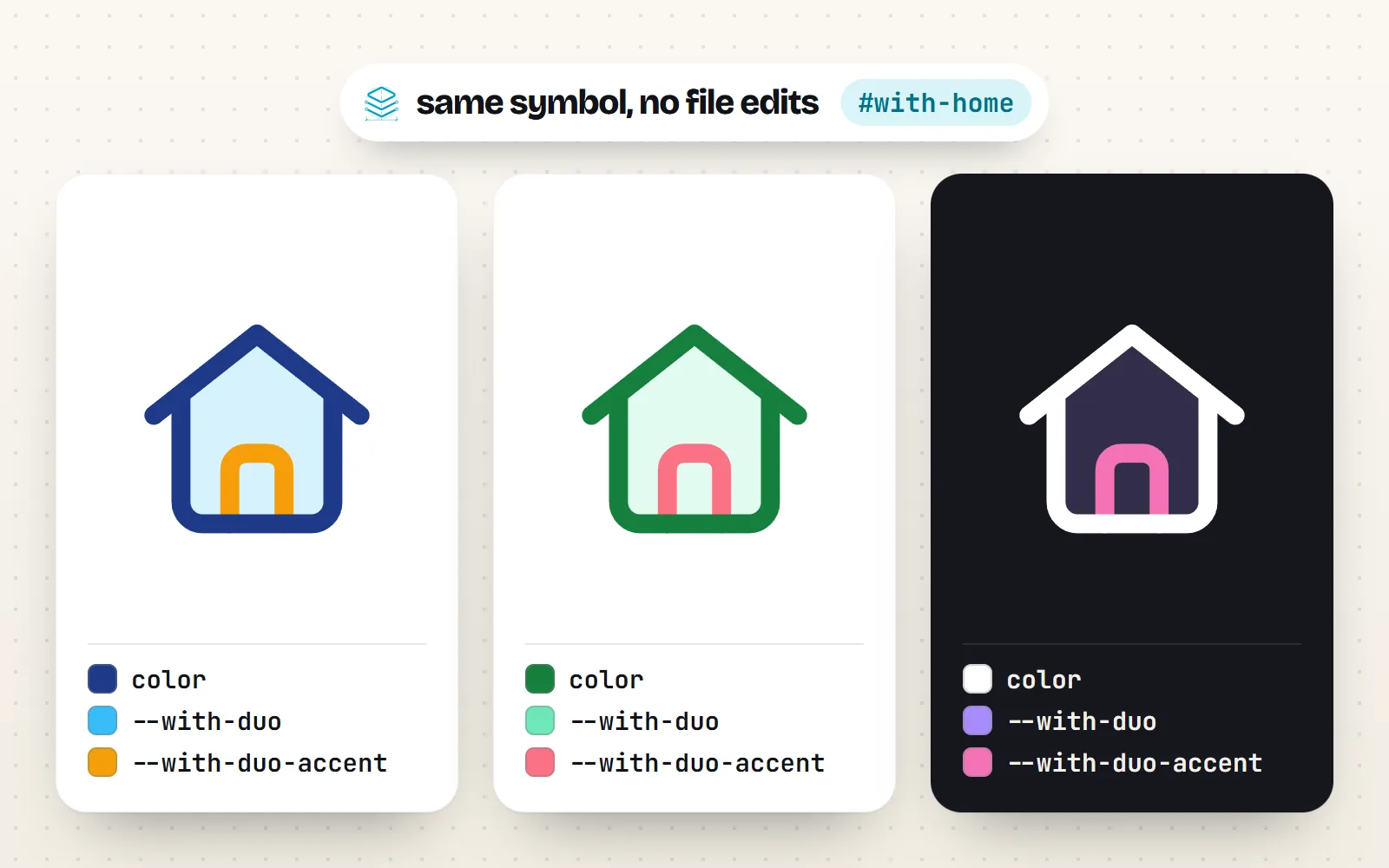
Write each extra colour inside the symbol as a CSS variable with a fallback. Then set the variables from outside, per icon, per section or for the whole page. The old 2015 answers said variables were “only supported in Firefox”; every current browser has supported them for years.
<!-- in the sprite: the duo home icon's tint and accent are variables -->
<symbol id="with-home" viewBox="0 0 24 24" fill="none" stroke="currentColor" stroke-width="1.75">
  <path d="M5 9.6 L12 4.1 L19 9.6 V19 A2 2 0 0 1 17 21 H7 A2 2 0 0 1 5 19 Z"
        fill="var(--with-duo, currentColor)" fill-opacity="0.2" stroke="none"/>
  <path d="M9.5 21 V16 A1.5 1.5 0 0 1 11 14.5 H13 A1.5 1.5 0 0 1 14.5 16 V21"
        stroke="var(--with-duo-accent, currentColor)"/>
  …
</symbol>

<!-- on the page: three independent colours -->
<svg width="32" height="32" style="color:#1e3a8a; --with-duo:#38bdf8; --with-duo-accent:#f59e0b">
  <use href="/sprite-duo.svg#with-home"/>
</svg>
That is exactly how the with icons sprites are built: the main ink is currentColor, and every other colour is a var(--with-…, #fallback). The Duo style style has a tint and an accent; multi-colour styles such as Sticker style or Kawaii style have a full palette of variables, so one sprite icon can be recoloured to match a brand without editing the file.
Can I load an SVG sprite from a CDN or another domain?
Not through <use>. Browsers only follow an external <use href> to a file on the same origin as the page (same protocol, domain and port). MDN is blunt about it: there is currently no defined way to set a cross-origin policy for <use>, so sending CORS headers from the CDN does not help. The SVG 2 spec itself says it does not allow cross-origin or data: URL requests here. This is the cause of most “my sprite works locally but not from the CDN” reports.
You have four working options:
| Option | How | Good for |
|---|---|---|
| Serve it yourself | Copy the sprite into your site’s files (a build step can do it) and point href at /sprite.svg#id | Most sites. Cached once, reused everywhere |
| Inline it in the HTML | Paste the sprite once near the top of <body>, hidden, and use href="#id" | Small sprites, single pages |
| Fetch and insert it | Load the file with fetch() (a CDN that sends CORS headers allows this) and add it to the page | When you must use a CDN |
| A blob: URL | Turn the fetched text into a Blob and use URL.createObjectURL(), as Chrome’s guide suggests | Code that cannot touch the HTML |
The fetch route is the modern version of the old jQuery answers. jsDelivr, which serves the with icons packages, sends an Access-Control-Allow-Origin: * header, so this works:
<script type="module">
  const res = await fetch('https://cdn.jsdelivr.net/npm/@withicons/static@0.6.0/dist/sprite-line.svg')
  const box = document.createElement('div')
  box.setAttribute('aria-hidden', 'true')
  box.style.cssText = 'position:absolute;width:0;height:0;overflow:hidden'
  box.innerHTML = await res.text()
  document.body.prepend(box)
</script>
<svg width="24" height="24"><use href="#with-home"/></svg>Sprites, inline SVG or components: which should I use?
| Sprite | Inline SVG | Components | |
|---|---|---|---|
| Icon code in the HTML | One short line per icon | Full shapes every time | One tag per icon |
| Needs JavaScript | No | No | Yes, a framework |
| Downloads only what you use | Only if you build a small sprite | Yes | Yes, with tree-shaking |
| Works across domains | Same origin only | Yes | Yes |
| Colour with CSS | currentColor + variables | Everything | Props or CSS |
Use a sprite when a static site, CMS template or server-rendered page shows many icons of one style. Serve it from your own domain and build it from just the icons you use.
Load a sprite of the whole library to show five icons, or point <use> at a CDN URL and wonder why nothing appears.
Where are the with icons sprites?
In the developer packages: npm i @withicons/static ships one sprite per style in dist/, named sprite-line.svg, sprite-solid.svg and so on, with symbol ids like with-home. The newest styles’ sprites are in @withicons/static-plus. Copy the file next to your pages, then use <use href="/sprite-line.svg#with-home"/>.
Be honest with yourself about size: each sprite holds all 1000 icons of its style. The line sprite is about 419 KB before compression, and the richer styles run to several megabytes. That is fine for a docs site that shows hundreds of icons, and wasteful for a landing page with six. For a handful, use single SVG files, the free SVG downloads, or React components, or build your own sprite from the symbols you need.
- Symbol ids are
with-<name>, for examplewith-settings. - Colours: the ink is
currentColor; extra colours are--with-<style>-…variables that sprites keep. - Sizing: set width and height on the outer svg. Our guide to cut-off and blurry icons explains why.
The bottom line
SVG sprites still work well in 2026, and they are simpler than the old answers suggest: <symbol> plus <use href>, no polyfills, no xlink. Keep the file on your own domain, colour icons with currentColor and CSS variables, and only reach for a sprite when a page shows enough icons to make one file worth it. All 1000 with icons come as sprites in each of the 34 styles.
Frequently asked questions
What is an SVG sprite?
A single SVG file that holds many icons, each wrapped in a <symbol> with its own id and viewBox. The page loads the file once and shows any icon from it with a <use> element pointing at that id, so the icon shapes are not repeated in the HTML.
Is xlink:href deprecated?
Yes. SVG 2 deprecated xlink:href in favour of plain href, and MDN marks it deprecated. Plain href on <use> works in Chrome 50+, Firefox and Safari 12.1+. Browsers still read xlink:href for old files, but new code does not need it.
Why does my SVG sprite from a CDN not show?
Because <use> only loads external files from the same origin as the page. MDN notes there is no way to set a cross-origin policy for it, so CORS headers do not help. Copy the sprite to your own site, inline it in the HTML, or fetch it with JavaScript and insert it into the page.
How do I style paths inside an SVG use element?
You cannot target them with selectors from outside, because the browser copies the symbol into a hidden, read-only tree. Inherited values do get through: color, fill, stroke set on the outer SVG, and CSS custom properties. Write the colours inside the symbol as currentColor or var(--name, fallback) and set them from outside.
Can I use a data: URL in SVG use?
Not any more. Chrome removed data: URLs in <use> in version 120 (late 2023) for security reasons, Firefox followed in version 122, and Safari never supported them. Use a same-origin file, an inline sprite, or a blob: URL instead.
Are SVG sprites better than icon components?
Not better, different. Sprites avoid repeating icon code in the HTML and need no JavaScript, which suits static sites and CMS templates. Components (React, Vue and others) ship only the icons you import and are easier to type and check. Many sites use components in the app and a sprite for static pages.
Sources and notes
- MDN: the use element (same-origin note, xlink:href deprecated, data: URIs), checked November 2026
- MDN: xlink:href (deprecated), checked November 2026
- W3C SVG 2: the use element and its shadow tree
- Chrome for Developers: Migrate away from data URLs in SVG use (Chrome 120)
- Mozilla Bugzilla 1806964: Restrict SVG use to prevent data: URLs (fixed in Firefox 122)
- MDN browser compatibility data for use (href: Safari 12.1; data URI removed Chrome 120, Firefox 122), checked November 2026
- MDN: Using CSS custom properties (custom properties inherit), checked November 2026
- Stack Overflow: Cross-domain SVG sprite (question 32850536)
- Stack Overflow: Multiple colours in SVG sprite (question 31056134)
- with icons: @withicons/static on npm (sprites per style), checked November 2026
Facts about other icon sets were checked against their official sites in November 2026. Libraries change, so check the links above for the latest numbers.