a plain-English guide
Custom emoji and stickers for Slack, Discord, Notion and WhatsApp
The strict “128 x 128 PNG only” charts are out of date. Here are the real limits for each app in November 2026, WhatsApp’s built-in sticker maker, PNG versus GIF, and how to make a team set that matches.
- One file works almost everywhere: a square, transparent PNG of about 128 to 256 px, kept under 128 KB, uploads to Slack, Discord and Notion.
- Slack: square, under 128 KB, JPG, PNG or GIF (up to 50 frames). Discord: 128 x 128 is only a recommendation now; it resizes and crops on upload, files under 256 KB.
- Notion: custom emoji arrived in October 2024. Add them in Settings > Emoji, or tick “Add to workspace Emoji library” when you upload a page icon.
- WhatsApp: no extra app needed since 2024. Open stickers in a chat, tap Create and pick an image. Sticker apps still need 512 x 512 WebP files under 100 KB.
- Animated: GIF works in Slack and Discord but has rough edges on dark themes. Choose the edge colour to match the chat, or stay with a still PNG.
On this page 10 sections
To make a custom emoji, upload a square, transparent PNG of about 128 to 256 px, under 128 KB: that one file works in Slack, Discord and Notion. Discord no longer needs an exact 128 x 128 image, because its uploader resizes and crops for you. For WhatsApp you need no extra app: open the sticker tray in any chat, tap Create and pick an image.
Below: each app’s real limits in one table, the exact steps for each, when to use GIF instead of PNG, and how to make a set of team emoji that look like they belong together, using free icons in one style.
What are the custom emoji and sticker limits for each app?
| App | Make it | File limit | Formats | Good to know |
|---|---|---|---|---|
| Slack emoji | Square, transparent | Under 128 KB | JPG, PNG, GIF (up to 50 frames) | Desktop or iOS only; owners can restrict who adds |
| Discord emoji | 128 x 128 recommended, any size accepted | Under 256 KB | JPEG, PNG, GIF, WebP | 50 emoji + 50 animated per server, up to 250 each when boosted |
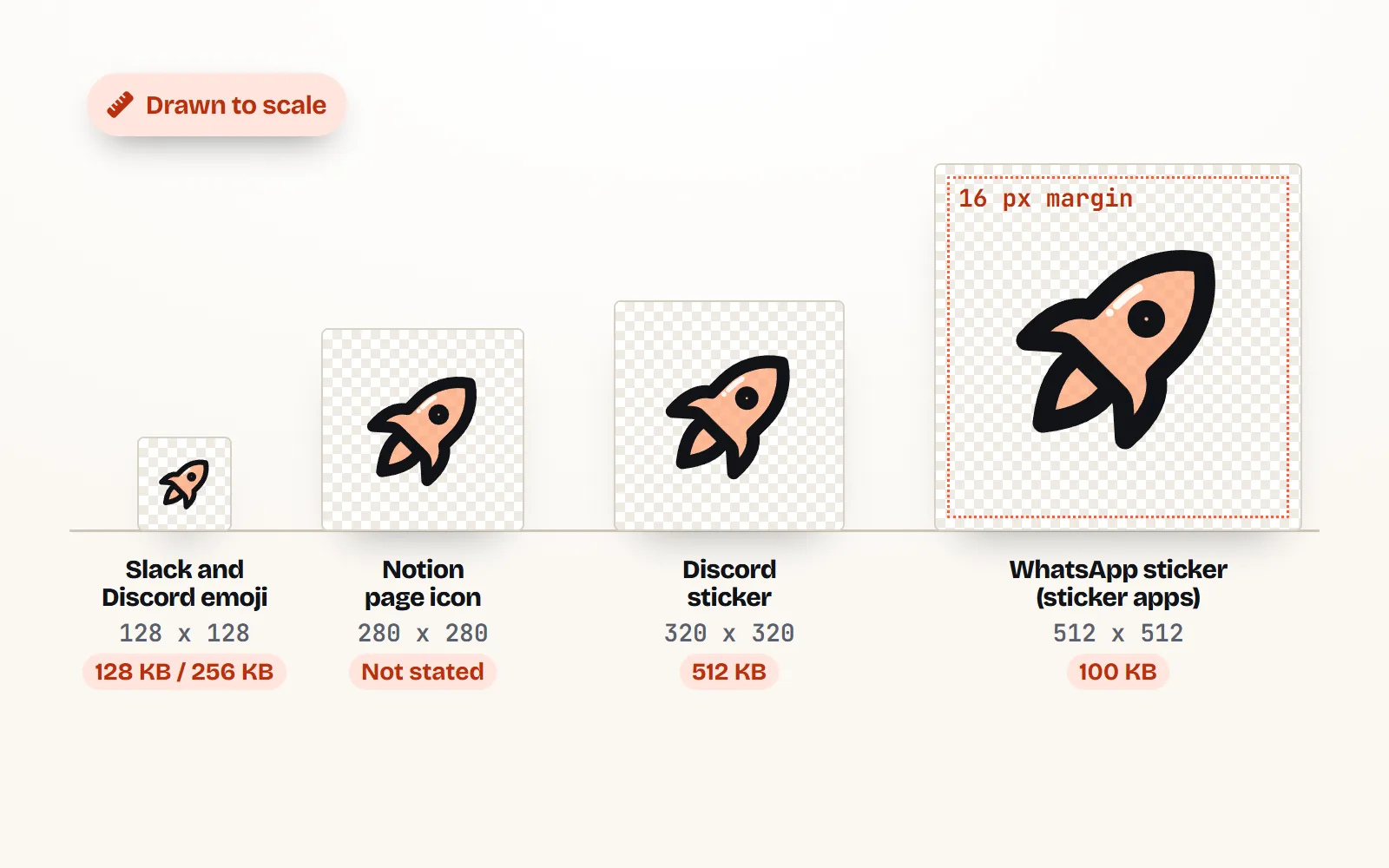
| Discord stickers | Exactly 320 x 320 | 512 KB | PNG, or APNG for animated | Shown at 160 x 160; slots come with server Boosts |
| Notion emoji | Square (page icons ideally 280 x 280) | Not stated | Images you upload | Since Oct 2024; 500 per workspace at launch |
| WhatsApp, built-in maker | Any photo or image | Handled for you | From your gallery | Saved to your stickers; group them into packs |
| WhatsApp, sticker apps | Exactly 512 x 512, 16 px margin | 100 KB (500 KB animated) | WebP, transparent | Packs of 3 to 30; a 96 x 96 tray icon under 50 KB |
Discord’s two pages disagree slightly: the help centre says emoji “must be under 256KB”, while the December 2025 guide says it will compress a bigger file for you. Staying under 256 KB avoids the question. Notion’s 500 limit comes from its engineering blog in February 2025, which called it a limit “for now”, so it may have grown since.
How do I add a custom emoji in Slack?
- 1Open the emoji menu
On desktop, click the smiley face in the message box.
- 2Click Add Emoji, then Upload Image
Pick your square PNG. Slack says images under 128 KB with transparent backgrounds work best.
- 3Give it a name and save
The name becomes its code, like :ship-it:. Keep names short and easy to guess.
On iPhone, tap the smiley, type a name, tap Add custom emoji and follow the prompts. Slack’s Android app cannot add custom emoji yet. If the button is missing, your workspace owner has limited who can add them, so ask an admin.
How do I add a custom emoji on Discord?
- 1Open Server Settings > Emoji
You need to own the server or have the Create Expressions permission.
- 2Upload your image
Any size is fine: Discord lets you resize and crop as you upload. 128 x 128 px is still its suggestion.
- 3Name it
At least 2 characters, letters, numbers and underscores only.
On desktop and in the browser you can also press Add Emoji in the emoji picker, which opens Discord’s new Emoji Studio (rolling out gradually, not on mobile). Every server gets 50 regular and 50 animated slots, rising to 100, 150 and 250 of each with Boost levels 1, 2 and 3. Discord’s guide says members need Nitro to use animated emoji, and to use a server’s emoji in other servers.
And Discord stickers?
Stickers are bigger and stricter: exactly 320 x 320 px, PNG (or APNG to animate), up to 512 KB, uploaded in Server Settings > Stickers. Discord asks for a matching emoji and suggests an optional description for screen reader users. Make the artwork fill most of the canvas, since stickers show at 160 x 160 in chat.
How do I add a custom emoji in Notion?
Notion has had workspace custom emoji since 24 October 2024. There are three ways in:
- Settings > Emoji > Add emoji to upload a file and manage the whole library.
- Type /emoji in a page and press the + at the bottom, then upload, name and save.
- Upload a page icon and tick Add to workspace Emoji library. Notion suggests 280 x 280 px for page icons.
Anyone in the workspace can then use it as a page icon, a reaction or inline. Owners can switch on “Limit custom emoji creation to workspace owners”. Our Notion guide covers page icons in more detail.
How do I make WhatsApp stickers without another app?
WhatsApp has its own Custom Sticker Maker. It came to iPhone first and, according to WhatsApp’s blog, to Android on 14 August 2024. Save your image to your phone’s photos, then:
- 1Open the sticker tray in any chat
Tap the sticker icon in the message box (on Android, the emoji icon, then Stickers).
- 2Tap Create
On Android, if your photos do not show, tap Recents > See more > Photos.
- 3Pick your image and edit it
Choose one of the preset options, then add text, an emoji or a drawing if you like.
- 4Send it
WhatsApp saves it to your stickers automatically. Tap and hold it and choose Add to sticker pack to group a set.
Our Sticker style has a puffy white die-cut border built in, which is exactly what WhatsApp recommends so stickers stand out on any chat wallpaper. Download a 512 px PNG with a see-through background and it is ready.
Should I use PNG or GIF for animated emoji?
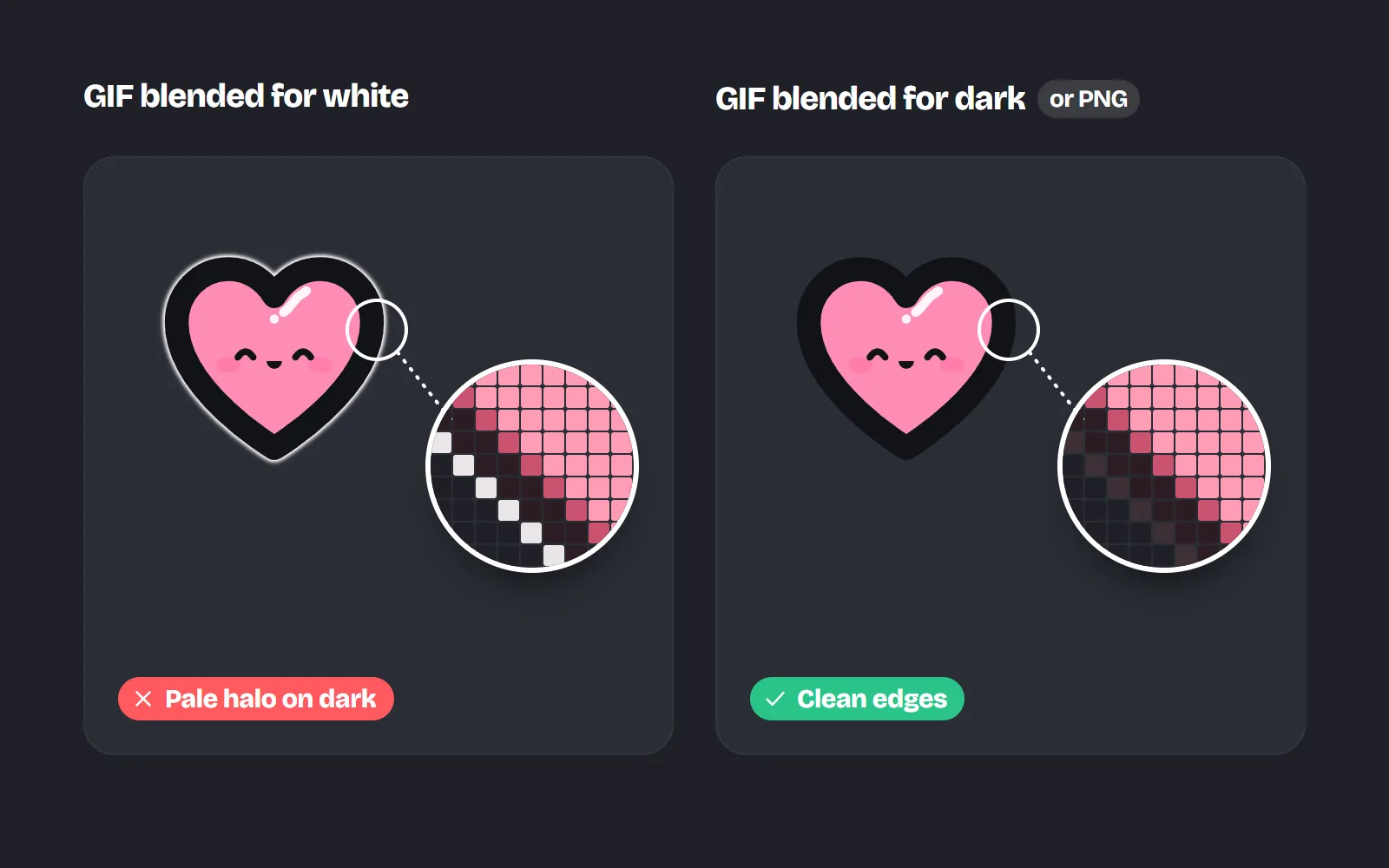
Use a still PNG unless the emoji really needs to move. PNG has smooth, see-through edges on any background. A GIF is what Slack and Discord play for animated emoji, but its transparency is on or off with nothing in between, so soft edges get a fringe of whatever colour they were blended with.
| Format | Animates? | Edges | Use it for |
|---|---|---|---|
| PNG | No | Smooth on any background | Still emoji everywhere |
| GIF | Yes | Blended with one colour | Animated emoji in Slack and Discord |
| Animated PNG (APNG) | Yes | Smooth | Animated Discord stickers |
| WebP | Can | Smooth | WhatsApp sticker apps, Discord emoji |
The with icons GIF download asks for the colour the GIF will sit on and blends the edges into it. Pick white for Slack’s light theme or a dark grey for Discord’s dark theme, and the fringe disappears. Icons with built-in motion can also be downloaded as animated PNG and animated WebP. Our post on animated icons explains when motion helps and when it distracts.
How do I make a team emoji set that matches?
A matching set looks intentional and is easier to read at a glance. Pick one style and one colour, then make every emoji the same way:
- 1Choose a style that reads small
Emoji show at about the height of a line of text. Bold styles hold up best: Solid style, Kawaii style or Sticker style.
- 2Choose a colour
Use your brand colour, or one of the hand-picked palettes for the multi-colour styles.
- 3Download PNG at 256 px, see-through
Set Space around to Small, so the icon fills most of the square without touching the edges. Check the file is under 128 KB for Slack.
- 4Name them the way your team talks
Short, lowercase codes like :ship-it:, :on-it:, :blocked:. Add aliases in Slack for other spellings.
Small sizes are the real test. The same icons in two styles, from emoji size up to sticker size:
Use one style and one colour for the whole set, keep a little space around each icon, and test it next to a line of text in the actual app.
Mix three icon styles, use thin outlines on a dark theme, or upload a big detailed picture and hope it shrinks well.
If your community likes cute, browse the cute icons and sticker icons collections. Wondering when an emoji beats an icon in the first place? See emoji or icons: which should you use?
Can I use free icons as custom emoji?
Yes, if the licence allows it. with icons is MIT licensed, so you can turn any icon into emoji or stickers for a company workspace, a Discord community or your family group, with no credit line. Leave out brand logos and characters you do not own: Discord asks that you have the rights to whatever you upload, and WhatsApp says stickers must be legal, authorized and acceptable. Our guide to free icons for commercial use explains the licences.
The short answer
Make a square, transparent PNG at 128 to 256 px and under 128 KB, and it will upload to Slack, Discord and Notion. Use 320 x 320 for Discord stickers and the built-in Create button for WhatsApp. Use GIF only when it must move, with the edge colour set to the chat theme. For a set that matches, pick one style and one colour from 1000 free icons.
Frequently asked questions
What size should a Discord emoji be?
Discord recommends 128 x 128 px, but since its uploader started resizing and cropping for you, bigger or smaller images work too. The help centre says files must be under 256 KB, and Discord’s own guide says it compresses larger ones. JPEG, PNG, GIF and WebP are accepted.
What are Slack’s custom emoji requirements?
Slack says square images under 128 KB with transparent backgrounds work best, in JPG, PNG or GIF format, and GIFs can have up to 50 frames. You add them from the emoji menu on desktop or iOS, not from the Android app, and your workspace owner can limit who adds them.
How do I make WhatsApp stickers without another app?
Open a chat, open the sticker tray, tap Create and pick a picture from your phone. Edit it with the text and drawing tools and send it: WhatsApp saves it to your stickers. Tap and hold a sticker and choose Add to sticker pack to group them. The built-in maker reached Android in August 2024, after iPhone.
Can I add custom emoji in Notion?
Yes, since October 2024. Go to Settings > Emoji > Add emoji, or type /emoji and press the plus button. When you upload a page icon you can also tick Add to workspace Emoji library. Workspace owners can limit who creates them.
Should I use PNG or GIF for animated emoji?
Use GIF for animated emoji in Slack and Discord, because that is what they play. GIF edges are either fully on or off, so choose an edge colour that matches the chat theme. For still emoji, PNG has smoother edges. Discord stickers can be animated PNG (APNG).
Can I use free icons as custom emoji at work?
Yes, if the licence allows it. with icons is MIT licensed, so you can turn any icon into team emoji or stickers, at work or for a community, with no credit needed. Avoid brand logos and other people’s characters.
Sources and notes
- Slack Help Center: Add custom emoji and aliases to your workspace (checked November 2026)
- Discord Support: How to add custom emojis on Discord (checked November 2026)
- Discord Blog: How to make and use custom emoji on Discord (12 December 2025)
- Discord Support: Tips for sticker creators (checked November 2026)
- Notion Help: Workspace settings, Emoji (checked November 2026)
- Notion Help: Style and customize your page, page icons and emoji
- Notion release notes: 2.46, custom emoji (24 October 2024)
- Notion Blog: How we built custom emoji (1 February 2025)
- WhatsApp Help Center: How to create and share custom stickers and sticker packs
- WhatsApp Help Center: How to design custom stickers
- WhatsApp Blog: Express yourself with more stickers (14 August 2024)
- WhatsApp stickers sample apps: Android README (sticker pack rules)
- with icons license (MIT)
Facts about other icon sets were checked against their official sites in November 2026. Libraries change, so check the links above for the latest numbers.