icons in code, the 2026 answer
How to optimise SVG icons without breaking them
SVGO 4 changed the defaults that broke icons for a decade. Here is what it does now, the few settings that still wreck icons and sprites, a tested config, and the no-code way with SVGOMG.
- Use SVGO 4 with its default preset. Since 4.0.0 (21 June 2025) it no longer removes
viewBoxor<title>, the two defaults that broke icons for years. The current release is 4.1.0 (August 2026). - Add three tweaks for icons: keep
roleattributes, addprefixIds(with class names left alone) so gradient ids never clash, and turn offmergePathsif you animate or colour parts separately. - Never run the default preset over a sprite file. In our test with SVGO 4.1.0 it deleted every symbol. Turn off
cleanupIdsandremoveHiddenElemsfor sprites. - Do not switch on
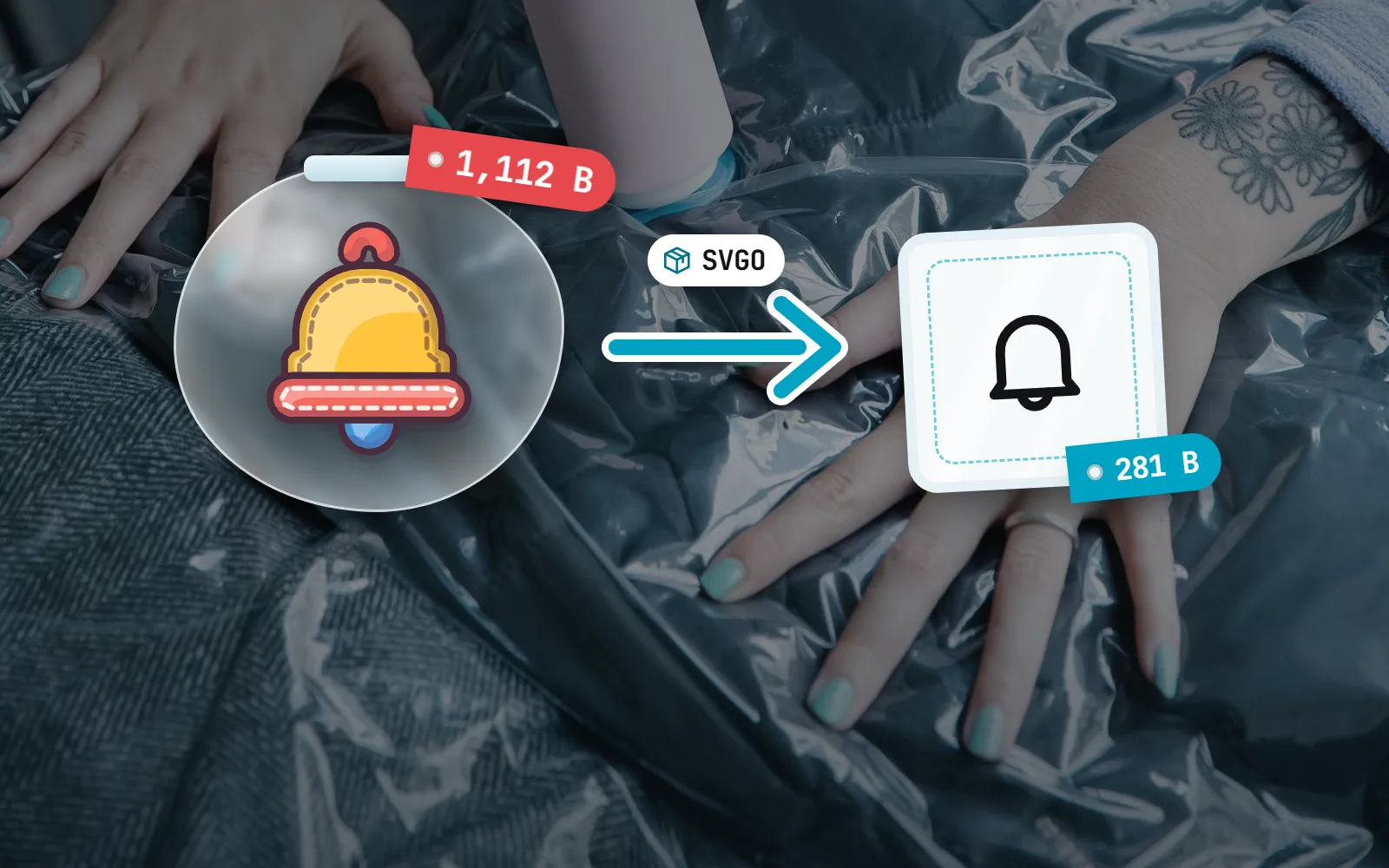
removeViewBox,removeDimensionsorconvertColorswithcurrentColor: truefor multi-colour icons, and keep number precision at 2 or 3 on a 24 grid. - No code? SVGOMG runs the same engine in your browser. A simple 24 px outline icon should end up at a few hundred bytes.
On this page 9 sections
To optimise SVG icons without breaking them, run SVGO 4 with its default preset: since version 4.0.0 (21 June 2025) it keeps the viewBox and <title> that older versions stripped. Then add three small tweaks for icons (keep role, prefix ids, and stop path merging if you animate parts), keep number precision at 2 or 3, and never run the default preset over a sprite file, which in our test deleted every icon in it.
SVGO (SVG Optimizer) is a free Node.js tool that tidies SVG files: it strips editor leftovers, rounds long numbers and rewrites shapes more compactly. Most build tools that “optimise SVG” use it under the hood. Below: what it does, what changed in version 4, which settings still hurt icons, a config we tested on real icons, and how small an icon should be. Not a developer? Skip to the SVGOMG section. Still deciding on a format? Start with SVG vs PNG icons.
What does SVGO actually do to an icon?
Design tools save more than the drawing: comments, editor data, empty groups, hidden layers and coordinates with eight decimals. SVGO runs a list of plugins (its default preset has about 30) that remove those extras and rewrite what is left in fewer characters. The drawing should look identical.
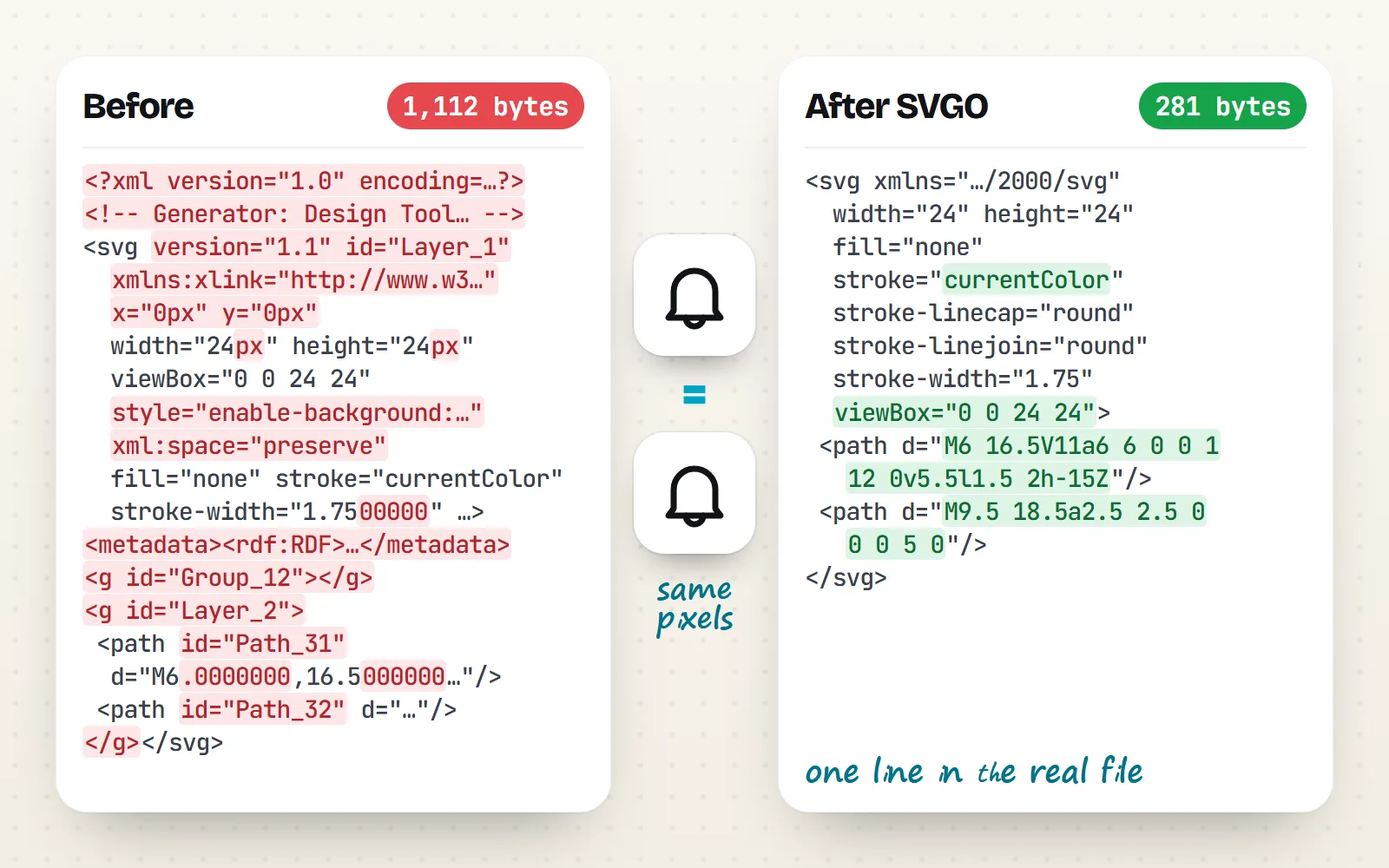
How much it saves depends on how messy the input is. Files straight from a design tool often shrink a lot. Files that were generated cleanly shrink less: we ran every with icons file in five styles through SVGO 4.1.0 with the config below. The median line icon got 8% smaller, duo 12%, glass 9%, sticker 18% and solid 30% (its cut-out shapes carry longer numbers).
What changed in SVGO 4?
| Change | What it means for icons |
|---|---|
removeViewBox no longer in the default preset | Icons keep scaling. Do not turn it back on |
removeTitle no longer in the default preset | Icons keep their accessible name |
removeScriptElement renamed removeScripts | Update old configs; it also strips event handlers and script links |
convertColors lowercases colours | It leaves currentColor and var(…) alone |
| Named exports only, Node.js 16 or newer | import { optimize } from 'svgo' in scripts |
Version 4.1.0 (24 August 2026) added stricter checks on malformed XML and hardened removeScripts. Neither changes how a normal icon looks.
Which SVGO settings break icons?
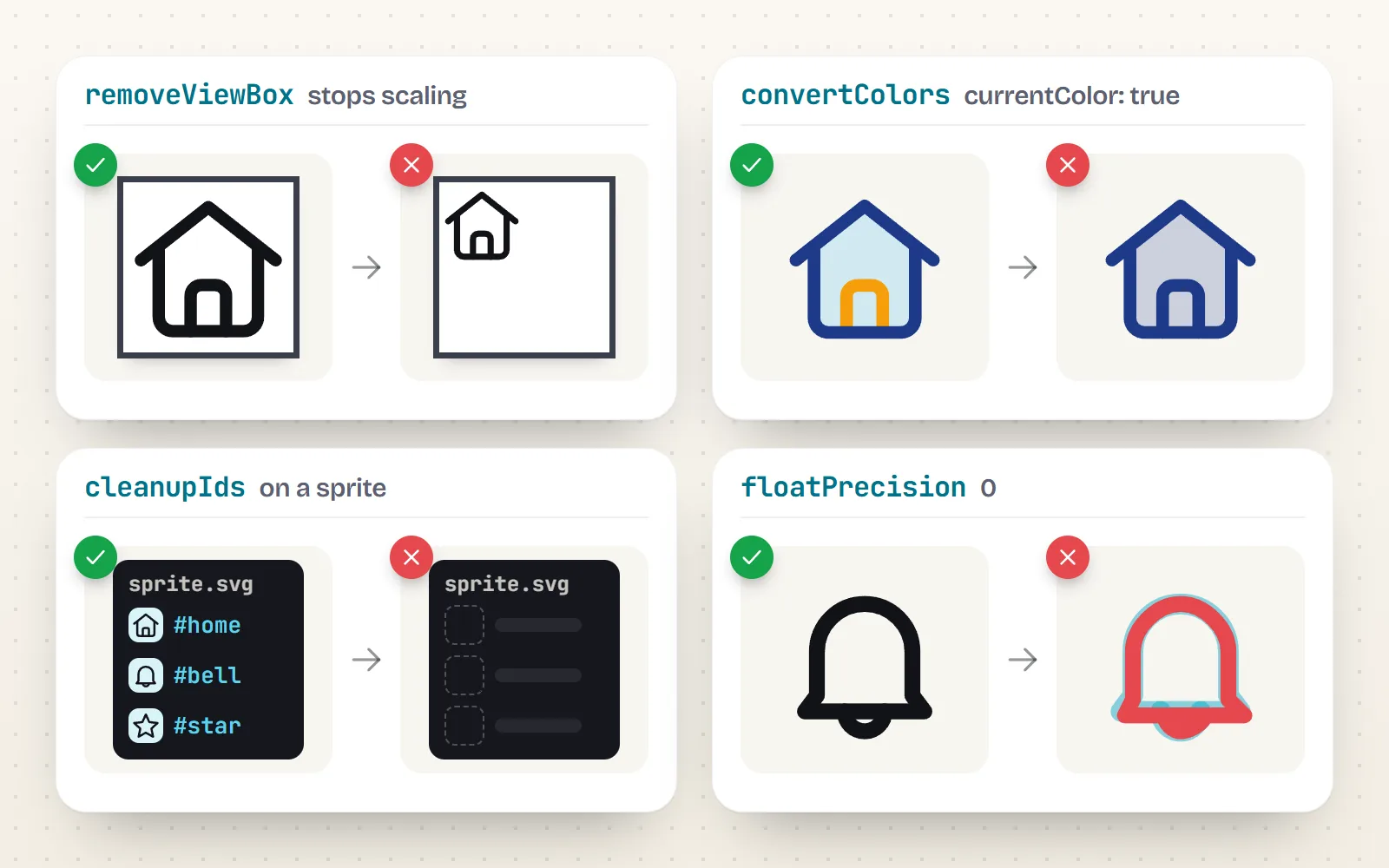
We tested each of these on real icons with SVGO 4.1.0. Most are opt-in, so you only hit them if a tutorial told you to switch them on. Two are in the default preset and only bite in specific cases.
| Setting | What goes wrong | In SVGO 4 defaults? |
|---|---|---|
removeViewBox | The icon cannot scale; resizing crops it or leaves it tiny | Off (on in v3 and earlier) |
removeDimensions | Drops width and height, so icons balloon when CSS is missing | Off |
cleanupIds on inlined icons | Gradient ids become a, b; two icons on one page clash | On |
cleanupIds or removeHiddenElems on a sprite | Symbols look unused inside the file and are deleted: either plugin emptied our test sprite | On |
mergePaths | Joins separate plain paths into one, so per-part animation or styling stops working | On |
removeUnknownsAndDefaults | Removes role="img" unless keepRoleAttr is on | On |
convertColors with currentColor: true | Every colour becomes one; a two-tone icon turns flat | Off |
floatPrecision 0 or 1 | At 0, curves visibly drift on a 24 grid | Default is 3 |
prefixIds defaults | Also renames class names, breaking CSS that targets them | Opt-in |
What about outlined strokes?
One more way to collapse an icon happens before SVGO: a design tool’s “outline stroke” or “flatten” command turns each line into a filled shape. The icon looks the same, but stroke-width props, vector-effect: non-scaling-stroke and stroke animations stop working, and the file usually grows. Keep line icons as live strokes.
What is a safe SVGO config for icons?
This is the config we tested on with icons files. It keeps the default preset (which already keeps viewBox and title in SVGO 4) and adds only what icons need.
// svgo.config.mjs (SVGO 4.x): icon files
export default {
  multipass: true,
  floatPrecision: 2,          // plenty for a 24-unit grid
  plugins: [
    {
      name: 'preset-default',
      params: {
        overrides: {
          removeUnknownsAndDefaults: { keepRoleAttr: true }, // keep role="img"
          mergePaths: false,  // keep parts you animate or colour separately
        },
      },
    },
    // unique gradient ids per file (from the file name), class names untouched
    { name: 'prefixIds', params: { prefixClassNames: false } },
  ],
}
Run it over a folder with npx svgo -f icons -o icons-min. For a sprite file, use a separate config that protects symbols:
// svgo.sprite.config.mjs: sprite files full of <symbol id="…">
export default {
  plugins: [
    {
      name: 'preset-default',
      params: { overrides: { cleanupIds: false, removeHiddenElems: false, mergePaths: false } },
    },
  ],
}- 1Check your version
Run
npx svgo --version. Below 4, upgrade or turnremoveViewBoxoff explicitly. - 2Optimise the single icons
Use the icon config. Look at a few results in a browser at 16, 24 and 48 px.
- 3Build the sprite after
Combine the optimised icons into symbols, then run the sprite config (or nothing) on the sprite.
- 4Compare before you ship
Open an icon page that uses gradients or several colours and check nothing changed. Our guide to SVG sprites covers the sprite side.
How do I optimise SVGs without code? (SVGOMG)
SVGOMG is a free web app by Jake Archibald that runs SVGO in your browser. Drop in a file or paste code, flip toggles and watch the size change live. Its code moved to SVGO 4 in 2025, and the page now reports SVGO v4.
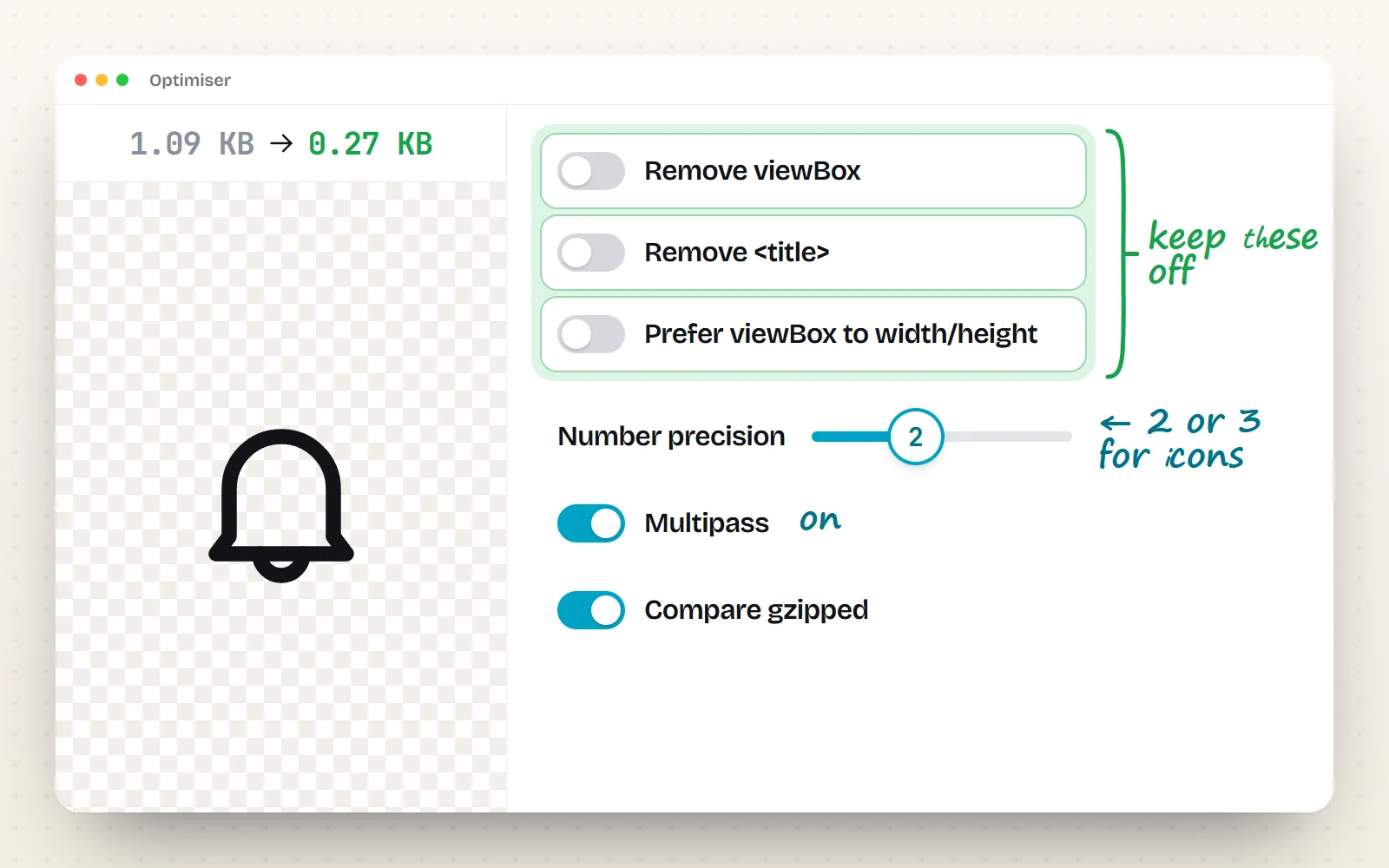
- Keep off: Remove viewBox, Remove <title> and Prefer viewBox to width/height. All three are off by default now.
- Number precision: 2 or 3 for icons on a 24 grid (3 is the default). Slide down while watching the preview; stop before curves move.
- Multipass: on. It reruns the plugins until nothing changes.
- Compare gzipped: on, to see the size that will actually travel over the network.
- Sprites: switch off Clean up IDs and Remove hidden elements before you optimise a sprite file.
How small should an SVG icon be?
A simple one-colour outline icon on a 24 grid should be a few hundred bytes. For reference, we measured every file in five with icons styles. The middle Line style icon is 429 bytes, and styles with gradients such as Glass style run to several kilobytes. If a simple outline icon is over about 2 KB, look for an embedded bitmap, editor metadata or coordinates with many decimals.
| Kind of icon | with icons style | Middle size | Most icons (10th to 90th percentile) |
|---|---|---|---|
| One-colour outline | line | 429 bytes | 0.3 to 0.7 KB |
| Outline plus a soft tint | duo | 675 bytes | 0.4 to 1.3 KB |
| Filled with cut-outs | solid | 1.4 KB | 0.8 to 2.3 KB |
| Multi-colour, flat | sticker | 2.4 KB | 1.8 to 3.3 KB |
| Multi-colour with gradients | glass | 4.9 KB | 2.9 to 7.9 KB |
Optimise once at build time, keep viewBox, width, height and title, check results at real sizes, and compress the files on your server (gzip or Brotli).
Copy a 2019 config that enables removeViewBox, run the default preset over a sprite, or drop precision to 0 to win a few bytes.
Do I need to optimise with icons files?
You do not have to. Every one of the 1000 icons in all 34 styles is generated with a proper viewBox, currentColor, no editor leftovers and, for gradient styles, ids that are unique per icon. SVGO still finds savings, most in the solid style (about 30% at the median), so it is worth running if you ship many files. Use the config above: prefixClassNames: false keeps the class names our motion package animates. Get the files from any icon page, the free SVG icons page, or the developer packages, and read why icons get cut off or blurry if something looks wrong after optimising.
The bottom line
In 2026, SVGO’s defaults are finally safe for icons. Upgrade to version 4, add keepRoleAttr and prefixIds, turn off mergePaths if you animate parts, and give sprites their own config. If you would rather click than code, SVGOMG does the same in your browser. Or start from icons that need none of it: browse the icon library.
Frequently asked questions
Does SVGO remove viewBox?
Not by default since SVGO 4.0.0 (21 June 2025). The removeViewBox plugin still exists, and SVGO 2 and 3 enable it in their default preset, so older build plugins and configs pinned to them still strip it. Check with npx svgo --version, and leave the plugin off for icons.
What is a safe SVGO config for icons?
SVGO 4’s preset-default with removeUnknownsAndDefaults: { keepRoleAttr: true }, mergePaths: false if you animate parts, floatPrecision: 2, and the prefixIds plugin with prefixClassNames: false. For sprite files also set cleanupIds and removeHiddenElems to false.
Why did SVGO break my SVG sprite?
Because a sprite’s symbols are used from other pages, so inside the sprite file they look unused. The default cleanupIds plugin strips ids that nothing in the file points to, and removeHiddenElems removes symbols that nothing in the file uses. In our test with SVGO 4.1.0, either one was enough to empty the sprite. Turn both off for sprite files.
Why do my gradients break after SVGO?
The default cleanupIds shortens ids to a, b, c. Two optimised icons inlined on one page can then both have a gradient called a, and the second picks up the first one’s colours. SVGO’s docs suggest the prefixIds plugin or turning off minify.
Is SVGOMG still safe to use?
Yes. SVGOMG is a free web app by Jake Archibald that runs SVGO in your browser, and it moved to SVGO 4 in 2025. “Remove viewBox”, “Remove <title>” and “Prefer viewBox to width/height” are off by default. Keep them off for icons and leave Number precision at 2 or 3.
How small should an SVG icon be?
For a simple one-colour outline icon on a 24 grid, a few hundred bytes: with icons line icons have a median of 429 bytes. Filled icons with cut-outs run to 1 or 2 KB, and multi-colour icons with gradients to several kilobytes. A simple outline icon over about 2 KB usually carries editor metadata, an embedded image or long decimals.
Sources and notes
- SVGO v4.0.0 release notes (21 June 2025)
- SVGO v4.1.0 release notes (24 August 2026)
- SVGO docs: migration from v3 to v4, checked November 2026
- SVGO docs: preset-default plugin list, checked November 2026
- SVGO docs: removeViewBox (“prevents SVGs from scaling”)
- SVGO docs: cleanupIds (problems when inlining multiple SVGs)
- SVGO docs: prefixIds
- SVGO README: configuration and preset overrides
- SVGO issue 1126: removeViewBox discussion (2019)
- SVGOMG by Jake Archibald (SVGO 4, default settings in src/config.json), checked November 2026
- npm: svgo versions and release dates, checked November 2026
Facts about other icon sets were checked against their official sites in November 2026. Libraries change, so check the links above for the latest numbers.