icons in code, the 2026 answer
Why is my SVG icon cut off, blurry or the wrong size?
Almost every one of these problems comes down to three attributes and a few pixels. Here is what viewBox, width and height really do, why icons get clipped or go soft, and how to keep strokes steady at any size.
- Keep the
viewBox. It is the drawing’s own graph paper (0 0 24 24for most icon sets). Without it the icon cannot scale, so it crops or sits tiny in a big box. - Keep
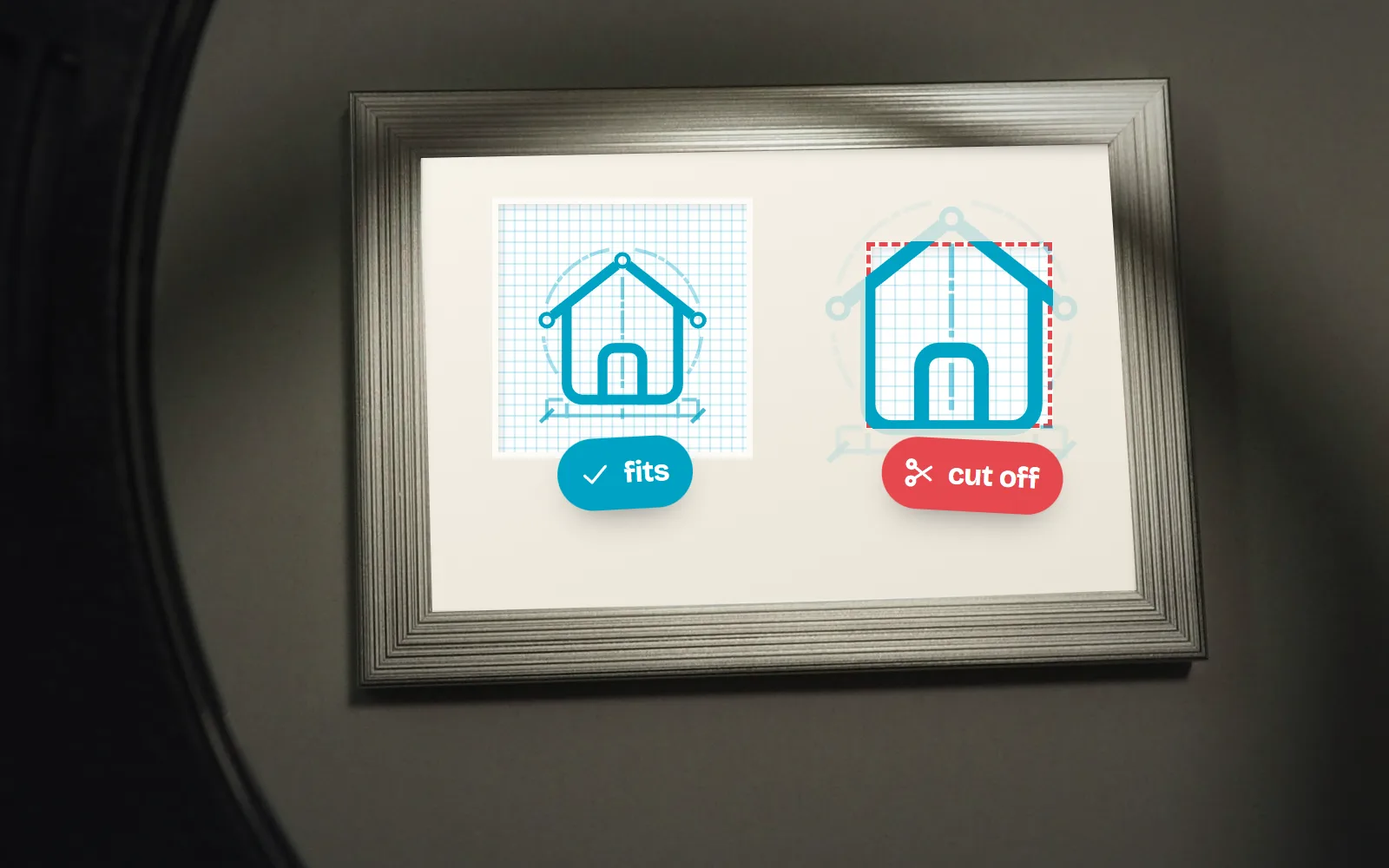
widthandheighttoo, then size with CSS. The attributes are the safe default; CSS overrides them. The old advice to delete them makes icons balloon when CSS is missing. - Cut off? The drawing goes past its viewBox (often a stroke at the edge), the viewBox was stripped or is wrong, or a parent box is too small. Nested SVGs hide overflow by default.
- Blurry? The icon lands on part-pixels: a 24-grid icon shown at 20 px, a size like
1.2rem(19.2 px), or atranslate(-50%)centre. Use whole multiples of the grid and whole-pixel positions. - Strokes too thick when big?
vector-effect: non-scaling-strokekeeps them a fixed width and has worked in every major browser since July 2020. SVGO 4 (June 2025) also stopped removingviewBoxby default.
On this page 9 sections
An SVG icon that is cut off, blurry or the wrong size almost always has one of three causes. Its viewBox (the drawing’s own coordinate box) is missing or wrong, so it cannot scale and gets cropped. Part of the drawing sits outside that box, often a stroke right on the edge. Or it is shown at a size or position that falls between pixels, so the edges go soft. Keep the viewBox, keep width and height as a default, set the real size in CSS, and use whole-pixel sizes that fit the icon’s grid.
Below: what the three attributes do, then clipping, blur and stroke width, each with its fix. Not a developer? Every icon page on with icons lets you download a PNG at the exact pixel size you need, which sidesteps all of this.
What do viewBox, width and height actually do?
Think of an SVG as a drawing on graph paper inside a picture frame. The viewBox describes the graph paper: four numbers for its left edge, top edge, width and height. viewBox="0 0 24 24" means the artwork lives on a 24 by 24 unit sheet. The width and height describe the frame: how big the picture is on the page. The browser scales the graph paper to fill the frame.
So one icon can be 16 or 160 pixels without changing a shape. Here is the line home icon as with icons ships it:
<svg xmlns="http://www.w3.org/2000/svg" width="24" height="24" viewBox="0 0 24 24"
     fill="none" stroke="currentColor" stroke-width="1.75"
     stroke-linecap="round" stroke-linejoin="round">
  <path d="M2.5 11 L12 3.5 L21.5 11"/>
  <path d="M5 9.5 V19 A2 2 0 0 0 7 21 H17 A2 2 0 0 0 19 19 V9.5"/>
  <path d="M9.5 21 V16 A1.5 1.5 0 0 1 11 14.5 H13 A1.5 1.5 0 0 1 14.5 16 V21"/>
</svg>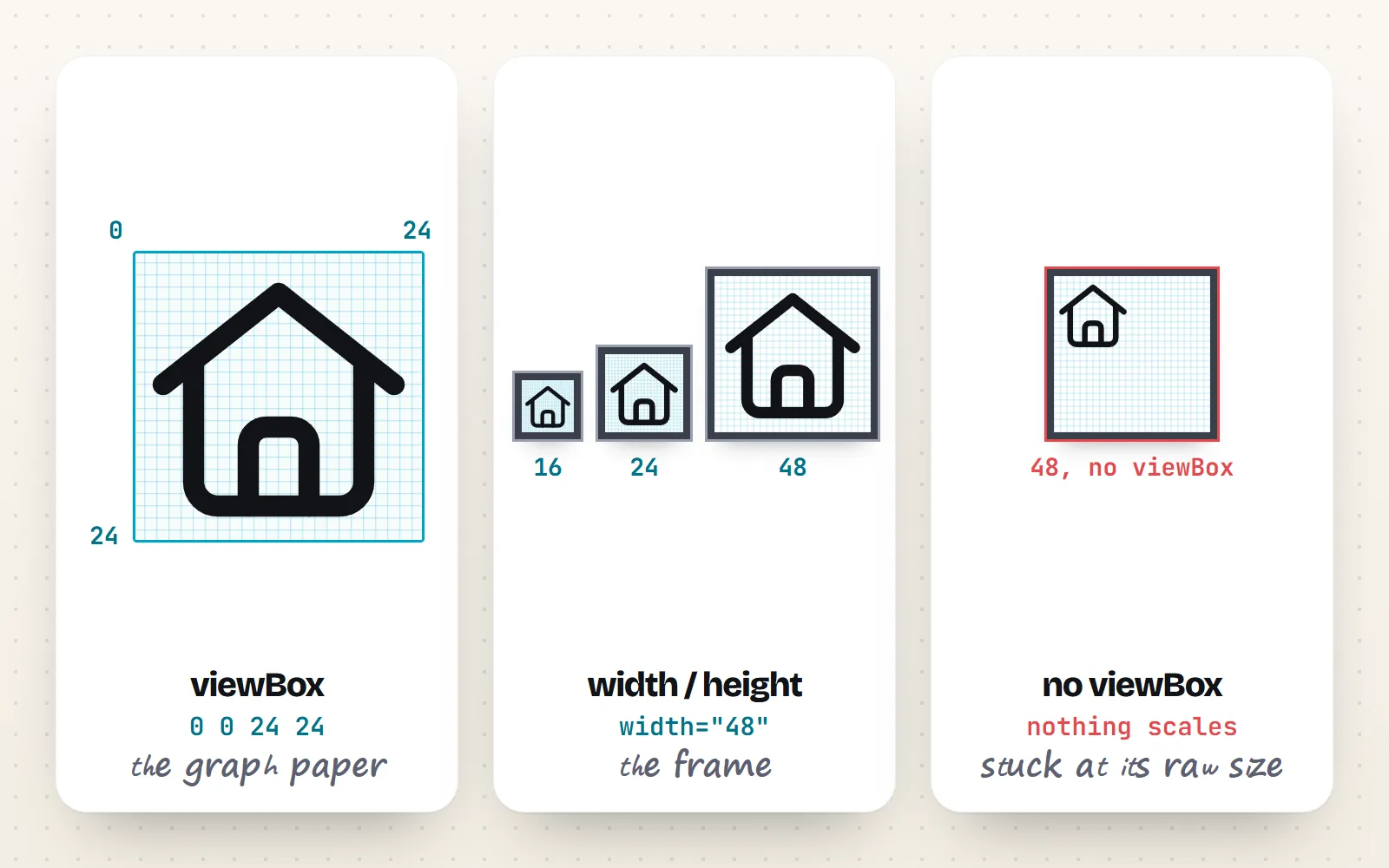
What happens if I remove the viewBox, width or height?
Each combination behaves differently, and most “my icon is huge” or “my icon is tiny” bugs are one of these rows.
| What the SVG has | What you see | Verdict |
|---|---|---|
| viewBox + width + height | The default size, and CSS can resize it cleanly | Best |
| viewBox only | An inline icon stretches to fill its container whenever CSS does not size it | Giant icons if CSS fails |
| width + height only | A fixed drawing: make the box bigger and the icon stays small; smaller and it is cropped | Cannot scale |
| Neither | The browser falls back to its default box for embedded content (300 by 150 pixels), with the drawing at its raw size | Broken |
Aaron Gustafson makes the case well in “Please size your inline SVGs”: if the size only lives in CSS and the stylesheet fails or arrives late, every inline icon swells to fill the page. The width and height attributes are a cheap safety net.
How do I resize an SVG icon properly?
- 1Keep the viewBox
Never delete it. It is what makes scaling possible. If a file has none, add one that matches the drawing, usually
0 0 24 24for interface icons. - 2Keep width and height as the default
Set them to the size the icon was designed for (24 for a 24-grid set). They stop the icon from ballooning when CSS is missing.
- 3Set the real size in CSS
CSS beats the attributes. Use
width: 1em; height: 1emto match the text around it, or a fixed size such as 20 or 24 pixels. - 4Use the icon’s colour, not a hard-coded one
With
stroke="currentColor"orfill="currentColor"the icon follows your text colour. Our guide to changing SVG colour with CSS covers the rest.
.icon { width: 1em; height: 1em; }    /* follows the font size */
.btn .icon { width: 20px; height: 20px; }
Using components? They do this for you. <Home size={20} /> in with icons for React writes the width, height and viewBox for you, and the HTML guide shows the same for plain pages.
Why is my SVG icon cut off?
A clipped icon is showing you its viewBox edge. Anything drawn outside that box is not painted, because browsers hide overflow on SVGs inside a page by default (the SVG 2 user agent style sheet sets overflow: hidden on nested svg and on symbol). The usual causes, most common first:
- A stroke on the edge. A stroke is centred on its path, so half of it falls outside. A circle with radius 12 in a 24 box, drawn with a 2-unit stroke, loses one unit all round and looks flattened at the sides.
- The viewBox was stripped. SVGO before version 4, and build plugins still pinned to it, remove it by default (SVGO’s own docs now warn this “prevents SVGs from scaling”). Run
npx svgo --version; our SVGO guide has a safe config. - The viewBox has the wrong numbers. Design tools export the artboard. If it was smaller than the icon, or sat at an offset, the box cuts through the drawing.
- A parent box is too small. A fixed-height button or a wrapper with
overflow: hiddencan hide part of a good icon. preserveAspectRatio="xMidYMid slice". “Slice” fills the frame and crops the rest. Icons want the default.
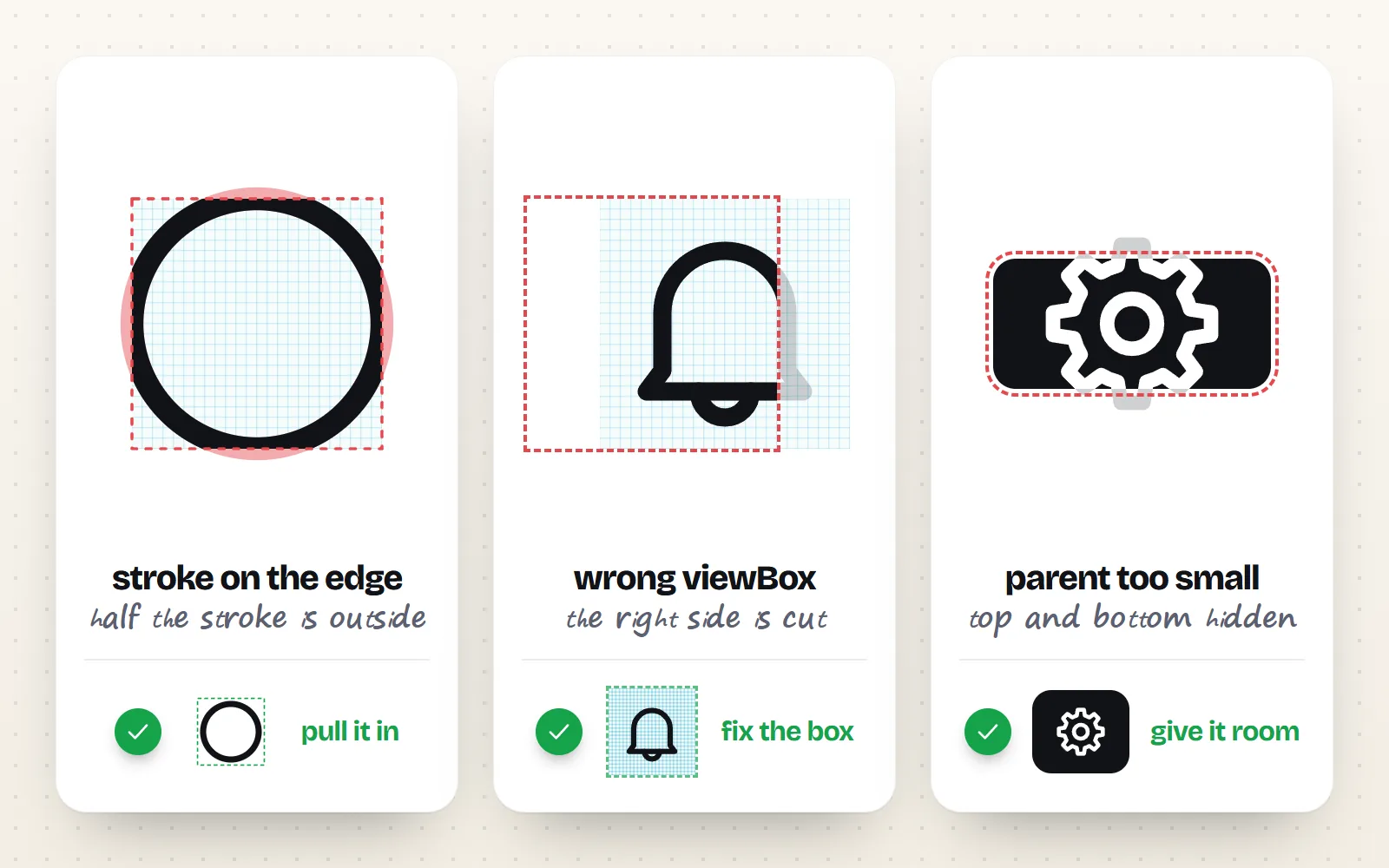
Fix the cause: pull the drawing in from the edge (good icon sets keep artwork a unit or two inside the box), restore or correct the viewBox, or give the parent room.
Reach for overflow: visible first. It works, but the icon now paints outside its own box, overlapping neighbours and ignoring the layout space it claims.
Every with icons drawing keeps its artwork between 2 and 22 units on the 24 grid, so even round shapes with their stroke stay inside the viewBox. More on keylines in how to keep icons consistent.
Why do my SVG icons look blurry?
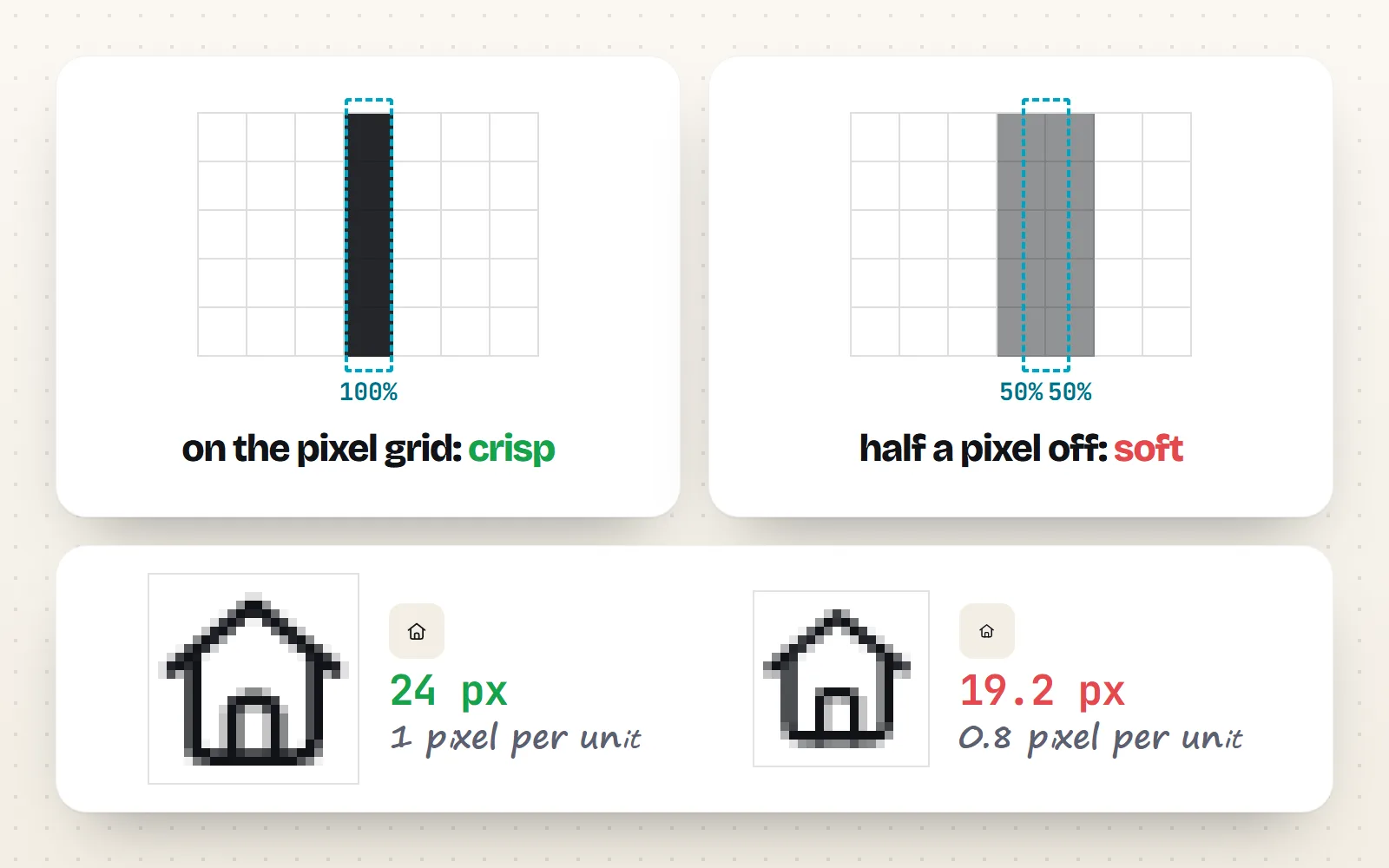
An SVG is redrawn from shapes at every size, so it never pixelates like a stretched photo. But your screen is a grid of pixels. An edge that lands on a pixel boundary looks crisp. One that lands halfway across a pixel gets shaded half-way (anti-aliasing), and looks soft.
1. The size does not fit the grid
A 24-grid icon at 24 pixels gets exactly one pixel per unit. At 48 it gets two. At 20 pixels each unit is 0.83 of a pixel, so lines that were drawn on whole units now fall on fractions. Here is the same set at five sizes. Look closely at 20 and 32 next to 24 and 48:
| Shown at | Pixels per unit (24 grid) | Sharpness |
|---|---|---|
| 16 px | 0.67 | Soft unless the icon was drawn for 16 |
| 20 px | 0.83 | Slightly soft |
| 24 px | 1 | Crisp |
| 32 px | 1.33 | Mostly fine |
| 48 px | 2 | Crisp |
2. Fractional sizes and positions
Relative units add hidden fractions: 1.2rem on a 16 px base is 19.2 pixels. Centring with translate(-50%, -50%) in a box with an odd width puts the icon on a half pixel. Check the computed size and position in your browser’s developer tools, and round any decimals.
3. Bitmaps stretched by the browser or by you
If an icon goes soft only during or after a scale animation, the browser is probably stretching a bitmap copy it made for speed: do not leave will-change: transform on permanently. And if the “SVG” is really a scaled-up PNG, get a real vector or a PNG at the final size.
What does not help: translateZ(0) and similar hacks from old answers. shape-rendering="crispEdges" may switch smoothing off, which can sharpen straight lines but makes curves jagged, so keep it for pixel art and charts. For truly pixel-sharp icons, the pixel style is drawn one unit per pixel and is crisp at 24, 48 and 72 px. On high-density screens all of this matters far less, because each unit gets two or three real pixels.
How do I keep the stroke width the same when an icon scales?
By default, strokes scale with the drawing. A 1.75-unit stroke is about 1.2 pixels at 16 px and 3.5 pixels at 48 px. Usually that is right, because the icon keeps its proportions. Sometimes you want a fixed line, for example big hero icons that should match a 1.5 px illustration.
The CSS answer is vector-effect: non-scaling-stroke. It keeps the stroke at its set width in screen pixels. MDN lists it as Baseline Widely available since July 2020. Page CSS only reaches inline SVG; for a file in an <img>, write it inside the file.
.icon-fixed path,
.icon-fixed circle { vector-effect: non-scaling-stroke; }
Component libraries usually wrap this in a prop. In with icons React, Vue and web components it is absoluteStrokeWidth (or the absolute-stroke-width attribute), which recalculates the stroke for the size you ask for. Lucide’s current docs call theirs nonScalingStroke. Only stroke-based styles such as Line style, Duo style, Blueprint style and Sketch style have a live stroke to adjust; filled styles are shapes, so they scale as a whole.
Quick fixes: which problem do you have?
| Symptom | Most likely cause | Fix |
|---|---|---|
| Icon is huge | No width/height, size only in CSS that did not apply | Add width and height, check the CSS selector |
| Icon stays tiny in a big box | No viewBox | Add viewBox="0 0 24 24" (or the drawing’s real box) |
| Edges cut off | Stroke on the edge, wrong viewBox or small parent | Fix the drawing or viewBox; give the parent room |
| Soft or fuzzy | Off-grid size, fractional size or position | Use 24 or 48 px for a 24 grid; round sizes and positions |
| Lines too thick when big | Strokes scale with the icon | vector-effect: non-scaling-stroke or an absolute stroke prop |
The bottom line
Keep the viewBox, keep width and height as a fallback, size icons in CSS, and use sizes that fit the grid. Those four habits fix most cut-off and blurry icons. For icons that already follow them, all 1000 with icons are drawn on the same 24 grid with a proper viewBox in each of the 34 styles. Browse the icon library or read the icon sizes guide next.
Frequently asked questions
Should I remove width and height from an SVG?
No. Keep them as the default size and set the real size in CSS, which overrides the attributes. If you delete them, an inline icon with a viewBox stretches to fill its container whenever your CSS fails to load or does not reach it, which is why so many pages flash giant icons.
What does viewBox do in an SVG?
It sets the drawing’s own coordinate system: four numbers for the left edge, top edge, width and height of the area the artwork lives in. The browser then scales that area to fit the element’s width and height. viewBox="0 0 24 24" means “a 24 by 24 unit drawing”, whatever size it is shown at.
Why is my SVG icon cut off at the edges?
Usually because part of the drawing sits outside the viewBox. A stroke is centred on its path, so a line drawn right on the edge loses half its width. Other causes: the viewBox was removed by an optimiser or export, it has the wrong numbers, or a parent box with overflow hidden is smaller than the icon. Fix the drawing or the viewBox first; overflow: visible is a last resort.
Why do my SVG icons look blurry in Chrome?
SVGs are smoothed (anti-aliased) wherever an edge falls between two pixels. Icons get soft when they are shown at a size that does not fit their grid (a 24 grid at 20 px), at fractional sizes from rem or em units, or at part-pixel positions from centring tricks and transforms. On high-density screens it is much less visible.
How do I keep the same stroke width when an SVG scales?
Add vector-effect: non-scaling-stroke to the paths, as an attribute or in CSS. The stroke then stays the same number of screen pixels at any size. Icon components often offer a prop for it: with icons has absoluteStrokeWidth, and Lucide calls it nonScalingStroke.
Does SVGO still remove viewBox?
Not by default any more. SVGO 4.0.0, released on 21 June 2025, took removeViewBox and removeTitle out of its default preset. Older SVGO 2 and 3 setups, and build plugins pinned to them, still strip viewBox unless you turn the plugin off.
Sources and notes
- MDN: viewBox attribute, checked November 2026
- MDN: overflow attribute (hidden by default on nested svg), checked November 2026
- W3C SVG 2: user agent style sheet (svg:not(:root), symbol { overflow: hidden })
- W3C CSS 2.1: replaced elements fall back to 300px by 150px
- MDN: vector-effect (Baseline Widely available since July 2020), checked November 2026
- MDN: shape-rendering, checked November 2026
- SVGO v4.0.0 release notes (21 June 2025)
- SVGO docs: migration from v3 to v4, checked November 2026
- Aaron Gustafson: Please size your inline SVGs
- Lucide docs: stroke width and nonScalingStroke, checked November 2026
- Stack Overflow: How can I make an SVG scale with its parent container? (question 19484707)
- Stack Overflow: Why is my resized SVG icon blurry when rendered? (question 57628106)
- Stack Overflow: Fixed stroke width in SVG (question 1301685)
Facts about other icon sets were checked against their official sites in November 2026. Libraries change, so check the links above for the latest numbers.