icons in code, the 2026 answer
How to import SVG icons in React and Next.js today
The top answers still use Create React App’s ReactComponent import and webpack configs that Next.js 16 refuses to build. Here are the four ways that work in November 2026, and when to use each.
- Your own one-off SVGs in Vite: add
vite-plugin-svgrand import with the?reactsuffix:import Logo from './logo.svg?react'. The old{ ReactComponent }import stopped being the default in version 4 (September 2023). - In Next.js 16: Turbopack is the default bundler, and a custom
webpack()config makesnext buildfail. Put@svgr/webpackunder the top-levelturbopack.rulesinstead. - Pictures you never restyle (illustrations, logos in fixed colours): use a plain
<img src>ornext/image. No loader, no JavaScript, but no CSS colour either. - A whole set of interface icons: install an icon component package. No loader, typed props, only the icons you import end up in the bundle, and good ones render in Server Components.
- Create React App was deprecated on 14 February 2025, so any answer that edits
react-scriptsor ejects is out of date.

On this page 10 sections
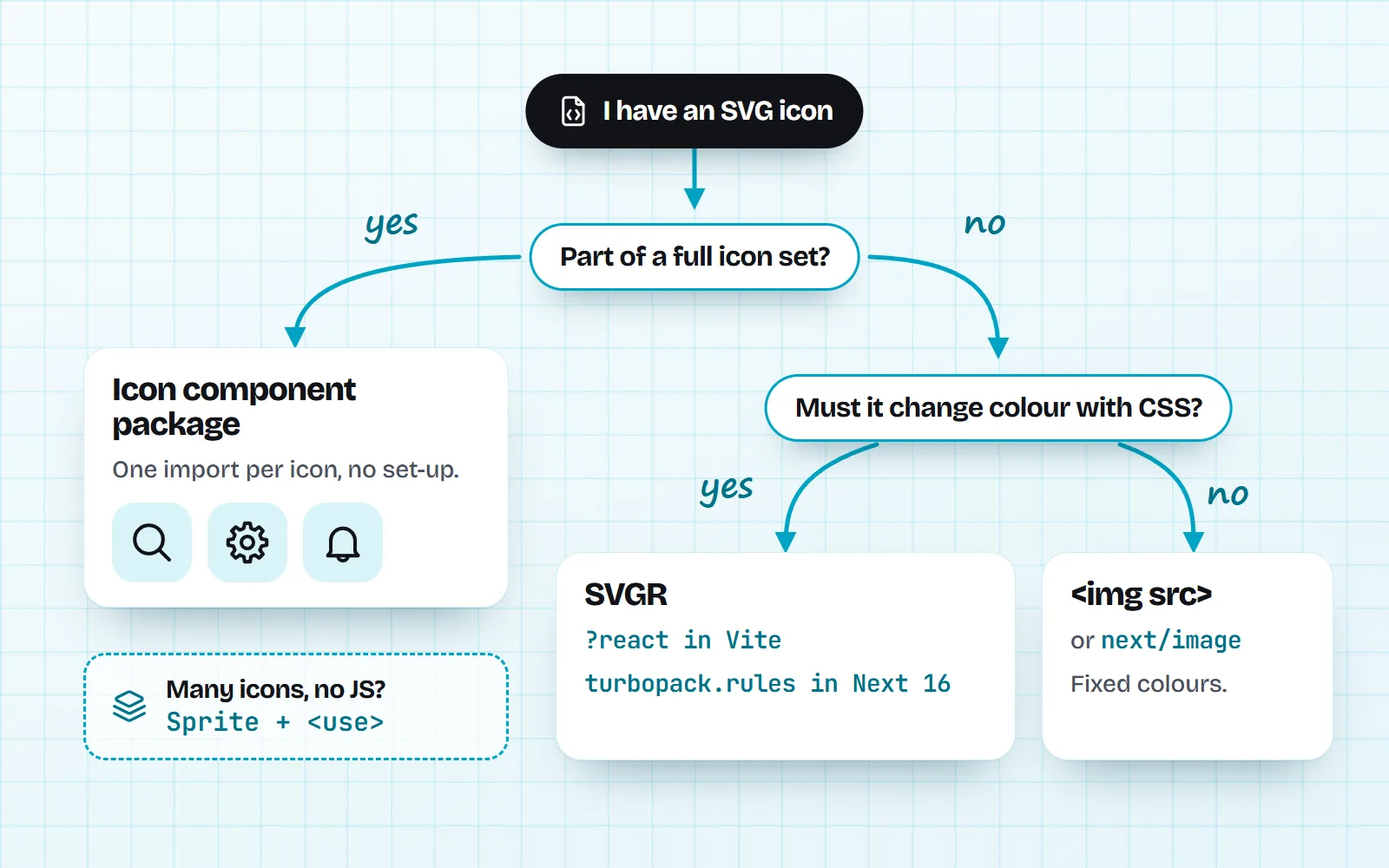
In React today there are four good ways to show an SVG icon. For your own one-off SVG files, use SVGR: in Vite that is vite-plugin-svgr with a ?react import, and in Next.js 16 it is @svgr/webpack under the top-level turbopack.rules setting. For pictures you never restyle, a plain <img src> is simplest. For a full set of interface icons, an icon component package needs no setup at all.
The reason this question keeps coming back is that the famous answers are from another era. They import { ReactComponent }, a Create React App trick, or paste a webpack() rule that Next.js 16 now rejects. Below is what works in November 2026, checked against the official docs. If you are choosing a library rather than wiring up files, our comparison of React icon libraries covers that, so we will not repeat it here.
What are the ways to use an SVG icon in React?
An SVG is a picture made of shapes, written as text, so it stays sharp at any size. React can show one in four ways, and each has a clear job:
| SVGR import | Pasted JSX | <img src> | Icon package | |
|---|---|---|---|---|
| Set-up | A plugin or loader | None | None | npm install |
| Follows your text colour | ||||
| Adds JavaScript per icon | Yes, a small component | Yes | No | Only the icons you import |
| Works in Server Components | Depends on the package | |||
| Best for | Your logo, a few custom SVGs | One or two icons | Illustrations, fixed colours | Every interface icon |
Why doesn’t import { ReactComponent } from "./logo.svg" work anymore?
Because that line was never React. It was a feature of Create React App, which bundled a tool called SVGR (it turns an SVG file into a React component) and exposed the result as a named export called ReactComponent. When you move to Vite or Next.js, that hidden set-up is gone, so the import fails with errors like “ReactComponent is not exported”.
The fix is not to recreate Create React App’s config. It is to use the modern form for your tool, below. If you are still on Create React App itself, the React team’s own advice is to move to a framework (they name Next.js, React Router and Expo) or to a build tool such as Vite.
How do I import an SVG as a React component in Vite?
Install the plugin, add it to your Vite config, then add ?react to the end of the import. Without the suffix, Vite gives you the file’s URL, which is what you want for an <img>.
npm i -D vite-plugin-svgr

// vite.config.js
import react from '@vitejs/plugin-react'
import svgr from 'vite-plugin-svgr'
export default { plugins: [react(), svgr()] }

// a component
import Logo from './logo.svg?react'      // a React component
import logoUrl from './logo.svg'         // a URL, for <img src>
export const Brand = () => <Logo className="h-6 w-6" aria-hidden="true" />
Using TypeScript? The plugin’s README asks you to add /// <reference types="vite-plugin-svgr/client" /> to vite-env.d.ts so the ?react import is typed.
How do I import SVG files in Next.js 16 with Turbopack?
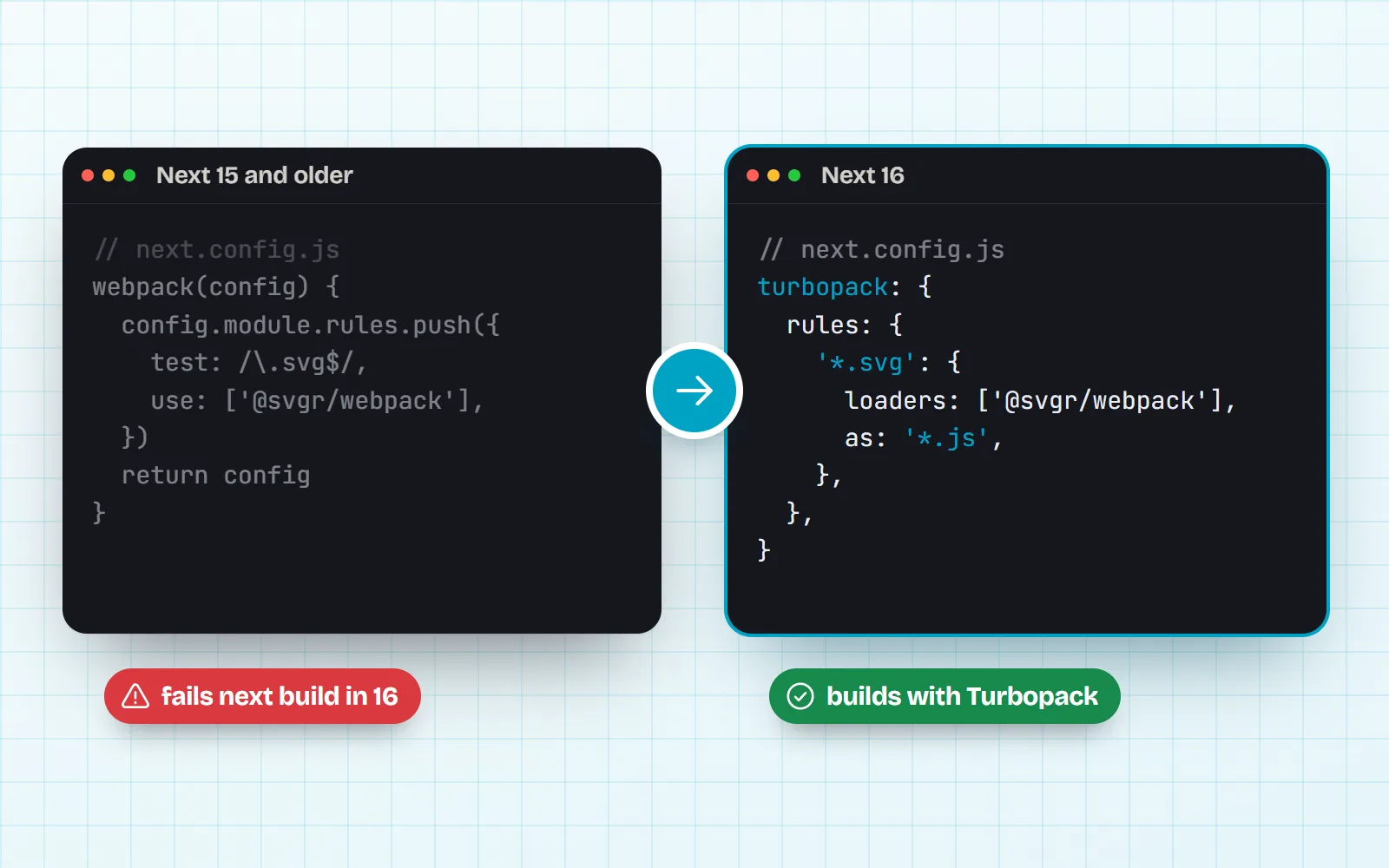
Next.js 16 builds with Turbopack by default. Turbopack can run many webpack loaders, and @svgr/webpack is on the Next.js list of loaders tested to work. You register it under the top-level turbopack key, not inside a webpack() function:
npm i -D @svgr/webpack

// next.config.js
module.exports = {
  turbopack: {
    rules: {
      '*.svg': {
        loaders: ['@svgr/webpack'],
        as: '*.js',
      },
    },
  },
}

// app/page.jsx
import Logo from './logo.svg'
export default function Page() { return <Logo width={32} height={32} /> }
The as: '*.js' line matters: it tells Turbopack that the loader turns the SVG into JavaScript. Loader options go in an object form ({ loader: '@svgr/webpack', options: { icon: true } }), and since Next.js 16.0 a rule can carry a condition, for example to apply SVGR to one folder only and keep the rest as plain files.
Can I just paste the SVG into my component as JSX?
Yes, and for one or two icons it is often the quickest route. Copy the SVG code, wrap it in a component, and change a few attribute names, because JSX uses camelCase: class becomes className, stroke-width becomes strokeWidth, fill-rule becomes fillRule. Set the colours to currentColor so the icon takes the text colour of whatever it sits in.
Every icon page on with icons can do this step for you: the download panel has React (JSX) and React + TypeScript (TSX) files, ready-made components with size, color and title props. Try it on the search icon or settings icon. The trade-off is upkeep: once you have twenty pasted icons, you have twenty files to keep consistent, and that is the point where a package pays off.
When is a plain img tag the right choice?
When the SVG is a finished picture: an illustration, an empty-state drawing, a badge in fixed brand colours. An <img src="/empty-inbox.svg" alt=""> needs no plugin, adds no JavaScript and is cached by the browser like any image. In Next.js you can put the file in public/ and point at it, or use next/image.
The catch is colour. An SVG loaded as an image is sealed off from your page, so currentColor inside it cannot see your CSS, and the ink shows in whatever colour the file says (often black). That makes <img> a poor fit for interface icons that must turn white on a dark button or blue on hover. Our post on changing icon colours explains the options in more depth.
About next/image: the Next.js docs say its default loader does not optimise SVG (it is already a vector, and SVG can carry scripts), and it skips optimisation on its own when src ends in .svg. You only need dangerouslyAllowSVG if you want SVGs pushed through the optimiser, and then you should add a Content Security Policy as the docs describe.
When should I use an icon component package instead?
As soon as you need more than a handful of interface icons. A package gives you icons drawn on one grid with one stroke, a size and colour prop, an accessible title, and nothing to configure in Vite or Next.js. Good packages are tree-shakable: your bundle keeps only the icons you import by name.
Here is how it looks with with icons, our free MIT set of 1000 icons in 34 styles. The root import is the line style, and every other style is a subpath:
npm i @withicons/react

import { Search, Bell } from '@withicons/react'          // line style
import { Heart } from '@withicons/react/solid'           // solid style

export function Toolbar() {
  return (
    <nav>
      <Search size={20} />
      <Bell className="text-slate-500" title="Notifications" />
      <Heart size={24} color="#e11d48" />
    </nav>
  )
}
These are plain components with no state, effects or React context, so they render in Next.js Server Components without 'use client', and the package documents that Next.js needs no optimizePackageImports entry for it. Why that matters, and what goes wrong with some other libraries, is the subject of our post on icons in React Server Components. More set-up detail lives on the developers page and the free React icons page.
@withicons/react, /solid, /duo and more.To be fair to SVGR: a package will not have the six custom SVGs your designer made. Keep SVGR for those and use the package for the common icons around them.
What about SVG sprites in React?
A sprite is one SVG file that holds many icons as <symbol>s, and each icon on the page points at one with <svg><use href="/sprite.svg#home" /></svg>. It costs no JavaScript per icon, the browser caches one file, and the icons still follow currentColor. It suits pages with many repeated icons, such as long tables. Two rules: serve the sprite from your own domain (browsers block <use> across origins), and use plain href, not the old xlink:href. The @withicons/static package ships one sprite per style. Our post on SVG sprites in 2026 goes deeper.
Which should I pick?
Use an icon package for interface icons, SVGR for the few SVGs that are truly yours, and <img> for finished illustrations. In Next.js 16, put SVGR under turbopack.rules.
Copy a 2019 answer that ejects Create React App, edits react-scripts, or adds a webpack() rule to a Next.js 16 app. And do not import a whole icon set as an object to pick icons by name.
- Building a product UI? Start with a package such as
@withicons/react, or compare options in our React icon library guide. - Adding your logo or a custom illustration? SVGR with
?react(Vite) orturbopack.rules(Next.js). - A static picture that never changes colour?
<img>ornext/image. - Hundreds of repeated icons and no JavaScript budget? A sprite.
Not writing code at all? Every icon in the library has Copy SVG, SVG and PNG downloads, and the HTML guide shows the no-framework way. The line style is the default for interfaces if you are unsure where to start.
Frequently asked questions
Why does import { ReactComponent as Logo } from "./logo.svg" not work?
That named export was a Create React App feature (through SVGR inside react-scripts). Vite and Next.js never had it built in. In Vite, vite-plugin-svgr 4 and later uses a query instead: import Logo from "./logo.svg?react". In Next.js you add @svgr/webpack yourself, and then the default export is the component.
How do I use SVGR with Turbopack in Next.js 16?
Install @svgr/webpack and add it to next.config under the top-level turbopack key: turbopack: { rules: { "*.svg": { loaders: ["@svgr/webpack"], as: "*.js" } } }. The as: "*.js" part tells Turbopack the loader returns JavaScript. Do not keep the old webpack() rule: in Next 16 a custom webpack config makes next build fail unless you pass --webpack.
Can I change the colour of an SVG used in an img tag?
Not with the CSS color property. An image loaded through img is a separate document, so currentColor inside it cannot see your page’s text colour. Inline the SVG (as JSX or a component), use a sprite with use, or use a CSS mask if you need it to follow the text colour.
Does next/image optimise SVG files?
No. The Next.js docs say the default loader does not optimise SVG, and that the unoptimized behaviour is applied automatically when src ends in .svg. You only need dangerouslyAllowSVG if you want SVGs to go through the image optimiser, and then you should also set a Content Security Policy.
Should I use SVGR or an icon library?
Use SVGR for a handful of SVGs that are unique to your product, such as your logo or a custom illustration. For the everyday interface icons (search, settings, trash, arrows), an icon component package saves the loader setup, keeps every icon on the same grid and stroke, and gives you size, colour and title props.
Sources and notes
- Next.js docs: turbopack config, webpack loaders and the @svgr/webpack example (checked November 2026)
- Next.js docs: upgrading to version 16 (custom webpack config fails next build)
- Next.js blog: Next.js 16 (21 October 2025)
- Next.js docs: Image component (SVG and dangerouslyAllowSVG)
- vite-plugin-svgr README (?react import, TypeScript reference)
- vite-plugin-svgr v4.0.0 release: “Export as default with query” (20 September 2023)
- Vite docs: static asset handling (?url, ?raw, inlining)
- React blog: Sunsetting Create React App (14 February 2025)
- with icons: @withicons/react on npm
Facts about other icon sets were checked against their official sites in November 2026. Libraries change, so check the links above for the latest numbers.