icons in code, the 2026 answer
How to move from an icon font to SVG icons, step by step
You do not need FontForge scripts or Batik. List the icons you use, map their names, swap the markup with components, a sprite or drop-in CSS classes, then test. Here is the whole plan.
- Start with an inventory, not a converter. Search your code for the icon classes you really use. Most apps use dozens of icons, not the whole font.
- Check for real SVG sources first. Many font vendors ship them: the Font Awesome Free npm package has an
svgs/folder next to its webfonts. Extract glyphs from a font file only for a custom font with no sources. - Pick the replacement by stack: components in React, Vue or Svelte; a sprite for static sites; or drop-in CSS classes that keep
<i class>markup and paint a real SVG through a CSS mask. - Migrate one area at a time. The old font and the new SVG icons can live side by side, so nothing breaks halfway.
- Test before you delete the font: screenshots, labels on icon-only buttons, high-contrast mode, and a search for leftover classes.
On this page 8 sections
To move from an icon font to SVG, do not start by converting the font. List the icon classes your code actually uses, map each one to an SVG icon, then swap the markup one area at a time: components if you use React, Vue or Svelte, a sprite for static pages, or drop-in CSS classes if you want to keep your <i class> tags. Test with screenshots and a screen reader, and only then delete the font.
The old answers to this question are about FontForge’s legacy scripting language, Java’s Batik toolkit, or a Font Awesome 4 .woff2. They stop at “now you have SVG files” and skip the hard part: renaming, sizing and replacing hundreds of tags without breaking the site. This guide covers the whole job as of November 2026. If you are still deciding whether to move, our post on icon fonts vs SVG explains the reasons; here we assume you have decided.
Why are teams still moving off icon fonts?
In one line each, because the full story is in the post linked above: fonts can fail to load or get blocked (and the icon turns into an empty box), they render like text so small icons can look soft, each icon is one colour, a page often downloads the whole set, and screen readers can trip over the hidden character. SVG fixes all five. If your icons are already showing as squares, our post on icons showing as squares helps you patch that first.
Step 1: How do I find every icon my site uses?
Search the code, not the font. A font may hold a thousand glyphs while your app uses forty. For Font Awesome-style classes, one search command lists every distinct name with a count:
# every fa-* class in your source, most used first
grep -rhoE "fa-[a-z0-9-]+" src templates | sort | uniq -c | sort -rn
Remove the modifier classes from that list (fa-solid, fa-2x, fa-spin, fa-fw) and you have your real icon list. Also look in places a code search misses: CMS content and database fields, email templates, and CSS that sets content: "\f015" on a pseudo-element. Material Icons is different again: the icon is the word inside the tag (<span class="material-icons">home</span>), so search for the class and read the text.
Step 2: Do I have to extract SVGs from the font file?
Usually not. Look for the original SVGs first:
- Font Awesome: the free npm package (
@fortawesome/fontawesome-free, version 7.3.1 in November 2026) ships ansvgs/folder with every free icon as a file, besidewebfonts/. - IcoMoon or Fontello: these tools build fonts from SVGs you uploaded or picked, so the project file or the original SVGs are the source.
- A font your team made long ago: ask the designer. The SVGs often still exist somewhere.
Only if there truly are no sources do you extract. FontForge can do it in a short Python script: fontforge.open() the font, loop over the glyphs, and call glyph.export("name.svg"). Each glyph knows its code point (glyph.unicode), and the font’s CSS tells you which class uses which code point. Font Awesome 7 writes it as .fa-house { --fa: "\f015" }; older versions use content. Expect two clean-up jobs: glyphs sit on a text baseline inside a font’s “em box”, so recentre each one into a square viewBox, then optimise the files. Our guide to optimising SVG icons with SVGO covers the second part.
Step 3: How do I map icon font names to the new icons?
Make a two-column table: old class, new icon. This is the single most useful artefact of the whole migration, because every later step (codemods, reviews, AI-assisted edits) reads from it. If you are moving to a different icon set rather than the font’s own SVGs, names will differ, so map each one by meaning, not spelling.
with icons helps here because its search understands aliases. The command-line tool resolves a name and tells you how it matched: npx withicons resolve house --json returns home, matched through an alias. Here is what it says for some common Font Awesome 6 and 7 names:
| Old class | with icons class | How it matched |
|---|---|---|
fa-house | with-home | Alias |
fa-gear | with-settings | Alias |
fa-magnifying-glass | with-search | Alias |
fa-xmark | with-close | Alias |
fa-trash-can | with-trash | Alias |
fa-envelope | with-mail | Alias |
fa-bars | with-menu (you choose) | Ambiguous: menu, chart-bar or signal |
fa-right-from-bracket | with-log-out (by meaning) | No alias: map it by hand |
Modifier classes map too. fa-spin, fa-fw, fa-2x to fa-5x and fa-rotate-90 have direct equivalents (with-spin, with-fw, with-2x, with-rotate-90), and fa-flip-horizontal becomes with-flip-h. The style class changes from fa-solid to with-solid; line is the default, so outline icons need no style class.
Step 4: Which replacement should I use: components, sprite or CSS classes?
It depends on how your pages are built. All three give you real SVGs; they differ in how much markup you change.
| Your stack | Best replacement | Markup change |
|---|---|---|
| React, Vue, Svelte, Angular, Solid | Icon components (<Home />) | Rewrite each tag as a component |
| Static HTML you control | A sprite with <svg><use href> | Replace each tag with a small svg |
| Templates, CMS content, many hands | Drop-in CSS classes (<i class="with with-home">) | Only the class names |
The low-effort path: keep the <i> tags
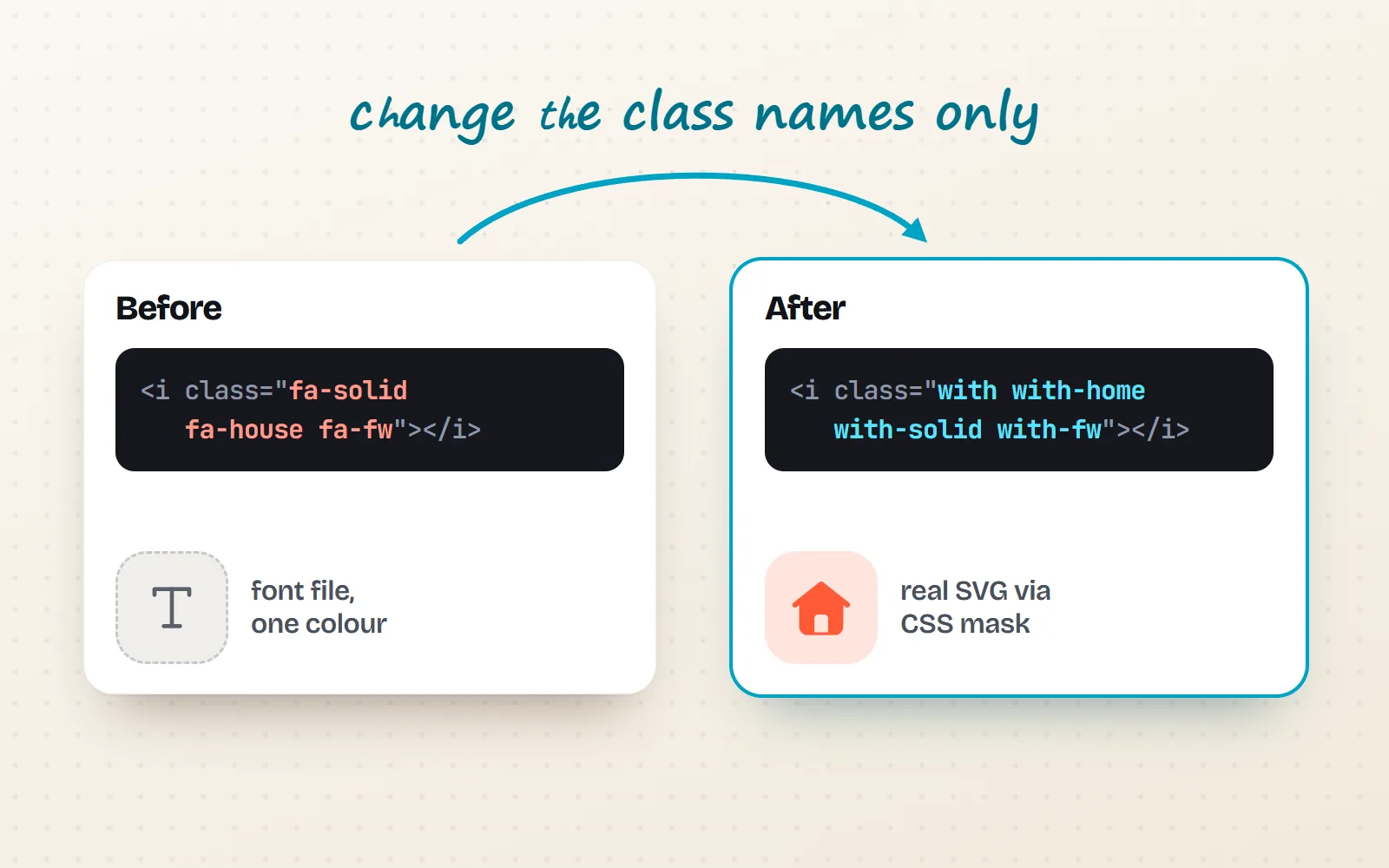
If you have hundreds of <i class="fa-solid fa-house"> tags spread over templates and CMS content, rewriting each as a component is a big job. The with icons CSS icon classes let you keep the tags and change only the class names. Each class is a tiny stylesheet that draws a real SVG into the empty tag as a CSS mask (a stencil the browser fills with your text colour), so the icon is 1em square, takes the text colour and size like the font did, and no font file is involved.
<!-- one line in the page: links only the icons the page shows -->
<script src="https://cdn.jsdelivr.net/npm/@withicons/classes@latest/dist/with-loader.js" defer></script>

<!-- before -->  <i class="fa-solid fa-house fa-fw"></i>
<!-- after  -->  <i class="with with-home with-solid with-fw"></i>
Prefer no JavaScript? Link one stylesheet per style instead (with-line.css is 65 KB gzipped for every line icon), or bundle only the files for the icons you use from npm i @withicons/classes. During the migration, Font Awesome-style names such as with-house also work: the loader adds the right class and leaves a hint in the console, so you can switch to the canonical name later. The HTML guide has the full set-up.
The component path
In a framework app, use components so you also get typed props and tree-shaking: npm i @withicons/react and import { Home } from '@withicons/react' (Vue, Svelte, Angular and Solid have matching packages). A codemod or an AI coding tool can do most of this rewrite if you give it the name table from step 3. For React specifics, see SVG icons in React and Next.js.
The sprite path
For static sites, one sprite file per style (from @withicons/static) and <svg><use href="sprite-line.svg#with-home"/></svg> costs no JavaScript. Serve the sprite from your own domain, because browsers block <use> across origins. Our post on SVG sprites explains the details.
Step 5: How do I roll it out without breaking the site?
- 1Load both for a while
The old font and the new icons use different class names (
fa-andwith-), so they do not clash. Migrate page by page or component by component. - 2Replace from the name table
Run the find-and-replace from your step 3 table, one area at a time, and review the diff. Handle the ambiguous and unmatched names by hand.
- 3Check sizes and alignment
Both sit on the text: with icons classes are 1em square with
vertical-align: -.125em, so most layouts line up. Look closely at buttons, inputs and tables. - 4Remove the font last
When a search for
fa-comes back empty, delete the font files, the CSS and the preload tags.
Step 6: How do I test an icon font migration?
- Screenshots before and after. A visual test (Playwright’s
toHaveScreenshot()saves a reference image and compares later runs) catches missing or shifted icons. - Labels on icon-only buttons. CSS-class icons are decorative by default (the tag is empty), so a button with only an icon needs
aria-label, or the icon needsrole="img"and a label. Our accessible icons guide shows the patterns. - High-contrast mode. The classes README says CSS-only icons stay visible in Windows high contrast and print even with “Background graphics” off. Check your own pages anyway.
- Fonts blocked. Turn off web fonts in the browser or a blocker and reload: every icon should still be there.
- Leftovers. Search the code, CMS and emails for the old prefix one last time.
Inventory the icons you use, map names in a shared table, migrate one area at a time with both systems loaded, and test before removing the font.
Convert the entire font “just in case”, swap every tag in one big commit, or delete the font before the last fa- class is gone.
Not a developer, and just need a few icons for a page builder that only accepts class names? The classes work there too, and every icon in the library has a copy button for its snippet. All 1000 icons come in 34 styles, starting with the line style.
Frequently asked questions
How do I convert an icon font to SVG?
First look for the original SVGs: icon sets usually publish them (Font Awesome Free includes an svgs folder, and IcoMoon or Fontello projects keep the files you uploaded). Only for a custom font with no sources, export each glyph with FontForge (its Python API has glyph.export("name.svg")), name the files from the font’s CSS map of class to code point, fix the viewBox to a square, and optimise the result.
Can I keep my <i class="..."> markup when moving to SVG?
Yes. CSS-class icon libraries let you keep the same kind of markup. With with icons you write <i class="with with-home"></i>, and a stylesheet paints a real SVG into the tag as a CSS mask, so it takes your text colour and size like a font did. You still change the class names, but not the HTML structure.
Do Font Awesome class names work with with icons?
Many do as aliases. In our name resolver, house, gear, magnifying-glass, xmark, circle-check, trash-can and envelope all map to a with icons icon (home, settings, search, close, check-circle, trash, mail). Some names are ambiguous (bars could be a menu or a bar chart) and some have no match, so check each name and switch to the canonical class in the end.
Is it legal to extract icons from a font?
It depends on the font’s licence. Font Awesome Free, for example, licenses its font files under the SIL OFL 1.1 and its SVG and JS icons under CC BY 4.0, which asks for credit. Read the licence before turning font glyphs into SVG files, and keep the credit the licence asks for.
How do I test an icon font migration?
Take before-and-after screenshots of key pages (a visual test tool such as Playwright’s toHaveScreenshot makes this repeatable), check that every icon-only button still has an accessible name, try Windows high-contrast mode, block web fonts to prove nothing depends on them, and search the code for leftover old class names.
Sources and notes
- Font Awesome Free 7.3.1 on jsDelivr: package contents (svgs, webfonts, css; checked November 2026)
- Font Awesome Free licence file (Icons CC BY 4.0, Fonts SIL OFL 1.1, Code MIT)
- Font Awesome docs: Web Fonts + CSS vs SVG + JS
- FontForge docs: Python module (open, glyph.export, glyph.unicode)
- MDN: mask-image (Baseline, across browsers since December 2023)
- Playwright docs: visual comparisons (toHaveScreenshot)
- with icons: @withicons/classes README (loader, modifiers, accessibility)
- with icons: withicons CLI (resolve, search, add)
Facts about other icon sets were checked against their official sites in November 2026. Libraries change, so check the links above for the latest numbers.